blankblank blank


Archive for the 'MicroDEM' Category Page 2 of 4


Determining 3D Distance Traveled Over Terrain

Most free GIS programs have a measuring tool that lets you determine the distance between two or more points. But this distance is usually a flat, straight-line distance, and doesn’t take into account the additional distance you would travel if the terrain weren’t flat. If the terrain is steep or hilly, your 3D distance traveled is longer than that flat, straight-line distance.

MicroDEM has the capability to determine both the straight-line distance and distance over terrain for an arbitrary path. After loading in a digital elevation model (DEM), click on the Distance (stream selection) in the window’s toolbar:

distance stream

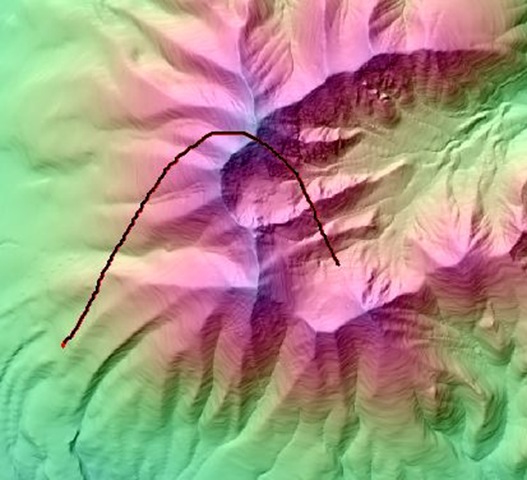
Then draw the path on your DEM:

DEM

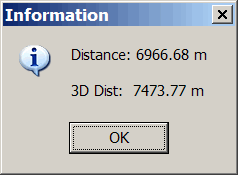
And MicroDEM brings up a window with the flat distance, and 3D distance over terrain:

demdistance

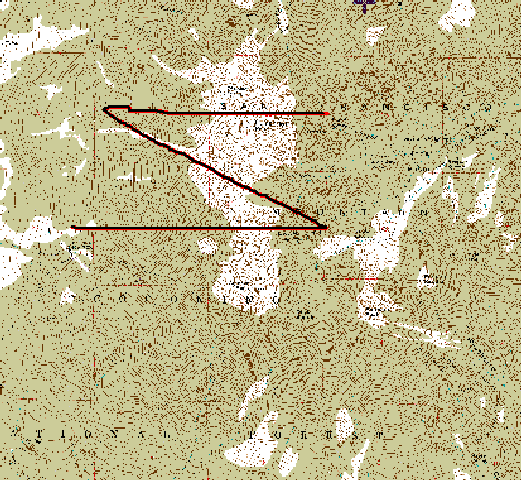
If you have a map whose area is covered by the DEM, you can draw the path directly on the map:

TOPO

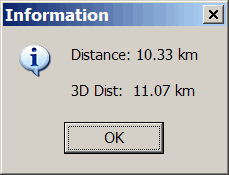
MicroDEM links the map with the DEM, and will calculate the straight-line and 3D distances:

topodistance


Cartographic Utilities In MicroDEM: Datum Shift, Magnetic Declination, UTM Grid Deviation From True North, And Sunrise/Sunset/Twilight Times

While its primary functions deal with DEM/terrain display and analysis, MicroDEM has some handy cartographic functions as well for any position on a georeferenced map. It can calculate the amount of shift in position between different datums for both UTM and geographic coordinates; determine the current angular variation between true and magnetic north; find the deviation from true north for the UTM grid, and label sunrise/sunset/twilight times for multiple points on a map.

More after the fold …

Continue reading ‘Cartographic Utilities In MicroDEM: Datum Shift, Magnetic Declination, UTM Grid Deviation From True North, And Sunrise/Sunset/Twilight Times’


LIDAR Data Coastal Erosion And Flooding Analysis Using MicroDEM

LIDAR (Light Detection and Ranging) can be used to create high-resolution terrain data (sub-meter), detail good enough to show individual man-made features like buildings and bridges. It’s especially useful for analyzing terrain in areas that are in constant change, like coastlines. High-resolution coastal LIDAR data is available at this NOAA website for the entire US ocean coastline, and parts of the Great Lakes coastlines, for times ranging from 1996 to the present.

Continue reading ‘LIDAR Data Coastal Erosion And Flooding Analysis Using MicroDEM’


The "Inconvenient Truth" Effect In Google Earth: Animated Sea Level Rise Flooding Of Lower Manhattan With An Added Depth Effect

Yesterday’s post showed how to create a sea level rise flooding animation in Google Earth, like this one:

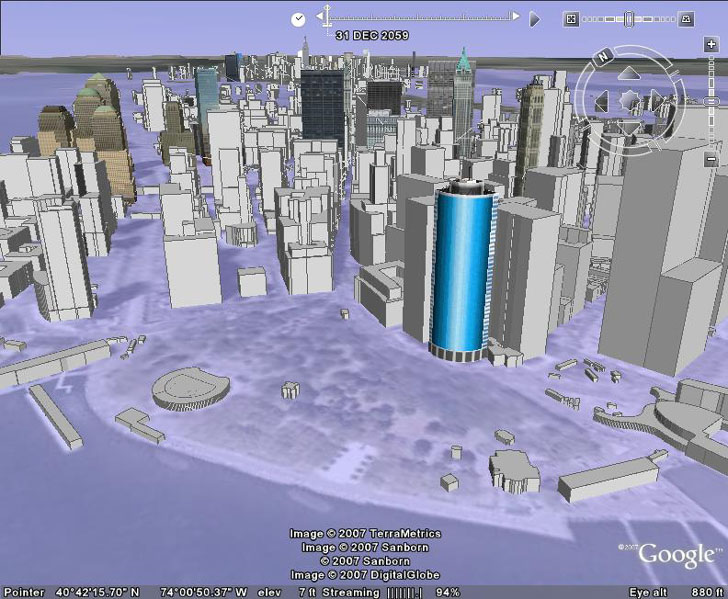
But if you downloaded the KMZ file used to create this animation, and ran it with 3D buildings turned on at the tip of Manhattan, the final image you’d get with 12 meters of flooding looks like this:Lower Manhattan flooded by sea level rise from global warming or storm surgeAnd there’s a problem with the accuracy of this image: there’s no actual depth to the flooding, i.e. the lower levels of the buildings aren’t covered with water. In fact, some of the buildings you can see in the view above would be completely covered with water if this were a more realistic depiction. That’s because no absolute altitude was assigned to the image overlays used in creating the animation, so they are “clamped” to the terrain level. But by assigning a height to every overlay image in the animation, one can create a realistic effect where the flooding doesn’t just cover more area as the sea level rises, but covers the bottom levels of some buildings, and completely covers other ones. This would be similar to the animations shown in the movie “An Inconvenient Truth”, and in one sense even better. In that movie, the flooding was show in overhead views, while the Google Earth animation can be viewed at an oblique angle of your choosing, with 3D buildings. Continue reading ‘The "Inconvenient Truth" Effect In Google Earth: Animated Sea Level Rise Flooding Of Lower Manhattan With An Added Depth Effect’


High-Resolution Sea Level Rise Flooding Animations In Google Earth

Creating a high-resolution static sea-level rise image for a specific sea level rise value, and displaying it in Google Earth, is fairly straightforward (see these three posts for the details):

Manhattan drowned by sea level rise from global warming or storm surge

But creating an animated version viewable in Google Earth, comparable to this animation created in MicroDEM

… takes a bit more work, including diving into the KML code. But while it’s a bit time-consuming, it’s not that hard, and the results are worth it:

Addendum: Do read the rest of this post, but also check out the next post in the series as well for even cooler effects. Continue reading ‘High-Resolution Sea Level Rise Flooding Animations In Google Earth’


Image Overlays In Google Earth

In a previous post, a vector-based KMZ file was created to show the effects of 8 meters of sea level rise on the Manhattan area (click on the image for a larger view):

If you read the earlier post, you’ll see that it’s a fairly convoluted process to convert a raster graphic image into a vector KML format, involving multiple steps that may not be that straightforward for a GIS newbie. But there’s an alternative path: take the original raster graphic image, and import that into Google Earth as an image overlay. This post will show specifically how to do that for the sea level rise image, but the process can be used with any generic image overlay.

Continue reading ‘Image Overlays In Google Earth’


Elevation, Slope, Terrain And 3D Anaglyph Map Shading In MicroDEM

For general map relief shading, my first choice is usually 3DEM, since it usually gives the best results. But MicroDEM also does a decent job at terrain relief shading, and has a few other shading options that 3DEM lacks.

Continue reading ‘Elevation, Slope, Terrain And 3D Anaglyph Map Shading In MicroDEM’


High-Resolution Sea Level Rise Effects In Google Earth

Last week, I posted on how to create an animated depiction of sea level rise due to a storm surge or global warming. Here’s a movie of the flooding for the Manhattan/NYC area:

Got a note from Frank Taylor over at the Google Earth Blog saying that it looked pretty interesting, and that he would have linked to it if it were in Google Earth. That got me to thinking about how you could show the effects of coastal sea level rise in Google Earth with high spatial resolution, both static and animated. I’ll start with the easy one: static. Continue reading ‘High-Resolution Sea Level Rise Effects In Google Earth’