

Been a while since I last posted about Prune (version 6) (earlier posts about versions three and four), a GPS data manager, visualizer and photo geotagger. It’s Java-based, so it runs in Windows, Mac and Linux, not a common trait with GPS software. Just checked the website, and discoverd that Prune is at version 10 (!), and has progressively added features with every version. Current feature set (from the website) includes:
- Loading of coordinate data from file in any text-based format, with any combination of fields and any separator, or in GPX or KML or KMZ or NMEA format. Xml files can be zipped or gzipped.
- Loading of coordinate data from GPS receivers using gpsbabel.
- Top-down, zoomable, draggable view of data points including map images from Openstreetmap or any similar map tile server (eg opencyclemap, openpistemap).
- Caching of map tiles to disk for faster access and offline use.
- Altitude profile view or speed profile view.
- Selection of individual points and ranges to show details.
- Deletion of duplicates and variable compression of track.
- Deletion of selected points and ranges, and reversal of ranges.
- Editing of point data, and creation of waypoints.
- Re-ordering of waypoints within data set.
- Saving of data in specified text format, XML format (GPX, KML, KMZ) or sending to GPS receiver.
- Interactive 3d display of data.
- Export to POV format for rendering of 3d model by Povray.
- Loading of photos in jpeg format with or without coordinate data in exif tags.
- Connection of photos to points, and saving of coordinates in exif tags. (requires exiftool)
- Automatic correlation of photos with track points using each photo’s timestamp.
- Inclusion of photo thumbnails in KMZ export.
- Generation of charts (eg altitudes, speeds) either on screen or exported to SVG file.
- Launch of browser showing area in various map websites such as Google Maps or Openstreetmap.
- Multiple Undo.
- Multiple language support – currently EN (English), DE (German), DE_ch (Swiss German), ES (Spanish), FR (French), IT (Italian), PL (Polish), ZH (simplified Chinese), JA (Japanese) and Portuguese (PT) are supported. Turkish (TR), Romanian (RO), Indonesian (ID) and Afrikaans (AF) are partially supported.
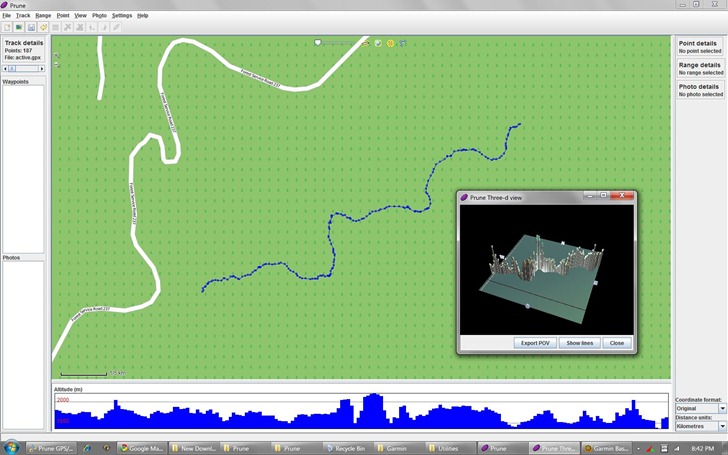
Screenshot (with 3D track window open):
You’ll need to have Java installed on your system just to run the program. But full functionality requires download and installation of a number of needed software packages, as described on the “Dependencies” page; all are free and available for all OS platforms.

Great find, thanks.
The first GPS track editor that “just works”. Free, clear and stable.
I’ve created a first draft of a Dutch translation. Get it from the prune website.