Doc Savage’s Old Word Archaeology website (great name!) has links to maps aerial/satellite photos, and vector data for most of Israel and Jordan, with some data for surrounding areas (mainly Syria and the Sinai); click on the links under “Digital Data” on the right. Most of the data is georeferenced for direct use in GIS software. Data includes:
- 1:50K topo maps; sources are US and Soviet military topos, and Arabic topos. See this post for more info on Soviet military topo maps.
- Landsat 28m resolution imagery
- NIMA-SPOT 10m panchromatic (black and white) imagery
- Digital Chart Of The World (DCW) data by country, including topography (hypsography), populated places, land use/land cover, transportation, drainages, cultural places, utility lines, and airports. This data dates from the early 1990s (essentially VMAP0), but is still useful. This vector data is in ArcInfo coverages; see this post for info on how to convert ArcInfo coverages into shapefiles.
The Relief Shading website defines “shaded relief” as “a method for representing topography on maps in a natural, aesthetic, and intuitive manner”. A review of the many resources on that site, and on Tom Patterson’s excellent Shaded Relief website, will convince you quickly that getting the best possible results requires a great deal of knowledge, expertise and time. But you can get fairly satisfactory relief shading of your maps quickly and easily using 3DEM.
Continue reading ‘Easy Map Relief Shading Using 3DEM’
A DEM (digital elevation model) essentially consists of a grid of data, where every square in the grid corresponds to a geographic location, and the value at that position in the grid is the elevation above sea level. But those are just numbers, which are hard to visualize.
3DEM is a free program that opens DEM data and lets you visualize and use it in a number of different ways. It comes with a first-rate PDF manual, available from the Help menu. Today’s post deals with just the basics; upcoming posts will cover some of the interesting ways you can use the data to visualize topography and geography.
Continue reading ‘DEM Terrain Depiction Using 3DEM’
Yesterday, I posted about the raster combining and export capabilities of the TatukGIS Viewer. But it’s also a first-rate vector file viewer as well, and can export high-resolution raster images of the vector display using the capability described yesterday.
Among the vector features of the TatukGIS Viewer are:
- Support for a large number of vector formats, including shape, E00, DXF, Tiger road data, GPX, KML, MIF, VPF, DLG, etc.
- Fast display.
- Overlay vector files on top of raster, modify transparency of both.
- A handy wizard for assigning vector display properties using attribute data.
- Standard query and selection by attribute.
- Pie and bar charts by table attribute, superimposed on the map. (Note: Do this before modifying shapefile display properties, otherwise it doesn’t work)
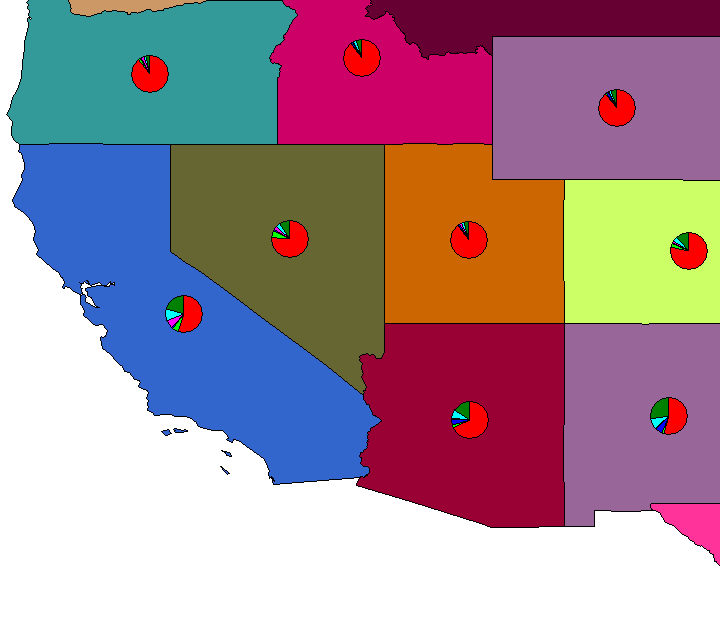
- Selection by point, line, rectangle, circle, polygon; intersect, touch, within, cross, overlap.
- Measure distance/area for line, polygon, rectangle, circle.
- High-resolution export of georeferenced raster image.
- Print image with options to include scale, title, or legend, either to printer or PDF file.
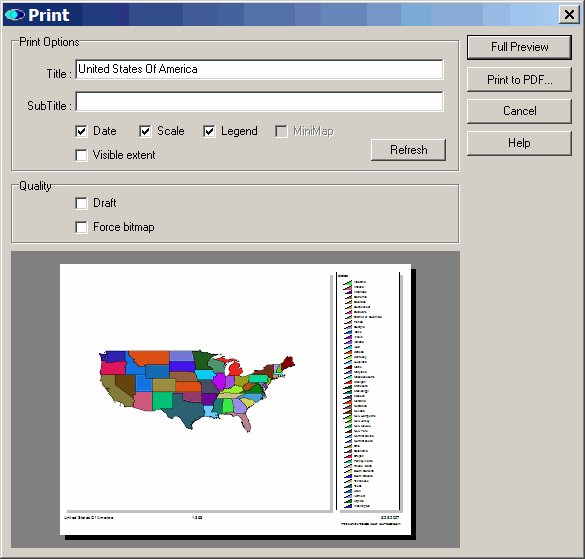
- User-selectable appearance themes.
- Save projects.
No editing capabilities, just viewing, but the TatukGIS Viewer is among the best free GIS viewers out there.
1/12/2010: Unfortunately, the latest versions of the TatukGIS viewer have removed the “Export To Image” function, which was the most valuable function of this program. So I can’t really recommend it anymore; you’d be better off with a free GIS program like qGIS, MapWindow or MicroDEM, which do offer raster combination and export functions, albeit without the same degree of control as the older version of TatukGIS Viewer. If you look around online, you might still be able to find the older version somewhere.
The USGS Seamless Server data gateway I posted about yesterday has a filesize limit per download of 250 MB uncompressed (the zipped, compressed size of the downloaded files is usually much smaller than the uncompressed size). If raster map data you’ve selected for download has a combined size greater than 250 MB, the server breaks it up into smaller segments, each downloadable as a file. If you import all of these separate files together into a GIS program, it will automatically position all the pieces together in the right place. But you might find it more convenient to combine all of the individual pieces together into a single map file with the same resolution, and still georeferenced.
Continue reading ‘Full Resolution Raster Map Combining, Subsetting And Export With The TatukGIS Viewer’
Over the next few weeks/months, I’ll be putting up a fair number of posts on software tools that work with Digital Elevation Models, or DEMs for short. A DEM is essentially a grid of an area where each point in the grid represents the elevation or altitude at that point. With a DEM, you can do things like determine the altitude and slope at a point, measure the terrain profile, make 3D views (both static and interactive), and so on. Before starting those posts, it makes sense to talk about a good source for that data.
Continue reading ‘The USGS Seamless Data Distribution System’
The Moderate Resolution Imaging Spectroradiometer (MODIS) is a low-to-moderate resolution multi-spectral imaging system currently in operation aboard two NASA satellites, Terra and Aqua. Both satellites are acquiring imagery on a continuous basis, and NASA has created a website that allows access to near-real time georeferenced imagery from both satellites, as well as archived imagery from previous days.
Continue reading ‘Near-Real-Time Georeferenced MODIS Satellite Images From The Terra/Aqua Satellites’
Note 1: See this series of posts for info on converting shapefiles to KML format.
Note 2: The current version of the program has a bug that doesn’t let you select a file. The author has indicated on the website that a new version should be out soon, but until then, you may have to use the approach described in either this post or another post. Also available now is an online KML to shapefile converter.
In two previous posts, I covered several multi-step hacks for converting Google Earth KML files to shapefile format, since there wasn’t a single-step free approach to my knowledge. Well, there is now, and it makes the process a lot easier.
Continue reading ‘The Last Word (For Now) On Converting Google Earth KML Files To Shapefiles’

