blankblank blank


Archive for the 'GIS' Category Page 10 of 23


More Mapping Booklets

Last week, I posted about a free new PDF publication from MapAction called the Field Guide To Humanitarian Mapping, an excellent introduction to GIS and GPS for humanitarian mapping. John Krygier’s Making Maps blog links not only to that guide, but two other freely-downloadable publications from TacticalTech that cover the use of maps and graphics by NGOs and other groups for informational and advocacy purposes:

Visualizing Information for Advocacy: An Introduction to Information Design discusses how to effectively use graphics, including maps, to present your data in an effective and convincing manner.

Maps For Advocacy deals with the same topics, this time concentrating on maps and neogeography.

For more info on these topics, and the pitfalls associated with them, try these books:

Making Maps: A Visual Guide to Map Design for GIS by John Krygier and Denis Wood

Designing Better Maps: A Guide for GIS Users by Cynthia Brewer

GIS Cartography: A Guide to Effective Map Design by Gretchen Peterson

The Visual Display of Quantitative Information, 2nd edition by Edward Tufte

Think Globally, Act Regionally: GIS and Data Visualization for Social Science and Public Policy Research by Richard LeGates

How to Lie with Maps (2nd Edition) by Mark Monmeier

How to Lie with Statistics by Darrell Huff


Free GIS-Related Software For The Mac

I get emails all the time asking about free GIS software for Mac OS X. Unfortunately, since I don’t have a Mac, I don’t spend a lot of time looking for Mac-compatible software. From what little I’ve seen, there’s far less GIS-related software for OS X than Windows, or even Linux, and that’s unlikely to change soon. But for what it’s worth, here’s a list of free GIS-related software I’ve run across that claims to come in a Mac-compatible version (no GPS-related software). Unless noted, there are Windows version of these as well, and usually Linux, too. As I come across more Mac programs, I’ll put up posts on those additional ones, but will also eventually add them here as well.

ArcExplorer Java Edition – ESRI’s Java-based GIS viewer.

Cartes And Donnees – Bills itself as “Geographical Analysis Software” instead of GIS. Statistical analysis and display of geographical data (choropleths, cartograms, pie charts/histograms superimposed on maps, etc.). Free personal version available for Mac and PC.

CoastWatch – “The CoastWatch Software Library and Utilities is a package of software tools for working with earth data sets distributed by the NOAA/NESDIS CoastWatch program.” Added 4/22/09.

GeoJasper – Converter between GeoTiff and GeoJPEG2000. Added 4/22/09.

Geomajas – “… an open source, web-based GIS framework specialized in editing and complex attribute relations.” Apparently works with Firefox in Mac, but has issues in Safari. Added 4/22/09.

GeoMapApp: “GeoMapApp provides direct access to the Global Multi-Resolution Topography (GMRT) compilation that includes high resolution (~100 m node spacing) topography from multibeam data for ocean areas and Shuttle Radar Topography Mission (SRTM) data over land.” Added 4/22/09.

GeoVISTA Studio – “GeoVISTA Studio is an open software development environment designed for geospatial data. Studio is a programming-free environment that allows users to quickly build applications for geocomputation and geographic visualization.” Note: Seems to have issues with the most recent versions of Java, at least on my PC. Added 4/22/09.

GISLook and GISMeta – GISLook adds preview capability to GIS data to the finder, supporting:

Vector data
• ESRI Shape (.shp)
• E00 ArcInfo Interchange (.e00)
• ArcInfo Coverage (.adf)

Raster grids, such as digital elevation models or land cover data with a single band
• BIL (.bil), BIP (.bip) and BSQ (.bsq) with .hdr file
• ESRI ASCII Grid (.asc)
• ESRI Binary Grid (.flt with .hdr file)
• PGM (.pgm)
• SRTM (.hgt and .dem)
• Surfer Grid (.grd)
• USGS DEM (.dem)

GISMeta lets you see the size of raster data files in the Finder. Added 4/19/09.

GMT (Generic Mapping Tools) – Set of command-line tools for visualizing geographical data. iGMT GUI available for Mac.

Grid Analysis and Display System (GrADS) – “The Grid Analysis and Display System (GrADS) is an interactive desktop tool that is used for easy access, manipulation, and visualization of earth science data. The format of the data may be either binary, GRIB, NetCDF, or HDF-SDS (Scientific Data Sets).” Added 5/9/09.

GRASS – Very powerful GIS, but extremely steep learning curve.

gvSIG – Java-based GIS viewer/editor. Started based on OpenJump, but a lot of effort and money is going into this project.

HEG – “… a tool developed to allow a user to reformat, re-project and perform stitching/mosaicing and subsetting operations on HDF-EOS objects. The output GeoTIFF file is ingestible into commonly used GIS applications. HEG will also write to HDF-EOS Grid & SWATH formats (i.e for Subsetting purposes) and native (or raw) binary. HEG presently works with MODIS (AQUA and TERRA), ASTER, MISR, AIRS, and AMSR-E HDF-EOS data sets.” Added 4/19/09.

HyperCube – US Army software for aerial/satellite imagery analysis.

JGrass – A Java implementation of GRASS with emphasis on hydrological and geomorphological analysis; uses uDIG as a framework. Added 4/19/09.

KyngChaos – A source of Mac OS X builds of GIS-related software like GDAL/OGR and MapServer. Added 4/19/09.

LandSerf – Full-featured Java-based terrain visualization and analysis program. Been meaning to do some posts on this as soon as version 2.3 comes out.

MacMap – In French, billed as a simple and easy GIS for Mac OS X only. Can’t tell for sure, but there may be a free limited version (maximum of 1500 objects) available for educational purposes.

MARPLOT – “MARPLOT is the mapping application. It allows users to “see” their data (e.g., roads, facilities, schools, response assets), display this information on computer maps, and print the information on area maps. The areas contaminated by potential or actual chemical release scenarios also can be overlaid on the maps to determine potential impacts. The maps are created from the U.S. Bureau of Census TIGER/Line files and can be manipulated quickly to show possible hazard areas.” Added 5/9/2009.

Minerva -”Minerva is an open-source program for viewing geospatial data that works on Windows, Mac, and Linux. It unifies standard GIS capabilities with high-performance, 3D visualization”. Added 4/22/09.

MSphinx – MODIS Satellite Process Handling Images uNder Xwindow. Added 4/22/09.

MultiSpec – Aerial/satellite imagery analysis software from Purdue University.

OpenJump – Java-based GIS. Has installation instructions for Mac OS X.

OSSIM: “OSSIM provides advanced geo-spatial image processing for remote sensing, photogrammetry, and Geographic Information Systems.  Backed by an active open source software development community, OSSIM solutions have been deployed on a number of critical commercial and government systems.” Added 4/19/09.

OrbitGIS Explorer – Free GIS data viewer.

PASSAGE – Spatial statistics and analysis.

Puzzle-GIS – “Puzzle is a Java Geographic Information Systems (GIS) development platform build on top of NetBeans6. The main goal of Puzzle GIS is to create a free, production ready and competitive tool as a valid alternative to commercial software.” Added 5/9/2009.

Quantum GIS (qGIS) – Basic GIS viewer and editor for now; new features added with every release. Also has built-in interface for GRASS

R – An open-source statistical analysis package. See this page for references on using it for geospatial analysis. Added 4/19/09.

SeaDAS – “ The SeaWiFS Data Analysis System (SeaDAS) is a comprehensive image analysis package for the processing, display, analysis, and quality control of ocean color data.” Added 4/22/09.

SGeMS – “SGeMS is a software for 3D geostatistical modeling.” Source code only is provided; website says that you should be able to compile it for Mac OS X, but apparently no one has tried it yet, and no Mac binaries are available. Added 4/22/09.

Spatial Commander – A free German GIS program. This link (in German) lists its features. Added 5/9/2009.

Spatial Data Integrator – “Spatial Data Integrator (SDI) is an ETL (Extract Transform Load) tool with geospatial capabilities. Added 5/9/2009.

STARS – “Space-Time Analysis Of Regional Systems (STARS) is an open source package designed for the analysis of areal data measured over time. STARS brings together a number of recently developed methods of space-time analysis into a user-friendly graphical environment offering an array of dynamically linked graphical views.” Added 4/22/09.

StarSpan – “StarSpan is designed to bridge the raster and vector worlds of spatial analysis using fast algorithms for pixel level extraction from geometry features (points, lines, polygons). StarSpan generates databases of extracted pixel values (from one or a set of raster images), fused with the database attributes from the vector files.” Added 4/22/09.

STEM – “The Spatiotemporal Epidemiological Modeler (STEM) tool is designed to help scientists and public health officials create and use spatial and temporal models of emerging infectious diseases. These models could aid in understanding, and potentially preventing, the spread such diseases.” Added 5/9/2009.

Thuban – GIS data viewer, raster and vector.

TNTmips (aka TNTlite) – Free full-featured version of TNTmips Pro with limits on the number of geographical objects, size of raster data.

uDIG – Java-based GIS viewer/editor.

VAPOR – Visualization and Analysis Platform for Ocean, Atmosphere, and Solar Researchers. Added 4/22/09.

  • A visual data discovery environment tailored towards the specialized needs of the geosciences CFD community
  • A desktop solution capable of handling terascale size data sets
  • Advanced interactive 3D visualization tightly coupled with quantitative data analysis
  • Support for multi-variate, time-varying data
  • Close coupling with RSI’s powerful interpretive data language, IDL.
  • Support for 3D visualization of WRF-ARW datasets

WorldWatcher – “WorldWatcher, a supportive scientific visualization environment for geospatial data, is available for both Macintosh and Windows. The software provides an accessible and supportive environment for students to explore, interpret, and analyze scientific data in a manner which allows them to emulate the work of actual scientists.” Note: This appears to be a free, but I can’t tell for sure. Added 4/22/09.

If you know of any other free Mac GIS software, drop me a line, and I’ll add it to the list.

Commercial Mac GIS software (i.e. not free)

Avenza – Add-ons like MAPublisher and Geographic Imager for Photoshop and Illustrator

Cartographica – A Macintosh-only GIS editor/viewer.

GAIA – “GAIA (Geographic Access Image and Analysis) Software … capabilities are focused on displaying any earth imagery including full SPOT or LANDSAT images and allowing users to combine spectral classes into meaningful covertypes and analyze a given area for acreage. GAIA also has full rastor/vector integration and can overlay vector maps (from MapGraphix and Microstation) onto the raster imagery to superimpose roads, geopolitical borders, hydrography, etc.”. Note: No download link, original website is down, may no longer be available. Added 4/22/09.

MyWorld GIS – “My World GIS™ is a Geographic Information System (GIS) designed specifically for use in educational settings.  My World allows learners to explore and analyze geographic data about our world.” Added 4/22/09.

Ortelius – Mapmaking software (coming soon).

TNTMips – Full version of the freeware TNTlite.


Assigning Attributes From A Polygon Shapefile To Another Shapefile

Here’s a recap of yesterday’s request from TD:

Wondering if you know of an easy way to create centroids (points) from polygons – I am using MapWindow and various other free tools. What I am ultimately trying to do is assign attribute data (parcel #) to a polygon shapefile representing buildings.  In other words, for each building polygon I want to assign it the correct parcel #.

Yesterday’s post went through the first part of this process, converting the building polygon shapefile  into a centroids (approximate building geometric centers) point shapefile, carrying over the building shapefile attributes to the corresponding centroid points. Now I need to assign attribute data from the parcel polygon shapefile to the centroids.

Continue reading ‘Assigning Attributes From A Polygon Shapefile To Another Shapefile’


Centroids From A Polygon Shapefile With SAGA

TD asks:

Wondering if you know of an easy way to create centroids (points) from polygons – I am using MapWindow and various other free tools. What I am ultimately trying to do is assign attribute data (parcel #) to a polygon shapefile representing buildings.  In other words, for each building polygon I want to assign it the correct parcel #.

Yes, you can do both tasks with free GIS software. Today, I’ll do the centroids, tomorrow the assignment of attribute data from one shapefile to another. Based on your description, you probably don’t need to create a centroid file, but it provides a convenient excuse for me to go through the functionality of a program full of great GIS tools. While I find its data display interface a little clumsy for regular use, the freeware GIS SAGA has an enormous list of useful functions, many of which are non-existent or hard to find in other free GIS programs. The basic process for using any of these functions is pretty much the same, so the following procedure can be used as a general guideline for using any of the function modules.

Continue reading ‘Centroids From A Polygon Shapefile With SAGA’


List Of Towns And Cities In A Country With Coordinates And Elevation

In a previous post’s comments section, someone asks if there’s “a way to filter for US cities (or world cities for that matter) that are between 3000 feet and 4000 feet elevation”. In order to do that, you need the data, and oddly enough there’s a specialized little application that can retrieve that data for world cities. GeoMaker (scroll down for the download link) lets you select from a list of world countries, then queries the NIMA (National Imaging and Mapping Agency) online database for the following:

  • City/town name
  • Geographical coordinates (latitude/longitude)
  • Region/State (if available)
  • Elevation above sea level (in meters)

You can also download a text file with NIMA gazetteer data as well for a particular country, but it includes all geographic features, not just cities, and can be enormous in size.

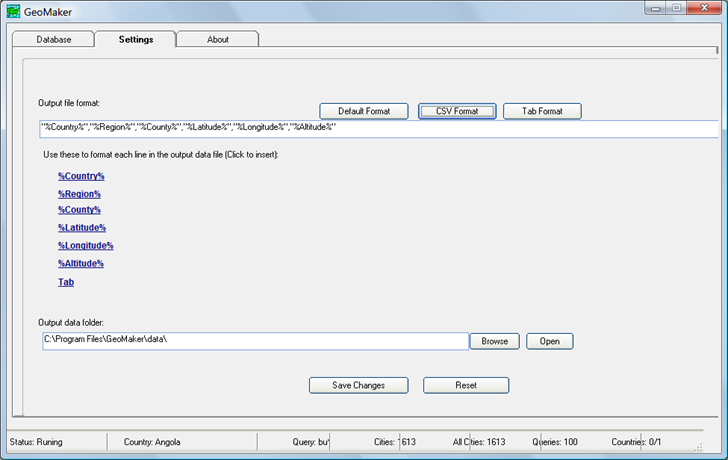
Output is in text format, in either “|”, comma or tab delimited formats, as specified in the Settings tab:

4-1-2009-8.17.26 PM

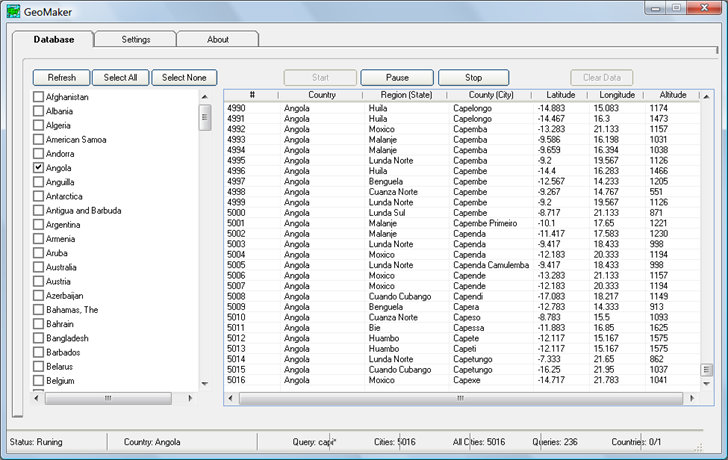
To retrieve the data, select the country you want the data for from the list on the main screen:

4-1-2009-8.20.42 PM

Click on the country name to select it, not the checkbox – clicking on the checkbox seems to select Afghanistan for every case in addition to the country you want. Once you’re selected the desired country, click “Start”, and the program will start querying the NIMA  database. It uses a brute force approach, where it queries for every possible set of 2-4 starting letters plus a wild card character. Consequently, the search may take quite a bit of time even for small countries, and will usually come up with duplicate entries.  Once complete, the output text file is saved in the “data” subfolder of the main program folder with a two-letter name descriptive of the country (e.g. “AF” for Afghanistan, “AO” for Angola).

You can open the text file in a spreadsheet and do a query or sort to find the information you need. If you saved it in CSV format, you could use a GIS program like MapWindow to convert it into shapefile format., and then query the attribute table. Source code for the app (Visual Basic 6) is also available at the download site.

For the United States, the program is supposed to use a different online database, but that doesn’t seem to be working right now. But a full install of MapWindow includes several sample projects; in the “United States” folder you’ll find the “cities” shapefile, which lists over 3000 US cities,  their elevation above sea level in feet, and other information. You can query this shapefile in a GIS program, or export it into spreadsheet format with Shape2Text.


Get DEM Elevations For A List Of Points

YP asks:

…would you know an easy (and free) way to query a DEM (Digital Elevation Model) to get elevations for a list of points (potentially as many as a few thousand)

Well, I know one way to do it with free software:

Continue reading ‘Get DEM Elevations For A List Of Points’


Free Introductory Guide To GIS And GPS

MapAction is a non-profit volunteer organization that provides GIS and mapping services to disaster areas. They’ve just published a free 118-page Field Guide To Humanitarian Mapping that’s a terrific introduction to both data acquisition using a GPS, and how to use Google Earth and the free open-source Windows GIS program MapWindow for mapping. I’d even say that it’s a far better choice for beginners than the recently-published GIS For Dummies (more on that soon, when I get the review of that volume done).

Via GIS @ Vassar.


Free And Open Source Windows GIS Software Installation With OSGeo4W

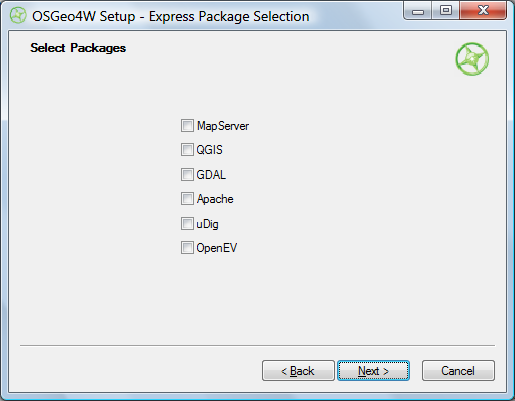
The OSGeo4W project is an automated installer for a variety of Free and Open Source Software GIS applications for Windows, including command-line, desktop and web apps. While some of the programs in this installer are also available in stand-alone installers (e.g. uDig and OpenEV), others can currently only be installed using the OSGeo4W installer (e.g. Quantum GIS (qGIS) v. 1, and the native Windows version of GRASS (6.4.0RC3-2)). You have two install options, Express and Advanced. Express just gives you a short checklist of installable applications:

OSGeo4W Express install

Choose the ones you want, and OSGeo4W takes care of downloading, unzipping and installing the programs, including all required dependencies. Desktop apps will be found in the Start Menu under Start => Programs => OSGeo4W; there will also be a “OSGeo4W Shell” icon that starts up a command window for running command line programs. You’ll also be given the option to put icons on the desktop.

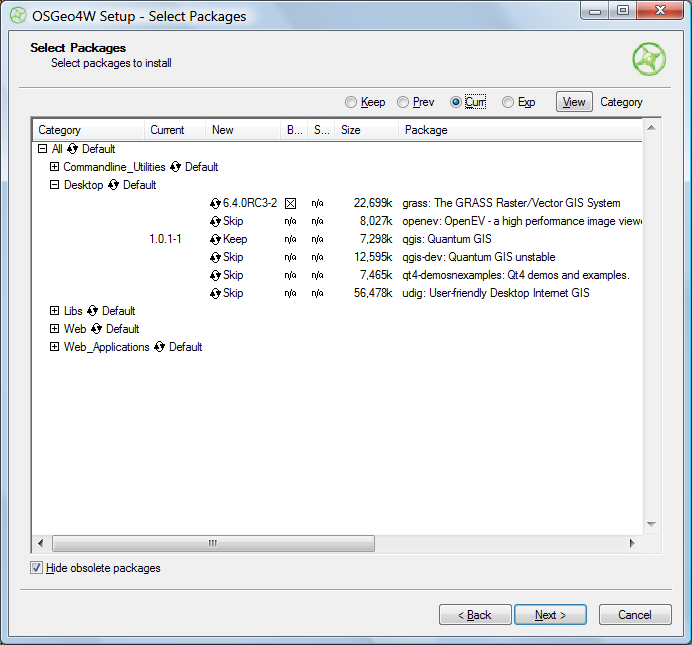
Selecting Advanced installation takes you through a set of configuration screens, then the one you need to use to select the programs to install:

OSGeo4W advanced install

Clicking on the circular arrow icon will take you through available options for that program:

  • Skip – No install
  • Keep – Keeps the currently installed version of that program. In the screen above, I already have Quantum GIS 1.0.1-1 installed, and would probably want to keep it.
  • Uninstall – Uninstalls a currently installed program
  • Reinstall – Reinstalls the same version of the program, useful if it’s gotten corrupted
  • Version numbers – Installs that version of the program. In the example above, the 6.4.0RC3-2 version of GRASS would be installed. I could also select a different version of Quantum GIS to install over the current version.

“Hide obsolete packages” presumably does what it says, but I was unable to find an example of an obsolete package being hidden or unhidden by checking/unchecking the box.

Once you’ve selected your desired packages, clicking Next starts up the same install process as in Express.

I can certainly see how this installer has its advantages, but for now think I still prefer stand-alone installers for individual programs; they give you more control over which program options to install, and which directory to put them in.  Also, if you use a stand-alone installer, you’ll typically be downloading it from the app’s home page, and will have already found out what it is and what it does from there.  The OSGeo4W has no such info in it, and I think the installer would benefit from having some kind of descriptions of the available software built into it (the current Package Listing page has no such information, so you’ll have to go to every program’s home page to find out more about it). But advanced users may well prefer OSGeo4W’s approach.

It would also be helpful if the OSGeo4W installer could also make a copy of itself in a program directory and create a desktop icon for itself; as is, you have to manually keep track of where the program is if you want to run it again in the future for additional installs or program updates..