blankblank blank


Archive for the 'GIS' Category Page 9 of 23


LandSerf – Terrain Visualization And Analysis For Windows, Mac And Linux

I’ve been waiting for LandSerf 2.3 to officially come out of beta before posting on it, and that finally happened about a month ago. LandSerf is a Java-based GIS program with:

  • Terrain visualization and analysis functions (its primary focus)
  • Some vector functionality related to terrain analysis, plus other basic vector functions
  • GPS and Google Earth utilities

Today, I’ll walk through some of LandSerf’s basic terrain visualization and analysis functions; upcoming posts will deal with the vector and GPS/Google Earth capabilities.

Continue reading ‘LandSerf – Terrain Visualization And Analysis For Windows, Mac And Linux’


New Free Stand-Alone MRSID Imagery Viewer/Exporter From LizardTech

A long time ago, LizardTech had a stand-alone viewer for MRSID imagery that let you export subsets of the image as TIFF files –  GeoTiffs if the original image was georeferenced. For some reason, that viewer was withdrawn as a free download in favor of a browser plugin, though you could still find the viewer available at some sites. I never really cared for the browser plugin, and kept my copy of their old viewer software safely stashed away.

LizardTech has just released GeoViewer 3.0, a new stand-alone viewer for georeferenced imagery, and a replacement for their $299 GeoView Express product. Note: The initial download is only 670KB, but that’s not the full program; it’s a front-end that downloads the 21 MB installer from LizardTech, so you’ll need a working Internet connection to install the software. It can read:

  • MRSID
  • JPEG 2000
  • GeoTiff
  • ERDAS Imagine
  • ECW
  • Express Server Layers
  • WMS Layers
  • JPIP Layers

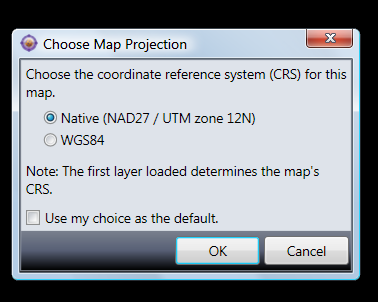
… and a bunch more, including vector shapefiles. It also opens JPEG and BMP imagery, and unregistered TIF images, but since it doesn’t seem to be able to use associated UTM worldfiles to register those images, it’s not clear how useful that is. If coordinate system data is embedded in the imagery, it uses the first file to set the native coordinate system, and re-projects successive files to match that native system. If that first file imagery is not in geographic coordinates (lat/long) and WGS84 datum, you’ll also have the option of re-projecting it immediately to lat/long, WGS84:

5-26-2009-9.34.06 PM

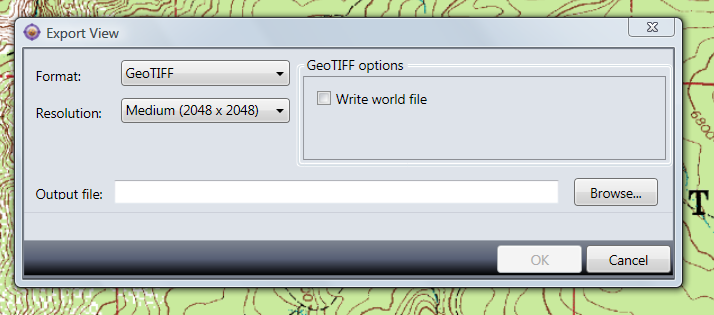
You can export either all the loaded data, or just the data in view, as a GeoTiff (Tools => Export), a raster PNG with worldfile, or JPEG with worldfile, in your choice of resolutions, using the Tools => Export menu:

5-26-2009-9.24.20 PM

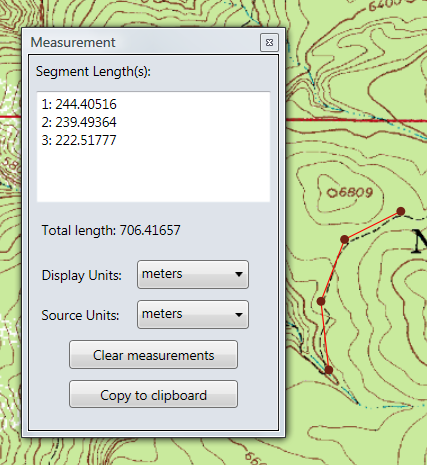
It also has a path measurement function, which works but is nothing to write home about:

5-26-2009-9.26.48 PM

You can load in multiple layers and mosaic them, and set layer transparencies, but you’re probably better off using other software for that. Really, the big thing about this program is that there’s now an up-t0-date, stand-alone MRSID viewer and imagery exporter from the company that created the format, LizardTech.

Via GISUser.


Free Tools For ArcGIS Server (And A Request For Ideas For More Free Tools)

David Enns of MapItOut writes:

Subsequent to the development of low-cost tools by Map It Out in previous versions of ArcGIS Server, the company will now release these tools free of cost, starting with ArcGIS Server 9.3. It will be seeking input from users to develop other no cost tools. Map It Out Inc. hopes to offer several other ease-of-use and multi-functional tools at no cost in the upcoming months based on the input/demand from the GIS community.

The first available tools are:

  • Area & Buffer Selection Tool
  • Bookmark Tool
  • Hyperlink Tool
  • Export Tool
  • Custom Query Tool

I don’t use ArcGIS Server, so can’t evaluate them; for anyone who does try them out, I’d welcome your opinions in the comments section.


Additions To List Of Free GIS Programs For The Mac

A few more additions to the full list of free Mac GIS software, where they will be added shortly; you need only bookmark that preceding link to have it as a complete and regularly-updated reference.

Grid Analysis and Display System (GrADS) – “The Grid Analysis and Display System (GrADS) is an interactive desktop tool that is used for easy access, manipulation, and visualization of earth science data. The format of the data may be either binary, GRIB, NetCDF, or HDF-SDS (Scientific Data Sets).”

MARPLOT – “MARPLOT is the mapping application. It allows users to “see” their data (e.g., roads, facilities, schools, response assets), display this information on computer maps, and print the information on area maps. The areas contaminated by potential or actual chemical release scenarios also can be overlaid on the maps to determine potential impacts. The maps are created from the U.S. Bureau of Census TIGER/Line files and can be manipulated quickly to show possible hazard areas.”

Puzzle-GIS – “Puzzle is a Java Geographic Information Systems (GIS) development platform build on top of NetBeans6. The main goal of Puzzle GIS is to create a free, production ready and competitive tool as a valid alternative to commercial software.”

Spatial Commander – A free German GIS program. This link (in German) lists its features.

Spatial Data Integrator – “Spatial Data Integrator (SDI) is an ETL (Extract Transform Load) tool with geospatial capabilities.”

STEM – “The Spatiotemporal Epidemiological Modeler (STEM) tool is designed to help scientists and public health officials create and use spatial and temporal models of emerging infectious diseases. These models could aid in understanding, and potentially preventing, the spread such diseases.”


Marine Navigation GIS Data

SM asks if I know “any free or commercial data source for boat landing or (boat ramp) sites…? I am especially interested in IL,IN,OH,and MI area.”.  My first idea was to check two US Government sources of marine GIS map data.

Continue reading ‘Marine Navigation GIS Data’


Even More Mac GIS Software For Free

Thought I was done with adding new Mac GIS apps to the full list, but here’s a few more:

CoastWatch – “The CoastWatch Software Library and Utilities is a package of software tools for working with earth data sets distributed by the NOAA/NESDIS CoastWatch program.”

GeoJasper – Converter between GeoTiff and GeoJPEG2000.

Geomajas – “… an open source, web-based GIS framework specialized in editing and complex attribute relations.” Apparently works with Firefox in Mac, but has issues in Safari.

GeoMapApp: “GeoMapApp provides direct access to the Global Multi-Resolution Topography (GMRT) compilation that includes high resolution (~100 m node spacing) topography from multibeam data for ocean areas and Shuttle Radar Topography Mission (SRTM) data over land.”

GeoVISTA Studio – “GeoVISTA Studio is an open software development environment designed for geospatial data. Studio is a programming-free environment that allows users to quickly build applications for geocomputation and geographic visualization.” Note: Seems to have issues with the most recent versions of Java, at least on my PC.

Minerva -“Minerva is an open-source program for viewing geospatial data that works on Windows, Mac, and Linux. It unifies standard GIS capabilities with high-performance, 3D visualization”

MSphinx – MODIS Satellite Process Handling Images uNder Xwindow.

SeaDAS – “ The SeaWiFS Data Analysis System (SeaDAS) is a comprehensive image analysis package for the processing, display, analysis, and quality control of ocean color data.”

SGeMS – “SGeMS is a software for 3D geostatistical modeling.” Source code only is provided; website says that you should be able to compile it for Mac OS X, but apparently no one has tried it yet, and no Mac binaries are available.

STARS – “Space-Time Analysis Of Regional Systems (STARS) is an open source package designed for the analysis of areal data measured over time. STARS brings together a number of recently developed methods of space-time analysis into a user-friendly graphical environment offering an array of dynamically linked graphical views.”

StarSpan – “StarSpan is designed to bridge the raster and vector worlds of spatial analysis using fast algorithms for pixel level extraction from geometry features (points, lines, polygons). StarSpan generates databases of extracted pixel values (from one or a set of raster images), fused with the database attributes from the vector files.”

VAPOR – Visualization and Analysis Platform for Ocean, Atmosphere, and Solar Researchers.

  • A visual data discovery environment tailored towards the specialized needs of the geosciences CFD community
  • A desktop solution capable of handling terascale size data sets
  • Advanced interactive 3D visualization tightly coupled with quantitative data analysis
  • Support for multi-variate, time-varying data
  • Close coupling with RSI’s powerful interpretive data language, IDL.
  • Support for 3D visualization of WRF-ARW datasets

WorldWatcher – “WorldWatcher, a supportive scientific visualization environment for geospatial data, is available for both Macintosh and Windows. The software provides an accessible and supportive environment for students to explore, interpret, and analyze scientific data in a manner which allows them to emulate the work of actual scientists.” Note: This appears to be a free, but I can’t tell for sure.

Commercial software (i.e. not free):

MyWorld GIS – “My World GIS™ is a Geographic Information System (GIS) designed specifically for use in educational settings.  My World allows learners to explore and analyze geographic data about our world.”

GAIA – “GAIA (Geographic Access Image and Analysis) Software … capabilities are focused on displaying any earth imagery including full SPOT or LANDSAT images and allowing users to combine spectral classes into meaningful covertypes and analyze a given area for acreage. GAIA also has full rastor/vector integration and can overlay vector maps (from MapGraphix and Microstation) onto the raster imagery to superimpose roads, geopolitical borders, hydrography, etc.”. Note: No download link, original website is down, may no longer be available.

All these will be added to the full list shortly.


More Free Mac GIS Programs

A final roundup of Macintosh GIS progams that I missed in my original post (they’ll be added to that main listing shortly)

R – An open-source statistical analysis package. See this page for references on using it for geospatial analysis.

JGrass – A Java implementation of GRASS with emphasis on hydrological and geomorphological analysis; uses uDIG as a framework.

KyngChaos – Mentioned by several commenters; a source of Mac OS X builds of GIS-related software like GDAL/OGR and MapServer.

OSSIM:

OSSIM provides advanced geo-spatial image processing for remote sensing, photogrammetry, and Geographic Information Systems.  Backed by an active open source software development community, OSSIM solutions have been deployed on a number of critical commercial and government systems.

And going back to my listing of aerial/satellite imagery programs, which included OSSIM:

One – A through H
Two – I through M
Three – N through R
Four – S through Z
Five – GIS software

I found:

HEG – “… a tool developed to allow a user to reformat, re-project and perform stitching/mosaicing and subsetting operations on HDF-EOS objects. The output GeoTIFF file is ingestible into commonly used GIS applications. HEG will also write to HDF-EOS Grid & SWATH formats (i.e for Subsetting purposes) and native (or raw) binary. HEG presently works with MODIS (AQUA and TERRA), ASTER, MISR, AIRS, and AMSR-E HDF-EOS data sets.”

Comments and emails also referenced paid Mac GIS-related software:

Avenza – Add-ons like MAPublisher and Geographic Imager for Photoshop and Illustrator

Ortelius – Mapmaking software (coming soon).

TNTMips – Full version of the freeware TNTlite.


Addition To Mac GIS Freeware List

Bernhard Jenny let me know about his GISLook and GISMeta add-ons to the Mac Finder; they’ll be added shortly to my previously-published list of Mac GIS freeware.

GISLook adds preview capability to GIS data to the finder, supporting:

Vector data
• ESRI Shape (.shp)
• E00 ArcInfo Interchange (.e00)
• ArcInfo Coverage (.adf)

Raster grids, such as digital elevation models or land cover data with a single band
• BIL (.bil), BIP (.bip) and BSQ (.bsq) with .hdr file
• ESRI ASCII Grid (.asc)
• ESRI Binary Grid (.flt with .hdr file)
• PGM (.pgm)
• SRTM (.hgt and .dem)
• Surfer Grid (.grd)
• USGS DEM (.dem)

GISMeta lets you see the size of raster data files in the Finder.