blankblank blank


Archive for the 'GIS' Category Page 11 of 23


GIS For Dummies Just Published

You know GIS has hit the big time when it gets its own “Dummies” book:


The author, Michael DeMers, is a professor of geography at New Mexico State University, and the author of the textbook Fundamentals Of Geographical Information Systems:


I ordered a copy of GIS For Dummies today, and plan to have a review up on this blog soon.


Create A Random Point Or Evenly-Spaced Point Grid Shapefile Within A Defined Area

Got an email question about how to create point grids in GIS format with free software, and the off-the-top-of-my-head solution was fGIS. fGIS (Forestry GIS) is a decent freeware GIS developed by the Wisconsin Department of Natural Resources using the TatukGIS Developer Kernel. Up until late 2005, updated versions were being released regularly as freeware, but a change in the Kernel licensing conditions made that impossible for future versions. The last free version is still available, but is not guaranteed to be bug-free and will never be fixed or updated. Still, it has some useful utilities, including the “Generate Cruise Points” tool, available from the Utilities menu; this tool lets you create random and regularly-spaced point shapefiles for a defined area.

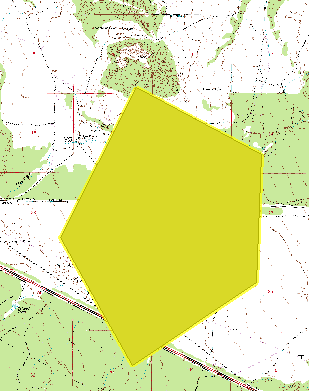
Start up fGIS,  and you’ll be asked to define a project name right away. The coordinate system will be defined by the first layer you add, either raster or vector, and whatever data layers you add to the program must be in the same coordinate system. The program supports many different formats, vector and raster, including shapefile and GeoTiff. You’ll need to have the area you want gridded defined by a vector layer, either one you open or one you create using the program’s vector editing functions; e.g. you could open a raster GeoTiff, then draw a polygon defining the area you want gridded on top of the raster image. You also need to highlight the polygon area you want to have gridded using the “Pick” tool (the red arrow icon at the top):

2-4-2009-2.54.08 PM

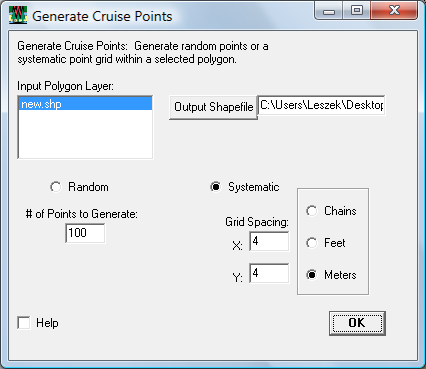
Then select Utilities => Generate Cruise Points:

2-4-2009-2.54.49 PM

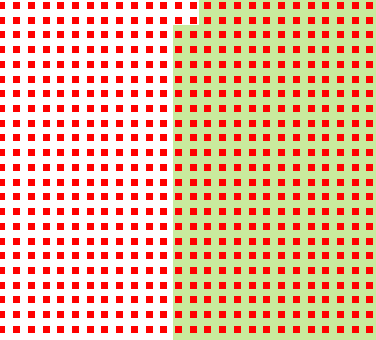
Here, new.shp is the polygon shapefile with the highlighted area to be gridded; specify the output grid point shapefile by clicking on the “Output Shapefile” button (entering the directory in the box at right has no effect). Then choose either a random grid and the number of random points, or a systematic grid with the desired spacing and units. Click OK, and the grid shapefile will be created and added to the map view; if the area is large, and the spacing is small, this may take a while. Here’s that grid shapefile plotted on top of the original raster (zoomed in very close):

2-4-2009-2.53.21 PM

With software like DNRGarmin, you could upload such a grid to your GPS as a set of sampling points.


The Big List Of Satellite/Aerial Imagery Analysis Programs V – GIS

The last in this series (parts one, two, three, and four). The previous applications have been primarily focused on remote sensing applications, but there are also a number of general purpose freeware GIS programs that include significant remote sensing analysis capabilities.

GRASS

A powerful but often difficult to use GIS program. Quantum GIS is implementing an easier interface for GRASS’s capabilities. A Java version of GRASS (JGRASS) is being built on top of uDIG, but is concentrating on hydrogeological and geomorphological capabilities for now.

  • Canonical component analysis (CCA)
  • Color composite generation
  • Edge detection
  • Frequency filtering (Fourier, convolution matrices)
  • Fourier and inverse fourier transformation
  • Histogram stretching
  • IHS transformation to RGB
  • Image rectification (affine and polynomial transformations on raster and vector targets)
  • Ortho photo rectification
  • Principal component analysis (PCA)
  • Radiometric corrections (Fourier)
  • Resampling
  • Resolution enhancement (with RGB/IHS)
  • RGB to IHS transformation
  • Texture oriented classification (sequential maximum a posteriori classification)
  • Shape detection
  • Supervised classification (training areas, maximum likelihood classification)
  • Unsupervised classification (minimum distance clustering, maximum likelihood classification)

gvSIG

gvSIG is moving towards release of version 2.0, which will add a substantial number of remote sensing analysis functions. If you want to look at an early version, there’s a 1.9 alpha release available.

– Clipping of bands and data
– Export layers
– Save from view to raster file
– Color table and gradient edition
– No data values management
– Pixel process (filters)
– Color interpretation management
– Overview creation
– Enhanced radiometric
– Histogram
– Geolocation
– Raster reprojection
– Georeferencing
– Automatic vectorization
– Band algebra
– Region of Interest (ROI) definition
– Supervised classification
– Semi-supervised classification
– Decision tree
– Transformations
– Image fusion
– Mosaic
– Scatter diagram
– Image profiles

ILWIS

Integrated Land and Water Information System, formerly commercial software, now open source.

  • Image enhancement (contrast, linear stretching)
  • Filtering
  • Band combination and compositing
  • Band ratios and indices
  • Georeferencing
  • Multi-band statistics
  • Principal component analysis
  • Image arithmetic
  • Image fusion (e.g. pan-sharpening)
  • Image classification

MicroDEM

A very strong terrain/DEM analysis program, but has other applications as well, including remote sensing.

  • Contrast enhancement
  • Filters
  • Band histograms
  • Correlation (covariance) matrix
  • Scattergrams
  • Band ratios and normalized indices (e.g. NDVI)
  • Principal components analysis
  • Multi-band merges
  • Image training and classification
  • Hyperspectral image analysis (AVIRIS)
  • Image averaging
  • Pan-sharpening

SAGA

Not primarily a remote sensing application, but has some modules for grid manipulation, statistics and analysis that could be useful.

Spring

  • LANDSAT, SPOT, ERS-1 and NOAA/AVHRR Data input;
  • Registration and Geometric Correction;
  • Image Mosaic with gray level equalization;
  • Image Enhancement by Histogram Manipulation;
  • Spatial Filtering;
  • IHS and Principal Components Transformations;
  • Arithmetical Operations;
  • Pixel Values Reading;
  • Maximum-likelihood pixel-based classifier;
  • Image Segmentation and Region Classifiers (Supervised and Unsupervised);
  • LANDSAT and SPOT Images Restoration;
  • Morphological Filters for Images;
  • Mixture Models;
  • Markov-based Techniques for Image Post-Classification;
  • Radar Image Processing.
  • And if you want to create your own remote sensing analysis program, or add capabilities to a GIS, there’s the Orfeo Toolbox (OTB), an open-source library/API for image processing:

    • image access: optimized read/write access for most of remote sensing image formats, meta-data access, simple visualization;
    • sensor geometry: sensor models, cartographic projections;
    • radiometry: atmospheric corrections, vegetation indices;
    • filtering: blurring, denoising, enhancement;
    • fusion: image pansharpening;
    • feature extraction: interest points, alignments, lines;
    • image segmentation: region growing, watershed, level sets;
    • classification: K-means, SVM, Markov random fields;
    • change detection.

    HT to Melaneum in comments.


    The Big List Of Satellite/Aerial Imagery Analysis Software IV – S Through Z

    Click here for parts one , two and three of this series.

    SamplePoint

    SamplePoint is a manual image-analysis program designed to facilitate vegetation cover measurements from nadir digital images of any scale. Operating essentially as a digital point frame, the software loads images, places classification points on the image, and stores classification data to a database as the user classes each point. Up to three simultaneous views of each classification point, at varying zoom levels, are possible. Functional use is not limited to vegetation classification. Installation file contains SamplePoint, SPTracker, a Help Manual, a PowerPoint Tutorial and two sample images.

    Note: Appears to be primarily for close-up vegetation cover analysis, but may be useful for other applications.

    SAMS

    The Spectral Analysis and Management System (SAMS) is a Java application to manage field spectra databases and analyses. Features include: import/export options in various formats, signature groupings, metadata management, common operations on single or multiple signatures, richer set of plotting capabilities, and a simple data structure for easy integration with other applications… SAMS 2.0 does not require Matlab and runs on multiple platforms
    (Windows, Linux, and UNIX). Databases are interchangeable among these platforms.

    SeaDAS

    The SeaWiFS Data Analysis System (SeaDAS) is a comprehensive image analysis package for the processing, display, analysis, and quality control of ocean color data.

    StarSpan

    StarSpan is designed to bridge the raster and vector worlds of spatial analysis using fast algorithms for pixel level extraction from geometry features (points, lines, polygons). StarSpan generates databases of extracted pixel values (from one or a set of raster images), fused with the database attributes from the vector files. This allows a user to do statistical analysis of the pixel vs. attribute data in many existing packages and can greatly speed up classification training and testing.

    TerraLOOK

    TerraLook is a collaborative project that provides access to satellite images for users that lack prior experience with remote sensing or Geographic Information System (GIS) technology.
    Formerly known as the Protected Area Archive, TerraLook combines collections of georeferenced JPEG images with a set of simple visualization and analysis tools. This allows users to explore the data and employ it for useful purposes in a variety of disciplines including conservation, development planning, education, urban studies, disaster planning and response, and others. It may be of particular use in developing countries that may have less capacity to purchase or work with remote sensing data.

    • Image find, roam, and zoom
    • Image annotation (adding text, arrows, etc,)
    • Image enhancement
    • View, edit, and create vector files
    • Distance and area measurement
    • Image mosaicking
    • Multi-lingual support (currently English, Spanish and French)
    • Image comparison using ‘flicker’
    • Multi-band dataset support (many formats)
    • Classification
    • 3-D viewing capability

    Note: Built on top of OpenEV.

    Windisp

    Windisp is a public domain, easy to use software package for the display and analysis of satellite images, maps and associated databases, with an emphasis on early warning for food security. WinDisp was originally developed for the FAO Global Information and Early Warning System. It allows users to:

    • Display and analyse satellite images
    • Compare two images and analyse trends in a time-series of images
    • Extract and graph trends from a number of satellite images such as during the growing season for comparison with other years
    • Compute new images from a series of images
    • Display tabular data in map format
    • Build custom products combining images, maps and specialised legends
    • Write and execute batch files to automate routine and tedious tasks
    • Build a customized project interface for providing users with detailed menus of available data for a country or a specific area

    Xbit

    Built upon Tcl/Tk, XBit is able to provide an easy-to-use GUI that integrates various image and map processing utilities.  XBit’s image processing functions include display, crop, geometric rectification, enhancement, calibration, convolution, classification, FFT analysis and filtering, principal component transformation, video stream display, real time image capture with digital camera and etc.  In addition, XBit implements a Tcl shell for OpenGL (currently only available to Windows), which together with the XBit’s image processing capability greatly enhances 3D image rendering. XBit’s map processing functions include displaying, editing and analysing graphic and tabular data of shape files (.shp) and table files (.dbf).


    The Big List Of Satellite/Aerial Imagery Analysis Software III – N Through R

    Click here for parts one and two of this series.

    NASA HDF-EOS Web GIS Software Suite (NWGISS)

    NASA HDF-EOS Web GIS Software Suite (NWGISS) is a suite of web GIS software that makes HDF-EOS data available to GIS users based on Open GIS Consortium’s (OGC) interoperability protocols. It consists of the following components: a map server (WMS), a coverage server (WCS), a catalog server, a Multi-Protocol Geoinformation Client (MPGC), and a toolbox. Those components can work both independently or collaboratively.

    NWGISS can work with all three types of HDF-EOS data, namely swath, grid, and point. Currently, the map server, compliant with OGC web mapping specification 1.0, has been developed and tested. The coverage server, which serves real data to GIS clients, has been developed and tested as a part of OGC WMT II activities. The catalog server provides catalog search capabilities to GIS clients. The state-full catalog server has been implemented and the http-based stateless catalog server is being implemented. The Multi-Protocol Geoinformation Client (MPGC) provides an interoperable way of accessing geospatial data, especially those from remote sensing. It is in conformity with OGC’s web coverage specification ( version 0.5 & 0.7 ), web feature, web map and web registry specification to communicate with a server to request any subsets of a multi-dimensional and multi-temporal geospatial data for a specific geographic region from the server and overlay map image. It also can reformat the returning dataset in user specified data format. And more, it is a robust visualization and analytical tool for geospatial data.

    The toolbox consists of two-way translators between HDF-EOS and major GIS formats, as well as the CreateCapabilities tool that automatically creates the XML capabilities descriptions from the metadata in HDF-EOS files. Both tools are available now. NWGISS map and coverage servers have been used by NASA and other space agencies. NWGISS is free to data providers who want to serve HDF-EOS data to GIS clients.

    Open Dragon

    OpenDragon offers a full suite of image analysis and raster GIS capabilities including image enhancement, supervised and unsupervised classification, geometric correction, measurement and statistics, vector capture and display, slope, aspect and buffer calculations and multi-criterion decision making. OpenDragon also includes the OpenDragon Toolkit, which allows users who can program in C to extend the software functionality.

    OpenEV

    OpenEV is a software library and application for viewing and analysing raster and vector geospatial data.

    • Run on popular platforms (Linux, Windows, Solaris, IRIX).
    • Handle raster and vector data.
    • Support 2D and 3D display.
    • Gracefully handle very large (gigabyte) raster datasets.
    • Support multi-channel, and complex raster datasets.
    • Understand and interpret georeferencing information, and provide on-the-fly reprojection of datasets.
    • Provide view manipulation functions (pan, zoom, rotate) at interactive frame rates.
    • Provide a powerful image analysis tool.
    • Serve as a component in a variety of image analysis applications.

    Note: Now part of the FWTools package; doesn’t seem to be under active development anymore. Gary Geller of the TerraLook group writes to say that OpenEV 2.0 is in active development, and should be released late in 2009.

    Opticks

    General Features:

    • Zoom, pan, rotate spatially large datasets.
    • Quickly layer GIS features, annotations, results, and other information over your data to provide context.
    • Link dataset geographically. Zoom and pan one dataset links to another.
    • Product mode and annotations.
    • Active annotations, including North Arrow, East Arrow, Scale Bar, and Timestamp
    • Many image display controls, such as colormap, histogram, transparency, etc.
    • User defined video/image processing “plug-ins”.
    • Support for datasets in excess of four gigabytes (64-bit support).
    • In memory and on disk processing.
    • Analysts can quickly combine steps using graphical wizards.
    • Batch processing.
    • Online Help
    • Native support for many remote sensing file formats: NITF2.0/2.1, ASPAM/PAR, CGM, DTED, ENVI, Generic RAW, ESRI Shapefile, HDF5, AVI, MPEG, JPEG, GIF, PNG, BMP, TIFF, GeoTIFF.
    • Connect to Geodatabases with ESRI ArcSDE integration.
    • Support for Microsoft Windows ( 32-bit and 64-bit ) and Solaris SPARC operating systems.

    Motion Imagery and Remote Sensing Video Features:

    • Pan, zoom, rotate, and geo-referencing spatially large video.
    • Playback multiple video datasets synchronized by time.
    • Overlay geographics features and have them georeference per frame, moving as you playback.

    Multi-Spectral and Hyper-Spectral Features:

    • Support for multiple spectral dataset formats including BIP, BSQ, and BIL.
    • Support for 1000’s of spectral bands.
    • ENVI signature importer.
    • Principle Component Analysis.

    SAR Features:

    • Native support for complex data.
    • Display as Phase, Magnitude, In-phase (I), and Quadrature (Q).

    OSSIM

    OSSIM (Open Source Software Image Map) is a high performance software system for remote sensing, image processing , geographical information systems and photogrammetry.

    • Parallel processing capabilities with mpi libraries
    • Rigorous sensor modeling
    • Universal Sensor Models (RPCs)
    • Wide range of Map Projections and Datums supported
    • Non-destructive, parameter based image chains
    • Native file access
    • Precision Terrain correction and orthorectification
    • Advanced Mosaicing, compositing, and fusions
    • Elevation support
    • Vector and shapelib support
    • Projection and resolution independent
    • Equation editors
    • Histogram matching and tonal balancing

    REGEEMY

    The main goal of this work is to bring developed registration methods into one automatic image registration system and make them work operationally.

    The developed registration system is a full-featured application intended for operational use by beginners as well as by advanced users. Registration may be achieved by one simple click or may be controlled by several parameters. The system contains toolboxes that increase the registration strength using user knowledge.

    Three different algorithms for control point extraction are implemented in the system and other methods can be easily added. One of the algorithms uses optical flow ideas to extract the features in both images. The second method uses spectral information of the images and their local wavelet transform modulus maxima to extract a set of control points. The last one uses centers of gravity of the closed contours and other strong edges as control points.

    Note: Covered in an earlier post.

    Remote Sensing Resources – Online Tools

    Not applications per se, but a nice set of online applications that demonstrate some of the basic principles of remote sensing.


    The Big List Of Satellite/Aerial Imagery Analysis Software II – I Through M

    Part two of the series (part one here):

    Image2000

    NASA Image2000 is being developed by NASA Goddard Space Flight Center Code 588 and NASA’s Scientific and Educational Endeavors (SEE). The purpose of NASA Image2000 is to provide a host-independent image processing system for students and educators using tutorials developed by SEE and the Center for Image Processing in Education (CIPE).

    Note: If you can’t get the software from the main page, try this link.

    ImageJ

    Java-based image acquisition and analysis software. More of a general image analysis program, but with dozens of plug-ins for image enhancement and analysis.

    ISIS

    The Integrated System for Imagers and Spectrometers (Isis) is a specialized image processing package. It has many standard image processing operations such as contrast stretch, image algebra, filters, and statistical analysis. Isis operates on both classical two-dimensional images as well as three-dimensional cubes collected from imaging spectrometers.

    Note: Created by the USGS primarily for analyzing imagery from planetary probes.

    IVICS

    IVICS (Interactive Visualizer and Image Classifier for Satellites) was developed as a visualization tool to facilitate selection of training samples from satellite images. It has evolved into a general purpose visualization system which supports several common satellite and remote sensing data formats.

    JMicrovision

    JMicroVision was designed to describe, measure, quantify and classify components of all kinds of images. It has an intuitive user interface with powerful features and supports very large images (more than 1 GB, even with a computer with little memory). JMicroVision contains tools having various degrees of automation in order to handle with complex and varied images.

    • Read images in TIFF, BMP, FlashPiX, GIF, JPEG, PNG, and PNM formats
    • Efficient visualization system
    • Quantify components: objects or background
    • Object analysis (size, shape, orientation, texture …)
    • Object classification
    • Image processing (binary and morphology operations, filtering, segmentation…)
    • Image rectification (geometric corrections by control points)
    • Digital point counting
    • Tools for data collection in one or two dimensions
    • Image annotation and description card
    • Profile (variation of granulometry, density, objects or background)
    • Save all measures, data, calibration and preferences in a single project file

    Note: Not primarily a geographically-oriented application

    MicroMSI

    MicroMSI is a multi-spectral imagery analysis program that is optimized for commonly available microcomputer hardware (Windows).

      • Multiple display of multi-spectral imagery including: gray-level, multiband (pseudo-color and derived panchromatic), band-ratioed, band-differenced, thermal, NDVI, supervised classification (three algorithms), unsupervised classification, spectral classification, stereo anaglyph and principal component analysis.
      • Image data importing/indexing wizard that simplifies the process of accessing new imagery
      • MicroMSI supports band sequential, BIL and BSQ file in many common commercial image formats
      • Up to 256 bands per image allows access to hyperspectral data.
      • Geo-registration and geo-rectification of images
      • Image annotation with text, grids, north arrow.

    Note: Active development ceased a few years ago. Link at NGA is currently dead, and I can’t find an alternate download site; when I do, I’ll update the link.

    MSphinx – “The concept behind Msphinx is to develop a progressive system architecture for future satellite sensors that is completely independent of the data volume, size and format derived from satellite observations, without developping a complex internal data structure that will loose the particularity of satellite data : series of pixels forming rows or columns of an image.”

    MultiSpec

    MultiSpec (©Purdue Research Foundation) is a processing system for interactively analyzing Earth observational multispectral image data such as that produced by the Landsat series of Earth satellites and hyperspectral image data from current and future airborne and spaceborne systems such as AVIRIS.

    • Import data in either Binary or ASCII format with or without a header, and in Band Interleaved by Line (BIL), Band Sequential (BSQ), or Band Interleaved by Sample (BIS) formats. The data values may be 8-bit integer, 16-bit integer, 32-bit integer, 32-bit real or 64-bit real. In cases of two, four or eight bytes per sample, the bytes may be in either order.
    • Display multispectral images in a variety of B/W or color formats using linear or equal area gray scales; display (internally generated) thematic images also in B/W or color, with an ability to control the color used for each theme. ArcView Shape Files may be overlain on the images.
    • Histogram data for use in determining the gray scale regime for a display or for listing and graphing.
    • Reformat the data file in a number of ways, e.g., by adding a standard header, changing from any one of the three interleave formats to either of the other two, editing out channels, combining files, adding or modifying channel descriptions, mosaicing data sets, changing the geometry of a data set, and a number of other changes.
    • Create new channels of data from existing channels. The new channels may be the result of a principal components or feature extraction transformation of the existing ones, or they may result from the ratio of a linear combination of existing bands divided by a different linear combination of bands.
    • Cluster data using either a single pass or an iterative (isodata) clustering algorithm. Save the results for display as a thematic map. Cluster statistics can also be saved as class statistics. Use of clustering followed by ECHO spectral/spatial classification provides an effective multivariate scene segmentation scheme.
    • Define classes via designating rectangular or polygonal training fields or mask image files, compute field and class statistics, and define test fields for use in evaluating classification results quantitatively. A feature called “Enhance Statistics” also allows one to improve the extent to which the defined class statistics fit the composite of all data in the data set. A covariance estimation scheme (LOOC) can optimize that estimate for small training sets.
    • Determine the best spectral features to use for a given classification using (a) searching for the best subset of features using any of five statistical distance measures, (b) a method based directly upon decision boundaries defined by training samples, or (c) a second method based directly upon the discriminant functions. Also included are methods especially designed to search for narrow spectral features such as spectroscopic characteristics, and for use of projection pursuit as a means of further improving the features extracted.
    • Classify a designated area in the data file. Six different classification algorithms are available: use of minimum distance to means, correlation classifier (SAM), matched filter (CEM), Fisher linear discriminant, the Gaussian maximum likelihood pixel scheme, or the ECHO spectral/spatial classifier. Save the results for display as a thematic map, with or without training and test fields being shown. Apply a threshold to a classification, and generate a probability/threshold map showing the degree of membership of each pixel to the class to which it was assigned.
    • List classification results of training or test areas in tabular form on a per field, per class, or groups of classes basis.
    • Show a graph of the spectral values of a currently selected pixel or the mean ± s for a selected area. Show scatter diagrams of data from pairs of bands and ellipses of concentration for training sets and selected areas. Show a graph of the histograms of the class or field data values used for training. Show the coordinates of a currently selected area.
    • Show a color presentation of the correlation matrix for a field or class as a visualization tool especially for hyperspectral data.
    • Several additional utility functions including listing out a subset of the data e.g., for use externally, conducting principal component analysis, etc.
    • Transfer intermediate or final results, be they text, B/W image or color image, to other application programs such as word processors, spreadsheet, or graphics program by copying and pasting or by saving and then opening the saved file within another application.

    Note: Extensive downloadable documentation and sample data files.


    The Big List Of Satellite/Aerial Imagery Analysis Software – A Through H

    In the spirit of my previous “Big List” series on free GIS programs and free metadata programs comes the Big List Of Satellite/Aerial Imagery Analysis Software. While a few of these programs are general image analysis/manipulation programs, most are specifically designed to primarily deal with some aspect of displaying and analyzing satellite or aerial imagery. The posts will group applications alphabetically rather than by function, because they can be hard to classify by function, and also because it’s easier for me that way. Descriptions and feature sets come mainly from the application websites, with the occasional random note by me at the end.

    There are a number of general purpose GIS programs that also include significant satellite/aerial imagery functionality, and I’ll include those in a separate post at the end of the series.

    Chips For Windows

    Chips, the Copenhagen Image Processing System, is a general-purpose software package for remote sensing image processing and spatial data analysis with extensive support for NOAA AVHRR data.

    • Multiple RGB/pseudocolor image views with both vector and raster overlays (ESRI shapes
    • Vector editing and digitizing
    • Image rectification
    • Image classification
    • Image statistics and visualization of statistics
    • Image arithmetics, filtering, profiles, semivariograms, principal components, scattergram and interpolation
    • 3D image visualization
    • Built-in scripting language

    Note: No longer under active development.

    CoastWatch Utilities – “The CoastWatch Software Library and Utilities is a package of software tools for working with earth data sets distributed by the NOAA/NESDIS CoastWatch program. The tools allow data users to easily manipulate and visualize data from the newer CoastWatch HDF files (local and network-accessible), the older CoastWatch IMGMAP files (.cwf extension), and NOAA 1b AVHRR. The CoastWatch Utilities have both graphical tools with a point-and-click interface and command-line tools for use in batch data processing scripts.”

    e-Foto

    A free GNU/GPL educational digital photogrammetric workstation.

    • Image Rectification
    • Interior Orientation
    • Exterior Orientation
    • Phototriangulation
    • Stereopair Normalization
    • Stereoplotting
    • D.E.M. and Orthorectification

    Note: While program comes in an English version, the principal documention is only available in Portuguese.

    Endrov

    Java-based general image analysis program.

    The GIMP

    A free and open source equivalent to the graphics editor Photoshop, albeit not as easy to use and not as many features. Interface is still tough to use; there’s an older version with an interface skinned to to look more like Photoshop, called GIMPShop.

    HEG

    The HDF-EOS To GeoTIFF Conversion Tool (HEG) is a tool developed to allow a user to reformat, re-project and perform stitching/mosaicing and subsetting operations on HDF-EOS objects. The output GeoTIFF file is ingestible into commonly used GIS applications. HEG will also write to HDF-EOS Grid & SWATH formats (i.e for Subsetting purposes) and native (or raw) binary. HEG presently works with MODIS (AQUA and TERRA), ASTER, MISR, AIRS, and AMSR-E HDF-EOS data sets.

    • Reprojection
    • Spatial (geolocation) Subsetting
    • Band and Parameter (aka Field) Subsetting of HDF-EOS datasets
    • Support for MODIS, ASTER, MISR, AIRS, and AMSR-E
      (Check List of Supported Products for full details)
    • Format Conversion of various output Format types: GeoTIFF, HDF-EOS GRID & SWATH, MultiBand GeoTIFF, Multi-Band HDF-EOS GRID & SWATH, and native binary.
    • Format Conversions without reprojection or manipulation of input data. Allows data to remain in original unaltered state.
    • Stitching (or mosaicing) HDF-EOS SWATH and GRID datasets
    • Stitching with combinations of Reformatting/Reprojection/Subsetting Operations
    • Data subsampling
    • Control of various parameters including output pixel resolution and output projection parameters
    • Metadata preservation and creation
    • Java GUI
    • Command-line interface (Useful for running batch jobs. This is usually seen in automated production environments where large quantities of granules are processed.)
    • Supported Platforms: LINUX, WINDOWS, SUN, SGI, and MAC OSX (built on Darwin Kernel Version 7.5.0)

    HighView

    The free trial version of GUI-based HighView is fully functional for band combination of 8- or 16-bit satellite imagery (e.g., global orthorectified Landsat 7 ETM+ imagery available at USGS GloVis and the Global Land Cover Facility, ASTER, SPOT, QuickBird and IKONOS), having no limitation on image size and output format. Stretched output in 24-bit BMP format and/or unstretched output in native GeoTIFF format can be readily used as base maps or backdrops in major GIS software, such as MapInfo and ArcGIS. Various options of linear and nonlinear stretches are allowed during the band combination.
    The free trial version of GUI-based HighView has no expiry date.
    For other modules, the trial version has the following limitations:

    • Pan-sharpening with local & global optimisation methods: The maximum size of input images is 32768*32768 pixels. Outputs will be limited to 24-bit BMPs only and watermarked with white stripes.
    • Maximum number of scenes to be processed in a batch mode is five.
    • Maximum size of input images for quantitative assessment modules is 128*128 pixels.
    • False-to-true colour simulation for G/R/NIR input is disabled.

    HyperCube

    HyperCube is a Macintosh and Windows application program (update information) specifically directed to the analysis and display of multi and hyperspectral imagery. This includes the static and dynamic display of the image cube and the generation of spectral classifications using both imagery and spectral libraries. In addition, HyperCube contains functions to filter, warp, mosaic, reformat, calibrate, combine, photogrammetrically project, stereo compile and to perform arithmetic on imagery and data.

    Note: Has an excellent manual in PDF format, and sample data.


    Online Traveling Salesman Problem Solver

    Wikipedia defines the “Traveling Salesman Problem” this way:

    … given a number of cities and the costs of travelling from any city to any other city, what is the least-cost round-trip route that visits each city exactly once and then returns to the starting city?

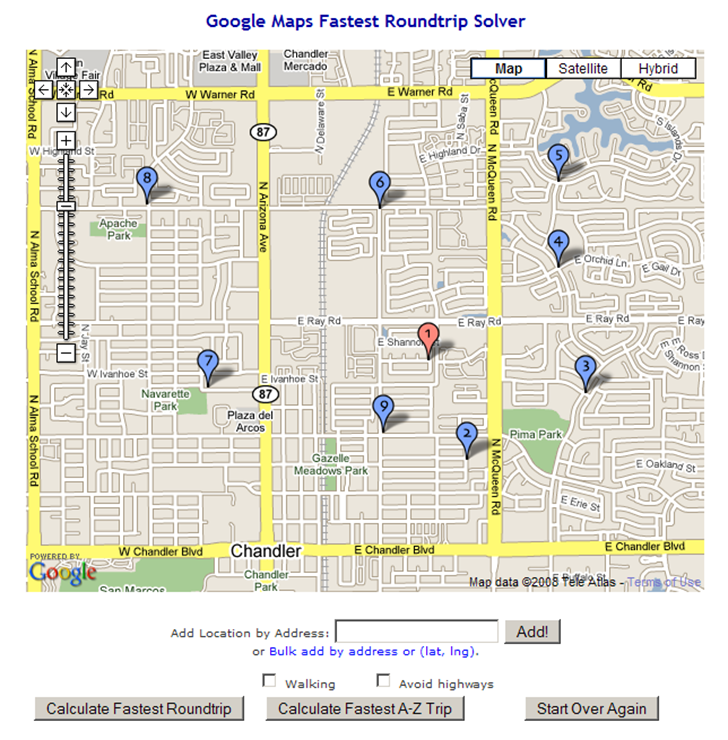
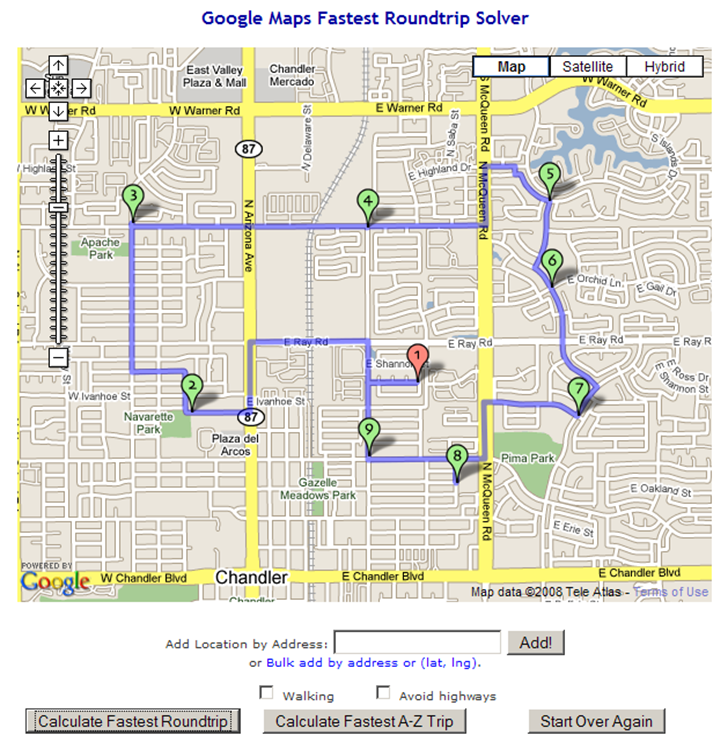
    You can substitute “address” for “city”, making this an intra-urban travel problem. The OptiMap website solves this problem automatically for up to 24 locations (“nodes”). You can enter the nodes by clicking in a Google Maps interface:

    12-1-2008-7.25.50 PM

    You can also enter address nodes individually using the “Add Location By Address” box. Even better, you can add text lists of addresses or coordinates (latitude/longitude) by clicking on the “Bulk add by address or (lat, lng).” link, then copying and pasting the list into the text box that shows up. Latitude/longitude should be in decimal format, one set on each line, separated by commas and surrounded by parentheses, e.g. (35.333, –110.254). You can also specify only walking directions, and avoiding highways. The first node or address entered is always considered to be the starting point.

    When you’re done entering nodes, click on “Calculate Fastest Roundtrip” to solve the problem for a round-trip that ends where you started:

    12-1-2008-7.26.28 PM

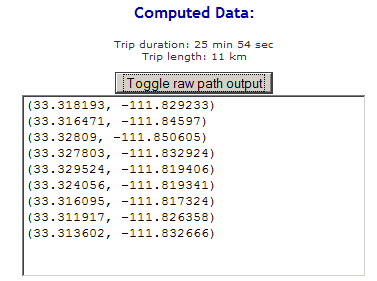
    You’ll also get a set of Google Maps driving directions for the trip shown in the solution map. By clicking on the “Toggle raw path output” button, you’ll also get a text list of latitude/longitude coordinates in sequence for this route that you could convert into a GPS route:

    12-1-2008-7.32.31 PM

    The “Calculate Fastest A-Z Trip” works in a similar fashion, but for a one-way trip, where the first address/node you entered is taken as the start “A”, and the last address/node is the destination “Z”.

    The technical background and source code are available on the OptiMap website, as are instructions on how to use this on your own website.