Last week, I posted on David Tryse’s Google Earth Position application for Windows, which can capture and save the geographic position in the center of the Google Earth view window. The biggest issue with the application is that it was difficult to figure out how to place a geographical object exactly at the center of the Google Earth window, since there’s no crosshair or marker in the application to indicate where it is. I linked to a KMZ file that places a crosshair at the Google Earth screen center, but that’s no longer necessary. The latest version of Google Earth Position now has the option to add such a crosshair to the screen. After starting the program, just right-click on it, and select the Show Crosshair option:
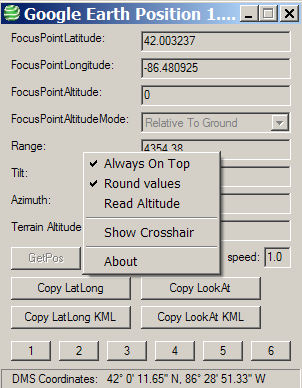
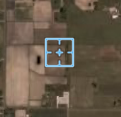
This will open up a crosshair screen overlay in Google Earth, at the center of the screen; this is the position displayed/captured in the Google Earth Position app:
Non-Windows users can use the KML link described in this post, or this one suggested by Maarten in comments (though I’ve had problems getting it to work).
Other posts in the Google Earth Tools series
- Using UTM Coordinates In Google Earth
- Share Positions In Google Earth
- New Version Of Globe Glider
- Yahoo Pipes Adds Google Earth Support
- Plotting Public Land Survey System Locations In Google Earth
- Panorama, Peak Identification And Viewsheds In Google Earth
- Colored Country/Subdivision Google Earth Polygons With "Color Your Map"
- Useful “Nearby” Utilities For Google Earth
- Simple On-Line Disaster Modeling In Google Maps And Google Earth With CleerImpact
- Dynamically-Sized Scalebar In Google Earth
- FlashEarth In Google Earth
- Horizon Terrain Profiles In Google Sky
- Creating Panoramas Using Google Earth
- Determining Google Earth Path Lengths
- Google Earth’s Hidden Flight Simulator
- Updates To The HeyWhatsThat Planisphere
- Two Google Earth Design Blogs
- Google Earth Index For US Army Map Service Topographic And City Maps
- A Simple Online KML Polygon Creator - With Holes!
- Compass Indicators In Google Earth
- Real-Time Satellite Visualization In Google Earth
- Easy Ways To Get Latitude/Longitude For A Screen Point In Google Earth
- Yet Another Way To Get Position Coordinates In Google Earth
- Update To Google Earth Position Application
- Displaying Datasets In The Google Earth Plugin With Earth Atlas


0 Responses to “Update To Google Earth Position Application”