This is part 3 of my review of the Garmin 62s GPS; part 1 is here, and part 2 here. Today I’ll look at the Garmin 62s’s worst functionality – the way it handles waypoints and tracks. And I’ll sum up with my final thoughts and conclusions, both on the 62s, and on proprietary GPS units in general.
Waypoints
The ability to mark and save a location, or use a saved location for navigation, is an essential function for any handheld GPS unit. My older Garmin 60Cx does a great job at this, and using it as a model should have made the 62s comparable if not better. But Garmin made some bizarre choices with the 62s that make its waypoint functionality markedly inferior to the 60Cx.
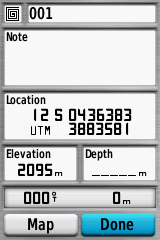
Let’s start with the most basic function: marking a point. For both the 60Cx and 62s, you can do this just by pushing the “Mark” button from any screen. This is a huge improvement from the Oregon series, which often required you to exit your current screen and go to new one to mark your location. Here are the waypoint creation screens for both models:
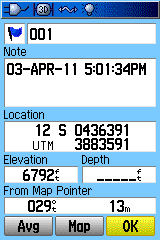
Garmin 60Cx |
Garmin 62s |
Pretty much the same, except that the 60Cx has a button that lets you average the position measurement to improve accuracy, while the 62s doesn’t. Why not? There’s plenty of room, and there actually is a waypoint averaging function on the 62s. If you check the 62s manual, there’s no mention of this option anywhere on the page that describes creating a waypoint. But if you push the “Menu” button on the 62s ..
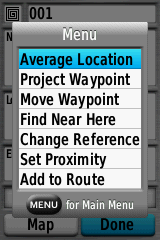
Bang – there’s the Averaging option, along with many other options, none of which are mentioned anywhere in the manual. How exactly is a normal user supposed to find this out? And why is the averaging option only accessible from this screen, instead of being a separate button? Basic functionality has been removed for no good reason that I can see.
You might notice that the waypoint icon in the 62s screen is an odd non-standard shape. The 62s, like the 60Cx before it, supports custom waypoint icons, up to 56 on the 62s versus 20 on the 60Cx; this is a really useful function for mapping. Want to use this function? Good luck …
- It’s not discussed anywhere in the manual; I found out about it at the Oregon wiki site
- Naming conventions for custom waypoint graphic files are different for the 62s than for the 60Cx
- The 62s requires BMP files in 24-bit color, and won’t accept the 8-bit color BMP files required by the 60Cx. So if you have both models, you have to maintain different graphic files for each unit. Bizarrely, though, Custom Garmin POI files with 8-bit graphics will work fine on the 62s, so it will support 8-bit graphics; Garmin just decided not to, presumably to make everyone’s life more difficult.
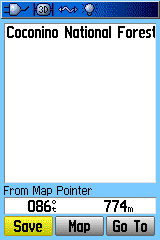
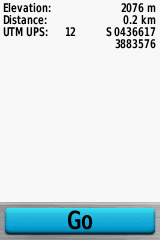
There’s another way to create waypoints on a 60Cx – use the cursor pad to move a cursor to a different location on the map, and press the Enter button; you’ll get a screen with options to Save that location as a waypoint, show it on the Map, or automatically generate a navigation reference waypoint and “Go” to it. Try something similar on the 62s, and only the “Go” option shows up:
Garmin 60Cx |
Garmin 62s |
Huh? So I can’t create waypoints on the map by selecting a map location on the 62s? Well, actually you can, though it’s not documented in the manual; pressing the “Menu” button on the unit brings up that option:
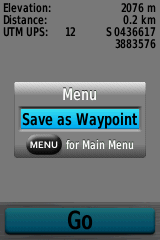
Except that if you push this button, unlike the 60Cx, you won’t get the option to set the waypoint name and icon, or other parameters; instead, it will create a waypoint automatically with a number ID, and the waypoint icon set to the last used icon. If you want to change the name, you’ll have to go to the waypoint manager, select that waypoint, and change its parameters manually. And on the 60Cx, if you move the cursor, the geographic coordinates at the cursor point show up, along with bearing and distance; on the 62s, you get no coordinates, only bearing and distance, even though there’s more than enough room to display them.
So, on to waypoint management. On the 60Cx, you push the “Find” button, then select “Waypoints” to get a list of waypoints on the unit. You can do the same thing on the 62s as well:
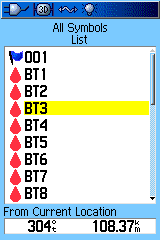
Garmin 60Cx |
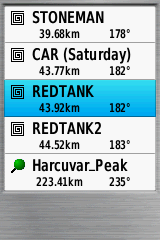
Garmin 62s |
Now select a waypoint from that list:
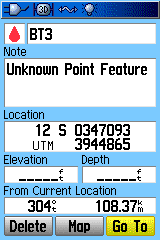
Garmin 60Cx |
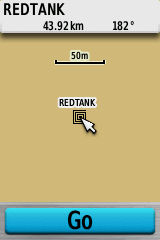
Garmin 62s |
On the 60Cx, you get a standard waypoint info/edit screen; pressing “Map” will show the waypoint on the map. On the 62s, though, you get the mapped waypoint, and only the option to “Go” to that point. WTF? If you try pressing the “Menu” button, to get more options, you do get some:
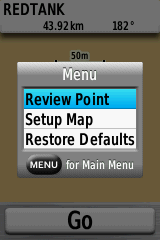
But they’re pretty useless. “Review Point” brings up an info screen, and that’s all (location blacked out on purpose):
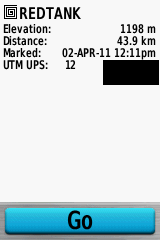
Turns out that if you want to edit an existing waypoint on the 62s,or delete that single waypoint, you have to go to an entirely different screen, the Waypoint Manager, which is accessed via the main menu. Why you can’t access it through the Find => Waypoints option, the same way you can with the 60Cx, I have no idea – makes no sense.
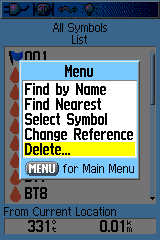
Garmin 60Cx |
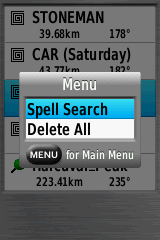
Garmin 62s |
On the 60Cx waypoint list, if you press the Menu button, you can screen waypoints by distance, name, the current map reference unit, or the icon symbol, the last of which is really convenient. And under the “Delete” option, you can choose to delete all the symbols, or just the ones with a specific icon symbol, handy for deleting temporary waypoints you don’t need anymore. On the 62s, for some bizarre reason, Garmin decided to leave most of this functionality out. The default is nearest waypoints, with Spell Search required for searching by name. And the only option for deleting waypoints is to delete all of them; no filtering by waypoint icon. This is a huge pain.
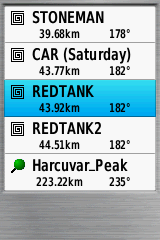
So is the 62s’s Waypoint Manager any better than Find => Waypoints for handling waypoints? Nope. First screen looks identical:
Select a waypoint, and you’ll finally get the option to edit a waypoint:
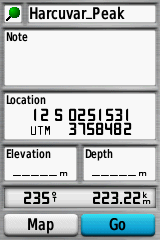
But where’s the option to Delete it, which shows up clearly in the 60Cx waypoint info screen? Once again, you have to press the Menu button to bring up that option.
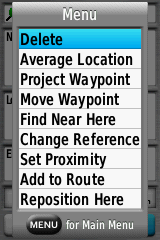
This is actually mentioned in the manual (!), but all the other options listed above aren’t. And you can’t delete all waypoints with a common icon; you either have to delete all of them, or delete them one at a time on the unit. Awesome.
One final idiocy. If you select “Go” to navigate to a waypoint, there’s no “Stop Navigation” option available from the menu on the map page, as there is on the 60Cx. You have to press the “Find” button to stop navigation. But if you do that, go back to the map page, and press the menu button, you will see a “Resume Navigation” option. Help me out, Garmin – why can’t you “Stop Navigation” from the map page, but you can “Resume Navigation” from the map page?
Tracks
I was going to go through a similar look at the idiotic way that Garmin has implemented track management on the 62s, but after writing about the idiocies with waypoint management, I don’t really have the heart. But here are some bullet points:
- There are actually some real improvements with track data storage on the 62s compared to the older 60Cx. The 60Cx had a maximum track point capacity for all tracks of 10,000 points, and a maximum of 20 stored tracks, each with no more than 500 points. The 62s allows up to 200 named stored tracks, each with up to 10,000 points. And it will actively archive the active track, so that you can have every point permanently recorded, up to the free memory available.
- Unlike the 60Cx, tracks saved on the 62s include the date/timestamp for every point and the altitude.
- However, turning track recording on and off is a pain on the 62s. On the 60Cx, there was a simple page that let you turn tracking on, save the active track to memory, then turn tracking off and clear the active track. This made recording linear or areal features easy. On the 62s, you can turn tracking on in the Track Manager, but you have to dive back into the Setup menu to turn it back off. And you can clear the current track out, but that’s at the bottom of the options list, and easy to miss.
- Options for changing track color/name, reversing it, showing/hiding it on the map, displaying track length/area used to be centralized on a single screen on the 60Cx; now on the 62s you have to go to multiple screensfor the same options.
- Sometimes a saved track simply refuses to show up on the regular map display, even if you’ve specified that it show up on the map.
Conclusions and Final Thoughts
I guess I’ll start with a Pros/Cons list for the Garmin 62s.
Pros
- Solid hardware
- Excellent screen visibility in all conditions
- Improved interface
- Improved map styling for better visibility
- Support for raster imagery (super-awesome)
- Terrific digital compass
Cons
- Expensive
- Appallingly bad documentation
- WAAS performance slightly improved from Oregon 450t, but still pretty bad
- Limitations on size of Custom Maps raster imagery
- Incredibly lame waypoint and track management
If the Garmin 62s had come out three years ago as the first model with the new Garmin OS, I probably would have recommended it; the hardware is solid, and given my many positive experiences with past Garmin units, I would have anticipated that most of the negatives would quickly be fixed. But Garmin’s been releasing models with this new OS for over three years now, and the fact that these issues still exist gives one pause. If someone told me that I could only take one GPS unit out in the field with me, and I had to choose between my old trusty Garmin 60Cx and my newer 62s, the choice would be very easy. If I absolutely had to have aerial imagery in the field, the 62s would be my choice by default, since the 60Cx doesn’t really do aerial imagery well. But in every other situation, I’d take the 60Cx, hands down. If I’m recording position location, or navigating in the field, I don’t feel like wrestling with my GPS unit’s idiosyncrasies, and that’s what I’d be doing with the 62s.
Looks like there’s a lot of people that apparently feel the same way; at Amazon.com, the Garmin 60CSx (same as the 60Cx but with a compass and altimeter) is the top-selling handheld GPS with a color display, five years after it was first introduced. And there are two other older Garmin GPS units (the eTrex Venture HC and eTrex Vista HCx), and the Magellan Explorist GC, on the bestseller list before you get to the top-selling new Garmin model – the Garmin 62s. When five-year-old technology outsells a newer model from the same company, you know it has issues. I think an open OS like Android is the future for portable navigation systems of all kinds, and that proprietary GPS OSes are going to have a tough time competing. If a manufacturer is going to stick with its own proprietary OS on expensive GPS units, it’s going to have to supply a lot of added value with that unit. Frankly, I just don’t see that with the newer Garmin models, including this one. There’s finally been a ruggedized Android phone announced, the Casio Commando, and I expect more models will be along soon; if Garmin doesn’t get its act together quickly, it’s not going to be a major force in this market in a few years.