

It’s been a bit more than a year since I first looked at Garmin’s free Basecamp software, and wasn’t terribly impressed. I did say, “Hopefully future versions will be snappier, and add more features.” I just did a GPS presentation to a local hiking group, and in preparation for that took a full look at the latest version of Basecamp (3.05). In short, it’s a major improvement over the first release; it’s now better than Garmin’s classic MapSource program for uploading/downloading/managing data. It’s so improved that it wouldn’t be a bad basic choice for creating data for use with non-Garmin GPS models; just export the data to GPX format, then use a program like EasyGPS to send it to your model. As an added bonus, it’s available in both PC and Mac versions.
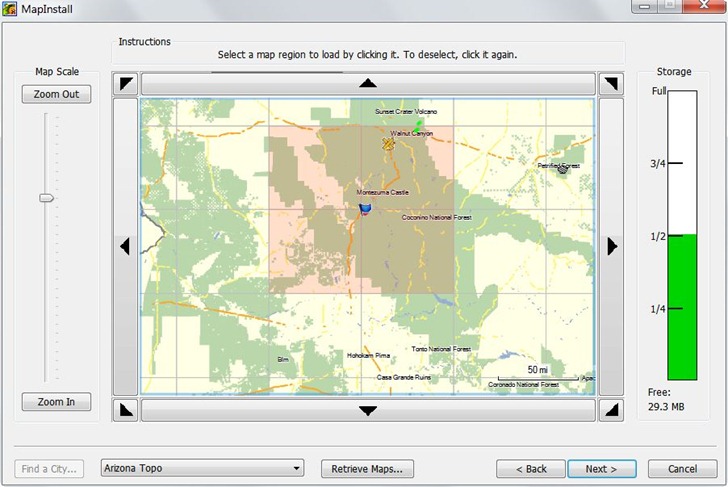
Probably the most important addition is an associated tool called MapInstall, that lets you upload Garmin-compatible maps to your GPS unit. Prior to this, the only complete tool for doing this was Garmin’s MapSource program, only available if you purchased a Garmin mapset, or Garmin’s Trip and Waypoint Planner software, sold for $30. If you wanted to use free mapsets like those available at the GPS File Depot, you were out of luck; now, you’re not. MapInstall isn’t as good for uploading and managing maps as MapSource, but it should be good enough for most people:
But there are lots of other useful new features:
- Faster and less buggy than earlier versions
- Tiled (poster) printing of installed mapsets
- Support for Garmin Custom Maps and Birdseye Imagery
- Better route management
- Conversion of tracks to simplified routes
- Better waypoint, track and route management
- Better export to Google Earth
- Ability to import mapsets pre-installed on some GPS models
Still some issues left, some kind of weird:
- Import of KML files is iffy
- Help file is still incomplete
- Only supports USB-interface models; older serial models are out of luck (though you can still export data and use EasyGPS to upload it
- There are features listed on the update/download page that don’t seem to exists, e.g. “Added printing of USGS Quads and other public land survey areas.”
- Be nice to be able to simplify tracks and still keep them as tracks; now, you can only save a simplified route.
- Basecamp insists on exporting waypoints to GPX, Google Earth format with a timestamp even if you’ve created them in the program (and don’t want a timestamp).
I did some Basecamp demo videos as a reference to what I presented at my talk, and have put them up on YouTube; not terribly exciting, but maybe you’ll find them useful.

Leszek,
Thank you for taking the time to post this information. I just got a Garmin Edge 800. Once I create a route on my computer and upload it to the 800 how do I access that route to ride it on my bicycle?
Haven’t ever used an Edge, so I’m not sure; for that matter, I never use routes on my 60Cx. If there’s a main Menu page, (same page that has the Setup icon), see if there’s a Routes option there.
Leszek,
I’ve watched you videos a number of times and they have been very helpful, but there is one item I cannot seem to do and you did not cover it.
You showed how to create a waypoint for a specific location, which I understand. What if you want to create a waypoint for a location just using the latitude and longtitude coordinates? I tried just creating a waypoint then modifying the lat and long in its properties, but it does not seem to allow me to do that. Any thoughts on how you accomplish this?
Thanks,
Bill Plesha
Your suggested approach is the right one, and it worked for me in BaseCamp when I just tried it. The only thing I can think of is that your system may have some odd permission issues that keep BaseCamp from writing data, but I really doubt it.