In a previous post, I covered the PC version of gpsvp, a program that lets you view Garmin vector maps on your PC, and plot your live GPS position on them; it also has multiple other functions like waypoint/track management, raster maps from the Internet, and more. In addition to the PC version, there are also versions available for a number of Windows Mobile Platforms that turn them into the functional equivalent of Garmin GPS devices :
- PocketPC 2003
- Pocket PC 5, 6
- Smartphone 2003
- Smartphone 5, 6
The look and feel of the app, and most of the functionality, are virtually identical to that of the PC version:
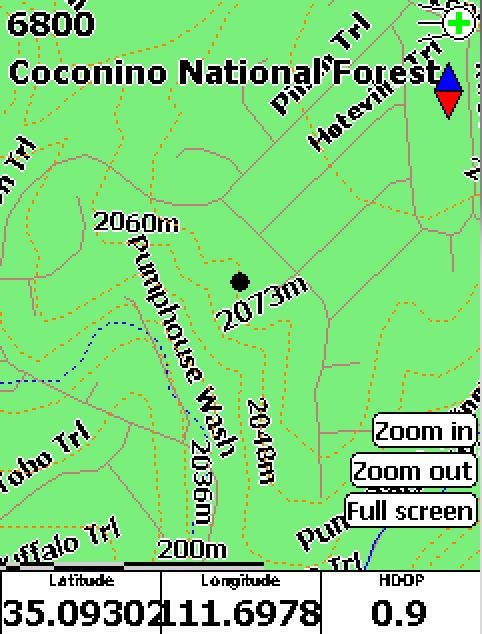
This is the Pocket PC / Windows Mobile 5 version, with a free Garmin topographic map of Arizona loaded (available at GPS File Depot), with my current GPS position plotted as the black dot. Obviously, you’ll need either a built-in GPS receiver in your Windows Mobile device, or a Bluetooth-connected GPS receiver, to get this full functionality.
Getting the maps on your mobile device involves copying them over onto the device using the ActiveSync File Explorer. While you can put it into the device’s main RAM, you’re probably better off installing it on the device’s SD card if it has one, since it likely has more memory space available. gpsvp will automatically search the device and SD memory to find Garmin .img map files, and let you select either an individual file or a folder full of files. Don’t load too many files in, as gpsvp can choke on large numbers of files; I was able to have all the Arizona topo map files loaded up, but it took a while to load them in. As described in this post, you can use GMapTool to select the map tiles you plan to use, then copy just that limited set of files over.
There’s also a version for Java VM enabled portable devices listed as GPS4Mobile.jar in the file list; don’t have such a device, so I don’t know what it’s functionality is.