blankblank blank


Prune Updated To 6.0 – Photo Geotagging And GPS Track Visualization For Windows, Mac And Linux


The Java-based GPS and geotagging application Prune, covered in earlier posts, has been updated to version 6.0. New features include:

  • Map view using OpenStreetMap images is now integrated in the main window, with control for map transparency; you can open up an OSM map or Google Map for the track location in a browser as well
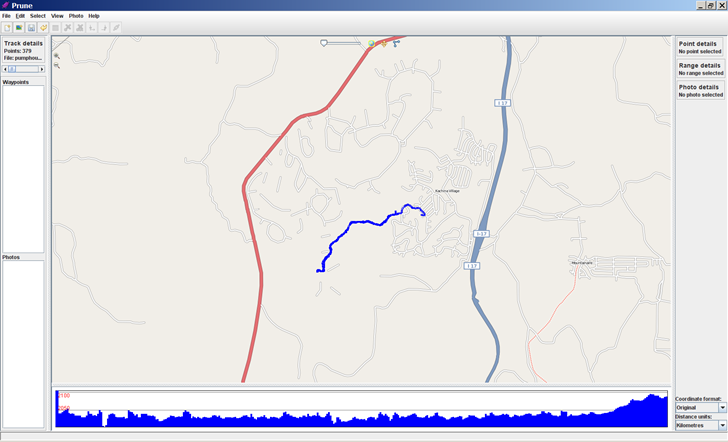
Prune Java-based geotagging application
(You may have to turn off the firewall in Windows to get this to work)

  • Pov export has a new option to use sphere sweeps for better appearance
  • New function to check online for a newer version of Prune
  • New function to take a section of track and cut/paste it to another position
  • New function to add or subtract a time offset from point timestamps to correct for time shifts between a GPS track and camera time
  • New function to call gpsbabel to load data directly from GPS receiver
  • Additional file filter options on load and save
  • Italian language support

Full support for all its features requires downloading of the Java3D library, exiftool, and GPSBabel.

Related posts:

  1. Prune Updated: Now With Automated Photo Geotagging For Windows, Mac, And Linux
  2. Prune – Java-Based GPS Track Visualization And Photo GeoTagging
  3. Updates To Photo GeoTagging Software
  4. Two Photo Geotagging Briefs
  5. Automating Your Garmin Oregon Photo Geotagging Flow Using GeoHarvest
  6. The Simplest Windows Photo GeoTagging Tool
  7. RouteConverter Updated – Java GPS Route Editing And Conversion For Windows (Mac And Linux Too?)
  8. LandSerf – Terrain Visualization And Analysis For Windows, Mac And Linux
  9. GPS Track Elevation Profiles With 3DEM
  10. Photo GeoTagging II – Locr
  11. Garmin BaseCamp Released
  12. Geographically-Linked Video With VeoGeo
  13. Importing GPS Data Into Google Earth II – GPSBabel and GPSVisualizer
  14. Microsoft's New Photo Geotagging Tool
  15. Using GPS Data To Geotag Photos: The Basics

Looking for something else? Enter some keywords below, then click "Search".
"This site" searches Free Geography Tools; "Web" searches the Internet using Google.