blankblank blank


Archive for the 'GIS' Category Page 13 of 23


The Big List Of Free Metadata Software I

The new stable release of MapWindow, with its built-in metadata editor and viewer, reminded me that I had a folder full of bookmarks to other metadata-related software. I may get around to longer posts on each of these at some point, but for now, I’ll just put up links and descriptions from the websites.

CatMDEdit: “CatMDEdit is a metadata editor tool that facilitates the documentation of resources, with special focus on the description of geographic information resources.” Note: Multiplatform, written in Java.

Computerized Process and Quality Assurance (CPQA): “CPQA is being developed as an automated QA/QC process for spatial data collection. It will assist the contract monitor and the contractor with this process and provide the Corps with the most efficient and cost effective means of evaluating a surveying and mapping project. The current version (CPQA Beta) is a Windows-based software package that assists the user in the production of a Scope of Work for surveys such as topographic, hydrographic, boundary, control, photogrammetric, etc. Based on user input and guidance from USACE Engineering Manuals and Engineering Circulars, the software provides suggestions as to the accuracy, scale, measurement density, etc., needed to complete specified projects. Later modules will assist in evaluating the quality of a survey and perform error checking on the survey information submitted by the contractor.”

Datalogr: “DataLogr is a free software package that helps people input and format metadata for geographic data. DataLogr (pronounced ‘data logger’) was developed and copyrighted by IMAGIN, a consortium of organizations in Michigan.”

Enraemed: “The Enraemed software is a freeware client/server or stand-alone metadata software collection tool. Enraemed will allow you to develop, archive and distribute your metadata according to metadata standards such as ISO, FGDC, Dublin Core and GILS. The backend database is Microsoft SQL.”

EPA Metadata Editor (EME): “The EPA Metadata Editor (EME) was developed to simplify and standardize geospatial metadata development across the Agency. It allows users to create and edit geospatial metadata records that meet the EPA Geospatial Metadata Technical Specification and Federal Geographic Data Committee (FGDC) Content Standard for Digital Geospatial Metadata (CSDGM) requirements.” Addendum: Requires ArcGIS 9.2 Service Pack 1 or higher

ImseVimse: “ImseVimse is a full-fledged graphical IMS metadata editor written in Java. It is a spin-off from the Conzilla project.”

Metadata Authoring Tool (MATT): “MATT runs from within a web browser such as Microsoft Internet Explorer, Netscape or Mozilla and has been written using a combination of XHTML and client-side JavaScript. Therefore it can be used either over the internet, across a network or directly from your hard-drive (offline).”

Metadata Enterprise Resource Management Aid (MERMAid): “NCDDC provides coastal data resources (organizations and individuals) with a web-based tool to develop, validate, manage and publish metadata records via secure internet access. The Metadata Enterprise Resource Management Aid (MERMAid) allows users/data providers to establish unlimited metadata databases to organize their metadata records any way they see fit (i.e. by program, project, data type, personnel).”

More in the next post …


New Stable Release Of MapWindow GIS

The open source GIS MapWindow (Windows only) has just put out its latest Stable Release (SR), version 4.5. This is the first SR in about 8 months. New features include:

Continue reading ‘New Stable Release Of MapWindow GIS’


Using The Demo Version Of Global Mapper As A Raster/Vector Data Viewer

Global Mapper is a first-rate program for viewing and converting GIS data, raster (image and elevation) and vector. It opens over 100 different raster/vector formats, with on-the-fly support/display conversion of virtually every coordinate system / projection / datum you can think of, and some you might not (the Moon, Mars, the moons of Jupiter). It comes in a demo version with the following limitations (from the help file):

  • You will be unable to export data to any format.
  • You will be limited to loading a maximum of 4 data files at a time. With the full version, you can load any number of data files simultaneously.
  • No 3D capabilities (full version supports 3D views, viewsheds, line of sight, cut-and-fill volumen
  • You will be unable to load workspaces.
  • You will be unable to work with map catalogs.
  • You will be unable to download data from WMS map servers.
  • You will be unable to save rectified imagery to fully rectified files.
  • You will not be able to print to a specific scale (i.e. 1:1000).
  • You will have to endure a nagging registration dialog every time that you run the program.
  • You will not be eligible for free email support.

There’s one more, which is you don’t have the option of printing/exporting the screen display as an image file (though you can still print to a printer what’s visible on screen; zoom in to get a higher-resolution printout). Global Mapper’s display options for vector objects are also more limited than a standard GIS data viewer (e.g. no coloring by attribute for shapefiles). For those two reason, the TatukGIS viewer may be a better choice, since it lets you export the data view, raster or vector, as a high-resolution georeferenced raster image. But TatukGIS Viewer only supports about 30-odd raster and vector file formats, and doesn’t do on-the-fly re-projection. For examining the occasional odd data format you run across, in unusual projections/coordinate systems, and making a quick print, Global Mapper is good to have in your toolbox.

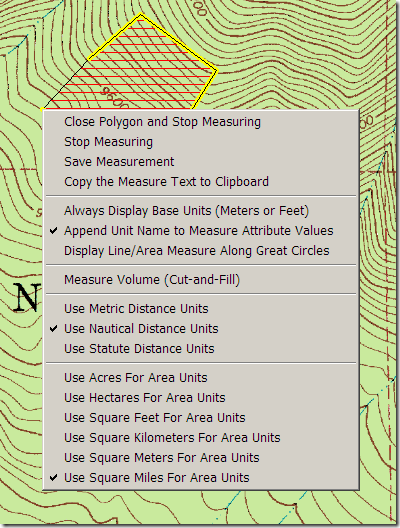
As a bonus, it also has a great line/area measurement function, which lets you modify the measurement units from metric to English and back on the fly, and copy them into the clipboard:

gmmeasure

The TatukGIS Viewer has a measure function, but it gives area only in the data’s native projection, less than useful if it’s in the geographic coordinate system (e.g. square degrees for area).

Finally, if you’re looking for an all-purpose data format converter with batch conversion capabilities, don’t need the considerable power (or expense) of FME, and don’t want to deal with the GDAL command-line utilities, you could do far worse than the $299 fully-registered version of Global Mapper.


Calculate New Coordinate Position From Current Position, Bearing And Distance

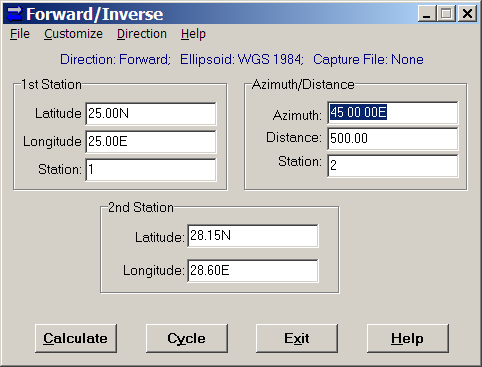
If you regularly work with bearing and distance from a coordinate position, you might find Forward/Inverse from Mentor Software a useful tool. Just enter the starting position (latitude/longitude), the bearing and distance to the destination, click Calculate, and get the coordinates of the destination:

forwardinverse

In this example, the distance is in kilometers, and the bearing in degrees, but you can customize those units: degrees or grads for angle, and a full range of English and metric units for distance. You have the choice of 26 different ellipsoids, and a selectable lat/long format (decimal degrees, DM, DMS).

You can also capture the results in a text file, useful if you have a list of them to calculate. The Cycle option is especially useful in such a case, as it puts the destination coordinates (2nd Station) automatically into the origin coordinates (1st Station). So, you can continually input azimuths and distances, calculate the next destination, make that the new “1st Station” with the Cycle button, and capture all the data for all points in a text file. Finally, if you choose “Inverse” under the Direction menu, you can calculate the azimuth and distance from the 1st station to the second one.


Online Raster Map Georeferencing/Registration With Map Rectifier

This has been around for a while, but I’ve just gotten to it. Metacarta Labs’ Map Rectifier lets you georeference/register an uploaded image file to geographic coordinates/WGS84 using data from a variety of sources. Default data layers, selected by clicking on the “+” sign in the right map window, include:

  • OpenLayers WMS
  • OpenStreetMap
  • Satellite
  • TIGER
  • Google Maps (roads)
  • Google Maps (satellite)

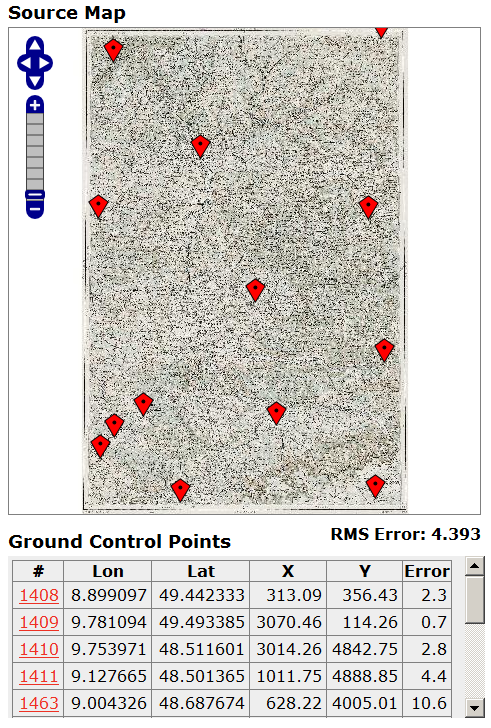
But you can add layers from any WMS server. The process is incredibly straightforward. Upload your map image to Map Rectifier, and it will appear in its own window:

Source Map, Map Rectifier

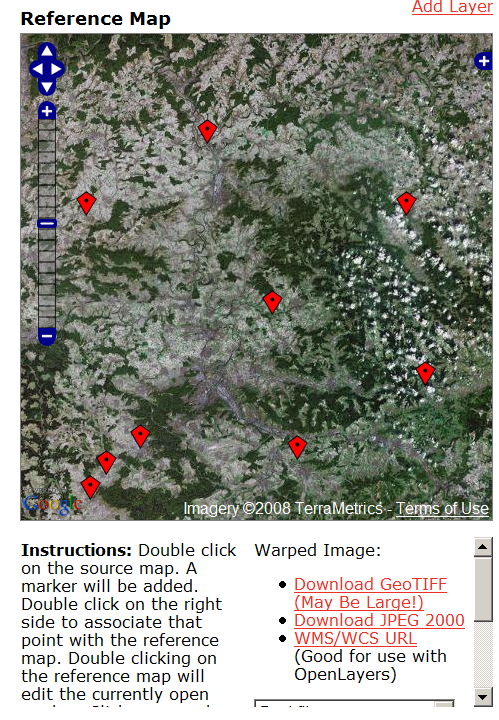
Add control points as markers on one side by double-clicking, then add them to the corresponding point in the data layer on the other side:

4-19-2008-4.46.31 PM

Double-click on an existing marker to move it to your desired point; the table on the left keeps track of the Ground Control Points and the estimated error. Select your warping method (Best Fit, Linear, Quadratic, Cubic, Thin Spline), then click the “Warp” button. You can display the warped map on top of the reference image as a semi-transparent overlay. Download a GeoTiff or JPEG2000 file of the registered image in geographic/WGS84 projection, or get a URL for a WMS. Uploaded images are publicly available, so don’t upload anything you wouldn’t want someone else to see. Final accuracy will depend on the accuracy of the registered image, which can vary. Still, very slick. There’s supposedly a more advanced version under development.


The Big List Of Free GIS Programs – S Through Z

The final part of the series. Part One, Part Two, Part Three. All parts will be regularly updated as more programs come to my attention.

SAGA

Type: Freeware, open-source

Platform: Windows, Linux

Last update: 2007

Personal experience: Medium

Continue reading ‘The Big List Of Free GIS Programs – S Through Z’


The Big List Of Free GIS Programs – N Through R

Part three of this series (part one, part two).

Natural Resources Database (NRDB)

Type: Freeware, open-source

Platform: Windows

Last update: 2007

Personal experience: Minimal

Description

Continue reading ‘The Big List Of Free GIS Programs – N Through R’


The Big List Of Free GIS Programs – I Through M

A continuation of this list from the first post.

Integrated Land and Water Information System (ILWIS)

Type: Freeware (formerly commercial), open-source

Platform: Windows

Last update: 2006?

Personal experience: Minimal

I plan to look at this one in greater detail in the future – looks like it has some really useful capabilities. Here’s a list of chapter titles from the Applications Guide to give you a feeling for what it can do:

Continue reading ‘The Big List Of Free GIS Programs – I Through M’