

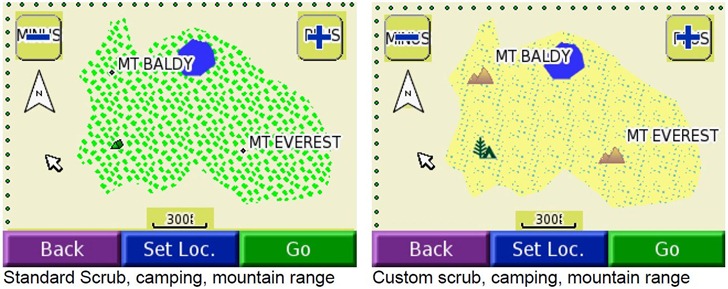
One of the most useful capabilities in custom Garmin vector maps is the ability to create your own designs for point icons, lines and polygon fill patterns, and use them in addition to (or as substitutes for) Garmin’s standard symbology sets. You define these in a special file called a TYP file, created either directly or by using the cgpsmapper compiler to convert a text code fileinto a special TYP file. You then you associate that TYP files with the maps that use your custom symbology. Here’s an example from the cgpsmapper manual of a map that uses standard Garmin symbology (on the left), and custom symbology (on the right):
This capability gives you enormous flexibility in creating your own thematic Garmin vector maps. But designing and coding custom TYP symbology in standard cgpsmapper text format can be a major pain; you have to assign colors to ASCII symbols, then manually type out the color code symbols to generate the image a la ASCII art (XPM format). Here’s sample code for a fill pattern (from a sample file in the cgpsmapper distribution):
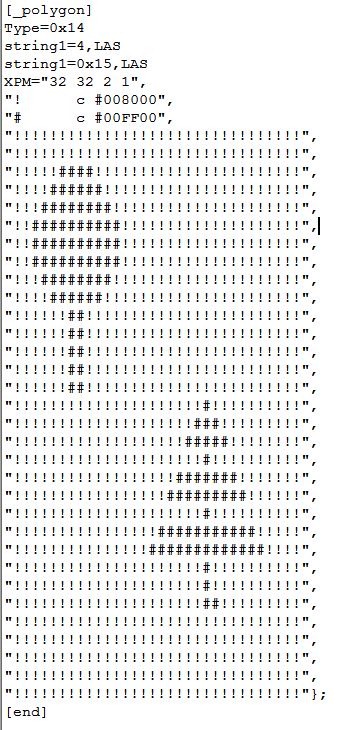
This is just two color, and simple symbols; if you wanted to make an elaborate, multi-colored fill pattern or point symbol, it could take a long time to create it. Fortunately, there are a number of free tools that can simplify the process.
cgpsmapper: AFAIK, this is the only program that fully supports all TYP file features, and you should have at least the free version installed on your system. The documentation includes a short section on how to create and compile type descriptions in text format into a TYP file, and how to incorporate these new symbols in your map code. The distribution also includes sample TYP code in the program directory (like the example above).
GarminColor (in French; free forum registration required to download it): Older Garmin handheld GPS units (like the GPSMap and eTrex models) allow for only 254 colors, 16 gray levels + 238 assorted colors. More recent models (like the Colorado/Oregon/Dakota series) allow for a larger color range, but if you’re designing custom symbols for use on all color Garmin units, you might want to stick with the more limited palette to insure that they’ll look the same on all the Garmin models. GarminColor shows you the allowed color palette, and gives you the hex code for every one:
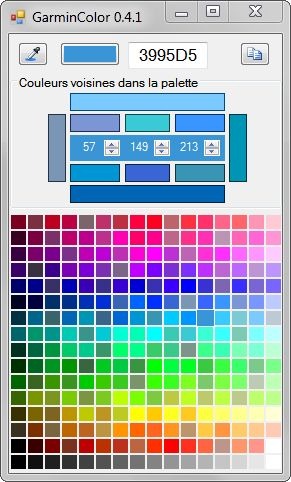
Click on a color to get the the hex code; click on the button at upper-right to copy the hex code to the clipboard. The numbers in the middle of the color bars represent the RGB decimal equivalents of the hex code. The color bars surround these numbers let you adjust the color by increments. The long bars at left/right select neighboring colors in the palette; the long bars at top/bottom select lighter/darker colors. The short bars above and below the numbers let you increase/decrease the red/green/blue values by values that conform to the palette restrictions.
MapToolkit (MapTk): Subject of yesterday’s post; in addition to its other features, like compiling maps, it also contains a built-in editor for custom points, lines and polygons:
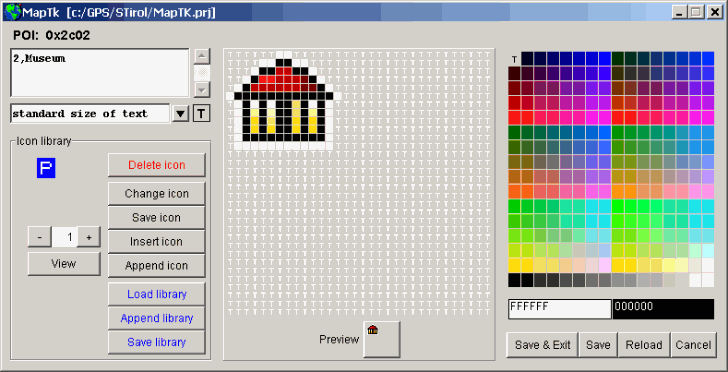
I’m still struggling my way through decoding the MapTk manual, but it appears as though it creates/edits TYP files directly, without the need for the cgpsmapper compiler. And it looks as though the palette is limited to 254 colors, making it fully compatible with all color Garmin units.
TYPViewer: A very nice TYP file viewer; will take text TYP code or a compiled TYP file as input, and let you view the symbols and text code for those symbols:
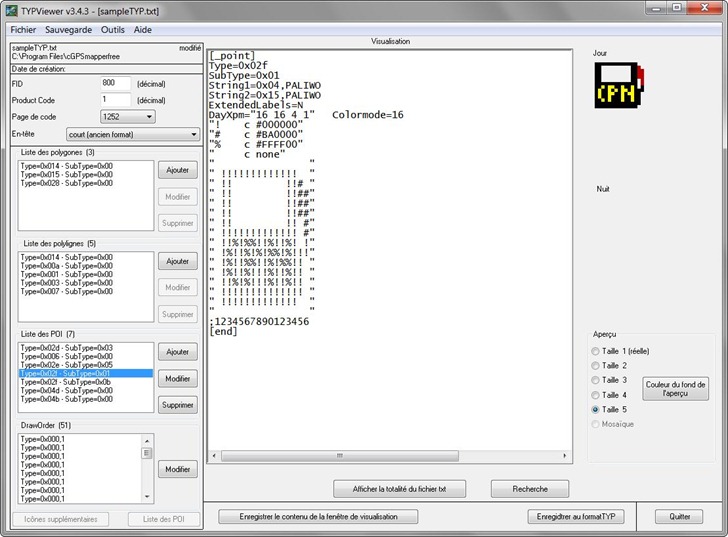
You can modify the TYP code directly in the text window; a red button will pop up telling you to “click here” if you want to incorporate those changes, and you’ll see them implemented immediately in the symbol graphic at upper right. But if you double-click on a custom symbol listed at left, you’ll bring up a graphical symbol editor:
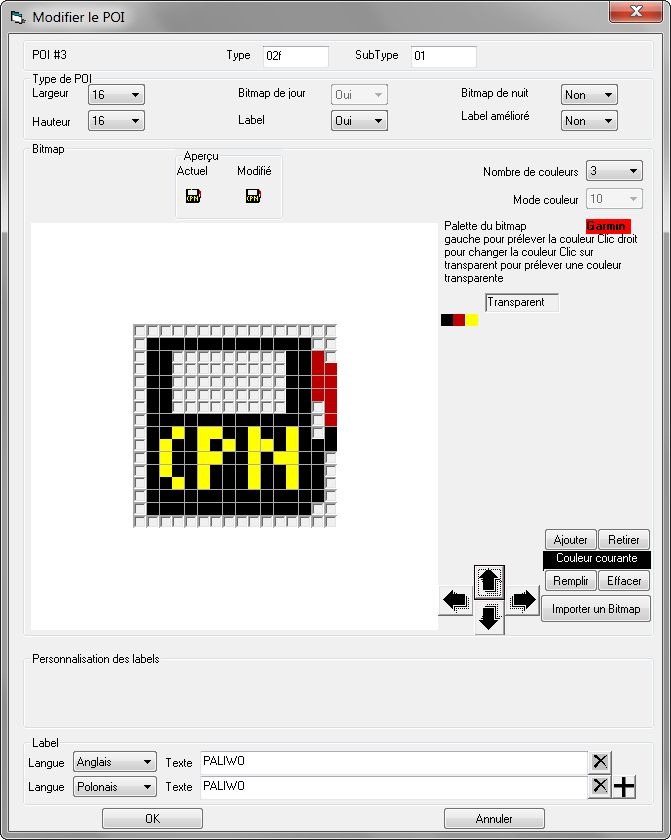
If you’re editing a binary TYP file, you can save it directly; if you’re working with a text file, you have the option of compiling it to a TYP file using cgpsmapper. There’s no help file, and the interface is completely in French, so you may need to spend some time with Google Translate to figure it out all the functionality. But I didn’t have too much trouble figuring out the basics using Google Translate (and my very rusty high school French). HT to csdf for this one.
A few more TYP tools tomorrow ….

You can also use this very nice online Garmin typ editor http://ati.land.cz/gps/typdecomp/editor.cgi
Also is possible with it to decode the compiled typ files
Tomorrow’s post (already written before your comment) is about those tools!