blankblank blank


Yet Another Way To Get Position Coordinates In Google Earth


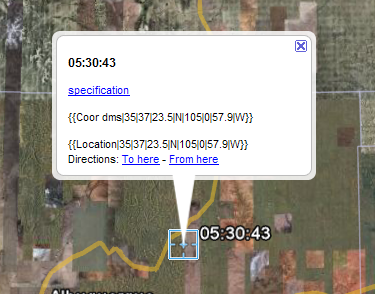
In comments on my recent post, Easy Ways To Get Latitude/Longitude For A Screen Point In Google Earth, SEWilco notes another app/link that can give you easily copyable/pastable lat/long coordinates for the screen center point. The hjl_get_Coor tool is a KMZ network link that puts a crosshair at the center of the Google Earth display; click on the crosshair, and you’ll get a balloon with the coordinates in copyable format (Degree-minute-seconds with “|” as the separator):
9-22-2008-8.37.14 PM

Coordinate formatting is a little inconvenient, but unlike the Google Earth Position app described in the earlier post, this will work on all systems, including Mac and Linux. Turn off the link when you’re not using it, to reduce load on the server feeding the network link.

Related posts:

  1. Update To Google Earth Position Application
  2. Coordinate, Elevation, Distance And More In Google Maps
  3. Google Earth Coordinates In Multiple Projections With Plex.Mark
  4. Get A Point Position With GetLatLon
  5. Google Earth Coordinate System Grids
  6. Real-Time GPS Tracking For Google Earth – Free Options I
  7. Easy Ways To Get Latitude/Longitude For A Screen Point In Google Earth
  8. Google Earth Caching Programs II – GE Cacher
  9. Google Earth Caching Programs I – GECacheBldr
  10. Calculate New Coordinate Position From Current Position, Bearing And Distance
  11. Google Earth Caching Programs III – Google Earth Voyager
  12. Share Positions In Google Earth
  13. Plot A Coordinate Position On Different Map Pages
  14. Using UTM Coordinates In Google Earth
  15. Creating Google Earth Screen Overlays With EarthPaint

Looking for something else? Enter some keywords below, then click "Search".    


1 Response to “Yet Another Way To Get Position Coordinates In Google Earth”


  1. 1 Maarten
Comments are currently closed; feel free to contact me with questions/issues.