

A while back, I posted about MapSet Toolkit, a program that adds information about Garmin-map-format .img files to MapSource, so you can upload them with that program to a compatible Garmin GPS unit. But there are several faster and more direct ways to upload a .img file to a Garmin unit which don’t require installation in MapSource; they may be more convenient for a single map file, or for evaluating a map file before installing it as a MapSource option.
The first one I’ll cover is MapUpload, from the creators of MapWel, a program for creating custom maps for Garmin GPS units. MapWel isn’t free, but MapUpload is; there’s a list of supported Garmin units on this page. Just download and run (no program installation):
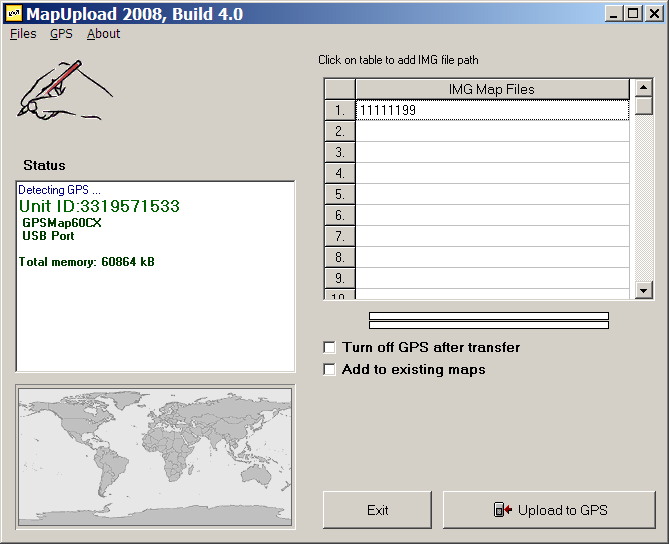
If your GPS unit is turned on, it should be recognized automatically, and info displayed in the Status window. If it’s off, turn it on and select “Detect GPS” from the GPS menu. Select .img files by clicking on the list at left (or the menu Files => Add img files to the list), and using the file selection dialog; there’s room for up to 300 files on the list. Click on “Upload to GPS”, and the maps will be sent to your GPS. There’s no way to tag a set of maps with a label; on your GPS, they’ll all have the category label “Custom area created with Mapwel”, followed by the .img creation date.
The default is to delete the current mapset, but if you check the box “Add to existing maps”, the maps on the list will supposedly be added to the maps currently loaded onto the GPS. I’ve had mixed success with this option – it seems to work better with small installed mapsets than with large ones. And if you have a large set of maps on your GPS, it will take a while to merge them, since the connection is either serial (unbearably slow) or USB 1.1. (painfully slow), and MapUpload first has to download the full mapset, then merge it with the new maps, then upload it back again. It doesn’t support the faster option of uploading data onto a memory card in a higher-speed (USB 2.0) card reader. There’s also no way to save a map list, so you have to select individual map files every time you want to do an upload. On the plus side, you can create a stand-alone program that takes all the .img files, and puts them into an executable that will upload the data to any attached, compatible Garmin GPS unit.
On the plus side, MAPUpload is fast and simple. If I have one or two maps I need to upload quickly, especially if I want to merge them with the current mapset, it’s my program of choice. For larger sets of maps, you’re better off using MapSet Toolkit, or other options I’ll cover soon.

Since it has to redownload the mapset will this work with locked mapsets such as City Navigator/Select?
Dan
how to replace the base map on my Garmin GPS V?
I would guess that MapUpload will work with locked mapsets like CityNavigator, but I’m not sure since I don’t have a locked mapset. Try it, and see what happens.
How is the uploaded map(s) removed from the GPS? (Garmin Legend)
Upload another map, and the old map will be erased. You can turn off the map in the Setup Map section of your GPS.