

Note: The free version of Google Earth now supports a basic version of live GPS tracking, but all this info is still relevant.
Here’s the first post in a series on real-time GPS tracking with the free version of Google Earth, starting with the completely free options, next donationware, then finally a couple of paid (but cheap) pieces of shareware.
nmea2kml – Freeware; NMEA interface only
This one takes a bit of work to set up, but once you do, it works – maybe. Just unzip the program to its own directory, then run it from the command line. The first argument in the command line should be the COM port that your GPS is hooked up to, while the second should be an open local port, any open number up to 65000 should work. For example, using the command “nmea2kml 4 82” opened the following window:
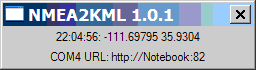
where “Notebook” is the name of my computer. The webpage says the default port is 80 if you don’t specify it, but I found you have to specify a port number to get it to work. If you start using this on a regular basis, you can always create a batch file to automate the process.
Now, in Google Earth, create a network link using Add = Network Link. Use the URL given in the window, http://Notebook:82 for the example above. If you’re in motion and want to track your progress, make sure you go to the Properties window for this link, and change the “Refresh” properties to do a periodic time refresh of your position. You’ll get a pushpin marker for your position in GE, and you can zoom to it and change the view as you wish.
The problem for me was while it read the longitude correctly, it dropped the first decimal place for my latitude, and placed me too far north of my actual position. I don’t know whether this is a program bug, or a problem with my NMEA connection. Pity, since in many ways it’s a simple and easy real-time tracker to use. But you may not have the same problem I did – try it and see, and let me know in the comments if it worked for you.
geepeeyes – Freeware; NMEA only
Run the downloaded file to install the software. geepeeyes looks like it could be a useful program. It can track your current position, and allow you to keep track of where you’ve been. If you’ve gotten driving locations from one location to another, geepeeyes will supposedly read those directions to you using your Windows default text-to-speech voice. Unfortunately, I couldn’t evaluate the software, since I couldn’t get it to work with my GPS. Either it said it couldn’t open the COM port successfully, or it got a position of 0/0 latitude/longitude, and placed me in the South Atlantic off the west coast of Africa (I wasn’t there at the time). Setting some of the parameters also requires you to manually edit a configuration file, which isn’t convenient. If you try it, and get it to work, please post your fix in the comments section.
MeHere – Freeware; NMEA only
No installation – just unzip the files into their own folder, and run it from there.
This is an fun little program; it opens up in a web browser with a Google Maps window showing the SF Bay Area. Make sure you select the COM port your GPS is connected to on the web page, click on the “Recenter Map” link, and it will show you Google Maps for your area, with a pin stuck in your current location.
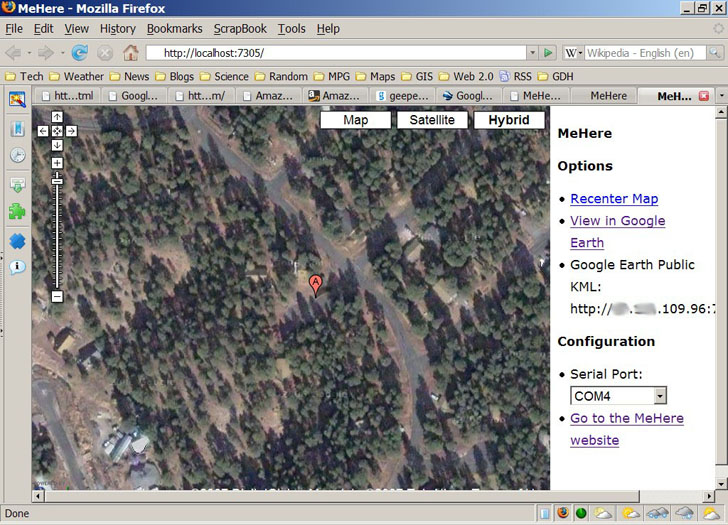
You can zoom in, and switch to satellite/hybrid views, the standard Google Maps views. Click on the “View In Google Earth” link at the right, open the created kml file in Google Earth, and it will create a live network KML link to your current position, simultaneous with the Google Maps display. Also on the right is a link to your current IP address, along with a port and file designation. If you open up that port on your computer/router/whatever, and give that link to someone else, they may be able to open up a live link to your current position (if you have to ask what that means, you shouldn’t). Altitude, tilt and orientation controls work correctly in Google Earth.
The position plotted is a bit off from the true position, about 25 meters or so for the example I tried, but that may be a Google Maps/Google Earth accuracy issue. You need an active Internet connection for the Google Maps display to work, but the local Google Earth link works fine with cached data. There’s no recording of track data. The program is over a year old, and it doesn’t look as though the author is working on it anymore (though the source code is available). But if you need to use your GPS with both Google Maps and Google Earth, or you need to be able to share your real-time position via a network link, it’s definitely worth a look.

Works good, but problems to get a low COM-port no. (onely 1-9 port.no)
mostly we get higher port.no.
I downloaded a freewareprogram witch mapped com-numbers (http://www.download32.com/serial-port-mapper-d34006.html)
Thamks a lot for your website, it helped me!
It would be useful, but it’s not freeware – costs $99.95. I plan to cover a free program that does the same soon.