

Many of Garmin’s mid-level handheld GPS units support auto-routing: automatic determination of the shortest distance or fastest time route to a destination, with turn-by-turn instructions (check your owner’s manual to see if your unit supports auto-routing). However, it was necessary to buy the City Navigator map disks to do turn-by-turn routing on-the-fly on your GPS. The cheaper MetroGuide map disks were able to do this in Version 4, but starting in MetroGuide Version 5 you could only do MetroGuide routing in the MapSource or nRoute programs on your PC, not on-the-fly on your GPS. MetroGuide is not only cheaper than City Navigator, it’s also unlocked, meaning you can use it on multiple GPS units; City Navigator is locked for use on a single GPS unit. But there’s a free piece of software that enables auto-routing on your GPS unit using MetroGuide maps.
MetroWizzz, the “AutoRouting MetroGuide Wizard”, lets you create mapset images from MetroGuide map disks that contain the indexing data necessary for auto-routing. I tried it with MetroGuide 7, and it does work as advertised. The process is a bit convoluted, involving starting up MapSource, creating a map set and starting a transfer, then aborting it. But the MetroWizzz wizard does a good job of walking you through the process. I did have problems getting it to work when I tried to mix different kinds of maps (US Topos and MetroGuide together), even though the website says you can do that. But if I only transferred MetroGuide maps, it worked every time. The website offers an example of it working with European MetroGuide maps as well. You can also save the mapset file created by MetroWizzz, and upload it to your Garmin later using either MetroWizzz or the techniques described in an previous post. They also sell a version of MetroWizzz that is somewhat easier to use.
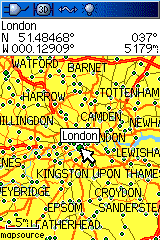
As an added bonus, the website also has a free European basemap that can be uploaded to US Garmin units. This could be useful not just for US visitors traveling to Europe, but also for Europeans who might be able to get a Garmin GPS units with the US basemap for less than what they would pay for a Garmin unit with the European basemap. I’ve installed the European basemap on my Garmin 60Cx, and it seems to work fine, taking up less than 11 MB of space. Here’s a screenshot of the basemap for the London area:

I also tried to get Metrowizz to work with mixed topo and Metroguide maps and it also didn’t work for me. Worked fine with only Metroguide maps.
http://www.gpswiki.de/dwiki/hersteller/metroguiderouting/ for free (if you understand German).
I found lots of success using MetroWizz to simultaneously load MetroGuide v5 maps and Topo into my GPSMap 60C and into my GPSMap 60CSx. My only problem was when I did an address search on my 60CSx it could only search the map segment in which the cursor was pointing. It was as if all the other loaded maps did not exist. A Garmin rep told me the problem was that the 60CSx was programed for NT map format. Anyone know how I can get my 60CSx to do an address search like a 60C?
Thank you for the program