

Ducky Sherwood writes to point out a free new service she’s created called Mapeteria. With Mapeteria, you can take a CSV file (comma-separated values) of data for US States, Canadian provinces, or French departements, and plot them as a choropleth map (color shade depends on the value of the data) in either Google Maps or Google Earth.
You’ll have to put the data in a specific format, but the Mapeteria website has full directions, and it’s a logical and straightforward format. You’ll also have to upload the CSV file to a webserver, and enter the web address for the CSV file on the Mapeteria site. Beyond that are a few more optional parameters to enter:
- Divisor – you can divide your data by population, area, or the default of nothing
- Color mapping -Set the colors for low and high data values
- Descriptive text
- High or low resolution
Then just click on the Give me a KML file! or Show it on Google Maps! button, and you’re good to go. A simple alternative to using GE-Graph.
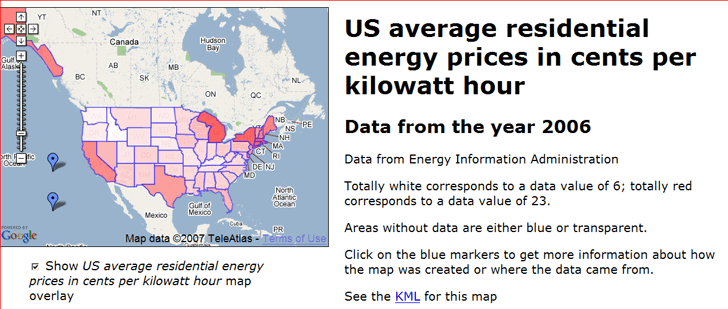
Ducky has some sample datasets to look at in either Google Maps or Google Earth. Here’s the price of electricity for the US in Google Maps:
And here’s the data I’ve always been looking for on French milk production in kiloliters by departement:
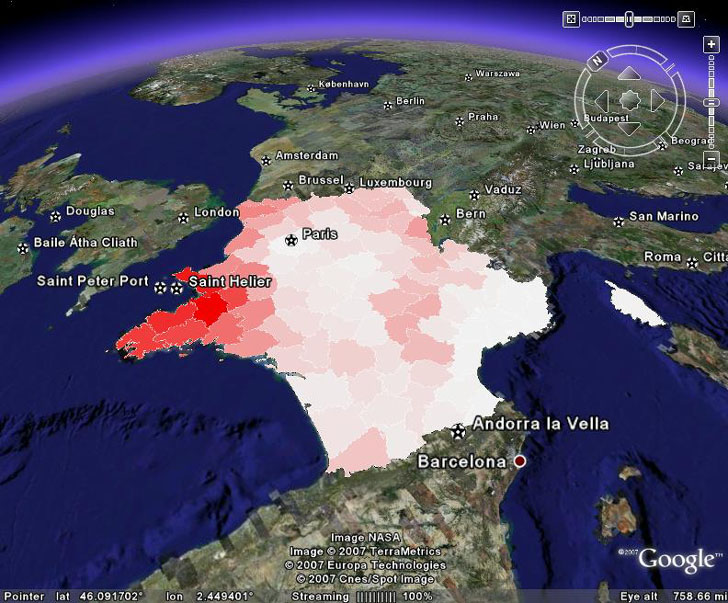
About the only thing I wish it had was an automatic scale marker, but you can always add those in the descriptive text.
More info is available on a posting on the KML Developer Support Group
Thanks, Ducky!
“chloropleth map” – typo? It’s choropleth.
Well, I was about to insist that “chloropleth” was correct, when I saw this in Wikipedia:<br/>”Choropleth is often misspelled as chloropleth – with an extra “L” – because it is mistakenly assumed that the name of the map refers to its use of colour.”<br/>Interesting – I’ve seen “chloropleth” more often than “choropleth”. You learn something new every day. Thanks!