

One of the quirks of Google Earth is that while you can draw a path between points as a feature using the “Add Path” toolbar button, or measure the individual and combined distances between points using the ruler (click on the “Show Ruler” button, then the “Path” tab), there’s no automatic way in Google Earth to determine the length of a path drawn using the “Add Path” button, short of tracing over it with the ruler. But there are several utilities that can take the KML file of a path and convert it into a distance. Two of them require you to to copy the KML path data into the clipboard (right-click on the path, and choose “Copy”), then paste it into the application. The third will accept data that way, but can also open a saved KML file to do the calculation.
measureGEpath is a Java app that should in principle be multi-platform, as long as you have Java installed. Download measureGEpath.jar (right-click on the link, and choose Save As). Then double-click on the file to run it. Interface is bare-bones:
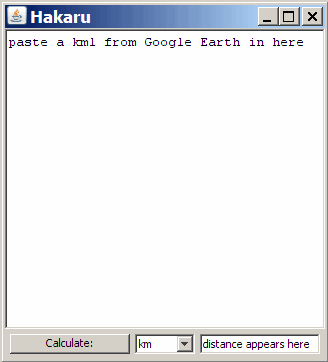
Paste the KML for the path in the box and press the Calculate button, get the total path distance at the lower right.
(Note: Found on the Google KML Developer Support Group)
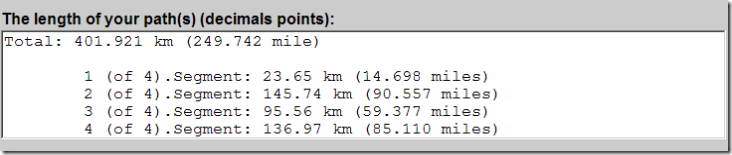
Next is an online converter at E.M.A GE Tools. Same basic functionality as above, just paste the path KML file into the box on the website, and press a Calculate button. You have the option of including heights in the distance calculation. The results include not only the total distance of the path, but the distances between every individual point in the path:
Finally, there’s a Windows-only program called the KML Path Measurer; download the .msi file and install it (you may have to right-click on the program link and choose Save As). Simple interface again:
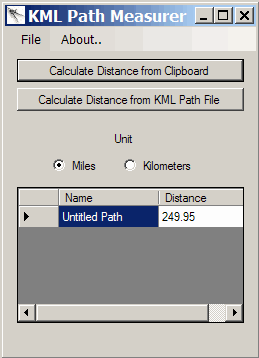
For KML data copied into the clipboard, you don’t even need to paste it into the program; just click on the top button. You can also open a KML file and do the same calculation. The program asks if you want to update either the clipboard data or file with the distances, but this feature didn’t work for me.
Thanks a lot, I was wondering if I was dumb or whatever, because I couldn’t find a button on Google Earth to measure the paths I’ve created, and, strangely enough, it doesn’t exist and I’m not totally dumb after all. Until now, I was using the site MapMyRide to measure the length of my walks in São Paulo, but Google Earth is much better for my exploring purposes. Tks again!
Well, I didn’t feel like installing a program on my computer, and I didn’t think anyone else should have to either, so I made a website where you can upload Google Earth path files and it will tell you how long the path is! Here’s the link:
http://www.craterfish.org/?googleearth
Enjoy!
I realized that my upload script was broken, but I fixed it. I also made it so that you can now upload .kmz path files or .kml path files. So again, here is the link to find the length of your Google Earth path:
http://www.craterfish.org/?googleearth
Thanks, Nick – a post on your Google Earth path length tool will go up this week.
You’re welcome! Thanks!