blankblank blank


Convert A Google Maps Point To Multiple Text Geographic Formats


There’s a handy Google Maps site that lets you place a marker, gives you the position, and then lets you convert that position into a number of geographic text formats.

At the geo:truc site, zoom into the desired location, and click on the Google Maps interface to enter a marker; you can also enter coordinates or an address in the search field. Geo:truc gives you the coordinates of that marker, and then a host of options to convert the position into geographic text formats:
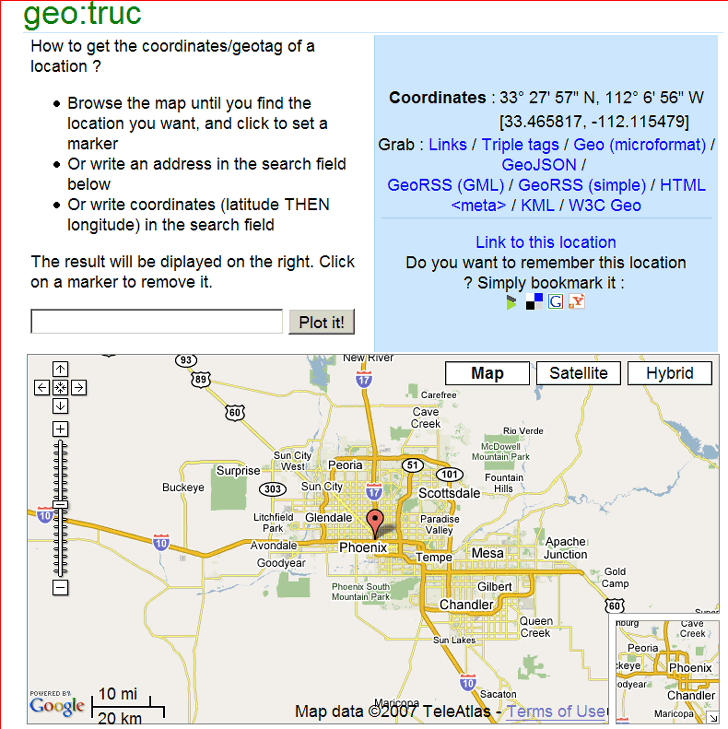
geotruc

Initially, you have the option to copy a link to this location on the page either with grabbing the hyperlink, or using one of the links to bookmarking services like Google Bookmarks, del.icio.us, etc.. Click on any of the “Grab” links in the upper-right (except “Links”, which brings you back to the default set of bookmarkable links), and a box will appear with the appropriately-formatted text; copy and paste it into your favorite HTML or text editor, and save it with the appropriate file extension. You can get

Triple tags:

geotagged geo:lat=33.461234 geo:lon=-112.109299

Geo (microformat):

<abbr class=”geo” title=”33.461234;-112.109299″>33.461234, -112.109299</abbr>

GeoJSON:

{ “features”: [
{ "id": "",
"title": "",
"point": [[33.461234, -112.109299, 0.0]],
“srs”: “EPSG:4326″
}
]
}

GeoRSS:

<georss:where>
<gml:Point>
<gml:pos>33.461234 -112.109299</gml:pos>
</gml:Point>
</georss:where>

HTML metatag:

<meta name=’geo.position’ content=’33.461234;-112.109299′ />

W3C Geo:

<geo:Point>
<geo:lat>33.461234</geo:lat>
<geo:long>-112.109299</geo:long>
</geo:Point>

Even a KML waypoint marker:

<?xml version=’1.0′ encoding=’UTF-8′?>
<kml xmlns=’http://earth.google.com/kml/2.1′>
<Placemark>
<name>33° 27′ 40.442922” N, 112° 6′ 33.475342” W</name>
<description></description>
<Point>
<coordinates>-112.109299, 33.461234, 0</coordinates>
</Point>
</Placemark>
</kml>

As indicated above, to get rid of the text box and get back the bookmarkable links to this marker, click on “Links”.

Via GoogleMapsMania (5/6/2007).

Other posts in the Google Maps Tools series

  1. Coordinate Data From Google Maps
  2. Reverse Address Geocoding With Google Maps
  3. Converting Google Maps Search Results To GPX
  4. Coordinate, Elevation, Distance And More In Google Maps
  5. Google Maps "My Maps" Features
  6. Measuring Elevation, Distance And Area In Google Maps
  7. Creating GPS Routes In Google Maps
  8. Thematic Polygon Shapefile Display In Google Maps
  9. Using The Google Maps Interface To Display General Maps And Images
  10. Heat Mapping In Google Maps
  11. Elevation Profile In Google Maps
  12. Embed Google Maps "My Maps" On Your Web Page
  13. Customizing Google Maps Markers
  14. Two Fun Cartographic Google Maps Tools
  15. Simple Guide To Embedding Google Maps "My Maps" On Your Own Webpage
  16. Another Google Maps Geocoder/Reverse Geocoder
  17. Drawing Lines Between Points In Google Maps, Straight And Great Circle
  18. Convert A Google Maps Point To Multiple Text Geographic Formats
  19. Meet Your Friends Halfway
  20. Plotting Swivel Data In Google Maps
  21. Meet Your Friends Halfway II
  22. Geographic Midpoint Calculator
  23. GIS-Like Functionality In Google Maps With ZeeMaps
  24. Creating GPS Waypoints Online From The USGS Geographic Names Information System (GNIS)
  25. MapMyRide.com
  26. Exporting KML Data From Google Maps MyMaps To A GPS
  27. Advanced Tool For Embedding Google Maps MyMaps On Your Website
  28. Draw/Label On Google Maps, And Generate GPX/KML/Embeddable Maps
  29. Another Way To Create Embeddable Google Maps With KML Data
  30. Documenting A Journey With Maptales
  31. Plot A Coordinate Position On Different Map Pages
  32. Worldwide Reverse Geocoding With Google Maps
  33. Google Maps Shaded Relief Site Updates
  34. Digipoint 2: Export Of Google Maps Points In Multiple Formats, And Elevation Data
  35. Google Maps Line Tool Now Supports Distance Measurement
  36. Geographically-Linked Video With VeoGeo
  37. Recent Google Maps Tools
  38. Google Maps Mapplets From Zonums Software
  39. Maximize Google Maps With Google Maps Max
  40. Mapping Zip And Area Code Boundaries, And More
  41. Altitudes And Terrain Profiles In Google Maps
  42. “Friendly” URLs To Address Maps
  43. Quick Zip Code Information
  44. Simple Online Form For Creating An Embeddable Google Map
  45. Embed Synchronized Google/Microsoft Virtual Earth Maps On Your Website/Blog
  46. Worldwide Contour Lines In Google Maps’ Terrain View
  47. Plot Gazetteer Features In A Google Maps Interface
  48. Antipodes Map

Looking for something else? Enter some keywords below, then click "Search".
"This site" searches Free Geography Tools; "Web" searches the Internet using Google.


2 Responses to “Convert A Google Maps Point To Multiple Text Geographic Formats”


  1. 1 real estate

    Thanks for the info.

    Do you know of any free software that will allow me to grab a google map image as a static jpeg,ping or gif?

  2. 2 Leszek Pawlowicz

    Any screen capture program will do that. For larger images, I know of several programs that will download tiles from Google Maps and assemble them into a single picture. But these are almost certainly violations of Copyright and Terms Of Service, so I’m not publicizing them.

Leave a Reply


I welcome all legitimate comments. But spammers should know that my spam filters are currently blocking almost 100% of comment spam, and any that gets through the filters is immediately deleted. Don't believe me? Try posting a spam comment, and see what happens.

Powered by WP Hashcash