Wikipedia defines the “Traveling Salesman Problem” this way:
… given a number of cities and the costs of travelling from any city to any other city, what is the least-cost round-trip route that visits each city exactly once and then returns to the starting city?
You can substitute “address” for “city”, making this an intra-urban travel problem. The OptiMap website solves this problem automatically for up to 24 locations (“nodes”). You can enter the nodes by clicking in a Google Maps interface:
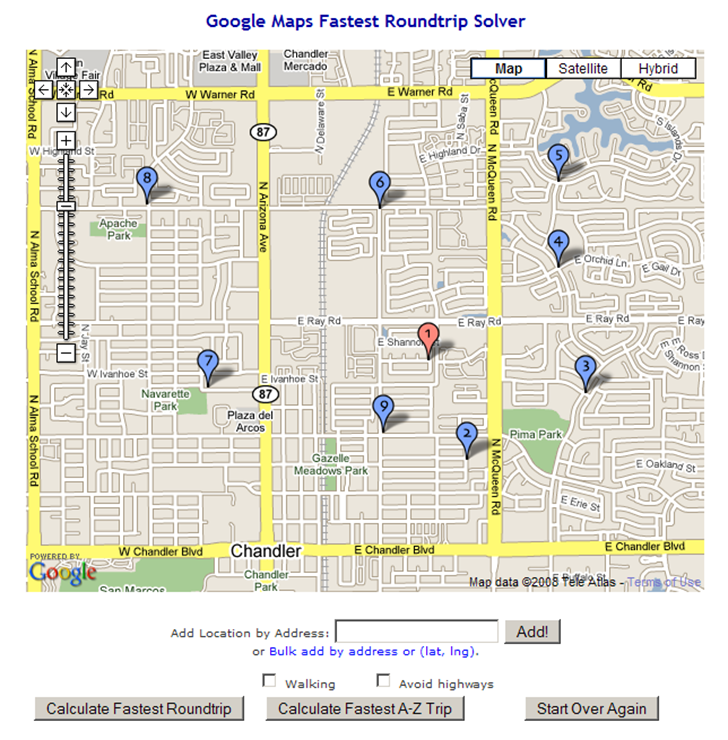
You can also enter address nodes individually using the “Add Location By Address” box. Even better, you can add text lists of addresses or coordinates (latitude/longitude) by clicking on the “Bulk add by address or (lat, lng).” link, then copying and pasting the list into the text box that shows up. Latitude/longitude should be in decimal format, one set on each line, separated by commas and surrounded by parentheses, e.g. (35.333, –110.254). You can also specify only walking directions, and avoiding highways. The first node or address entered is always considered to be the starting point.
When you’re done entering nodes, click on “Calculate Fastest Roundtrip” to solve the problem for a round-trip that ends where you started:
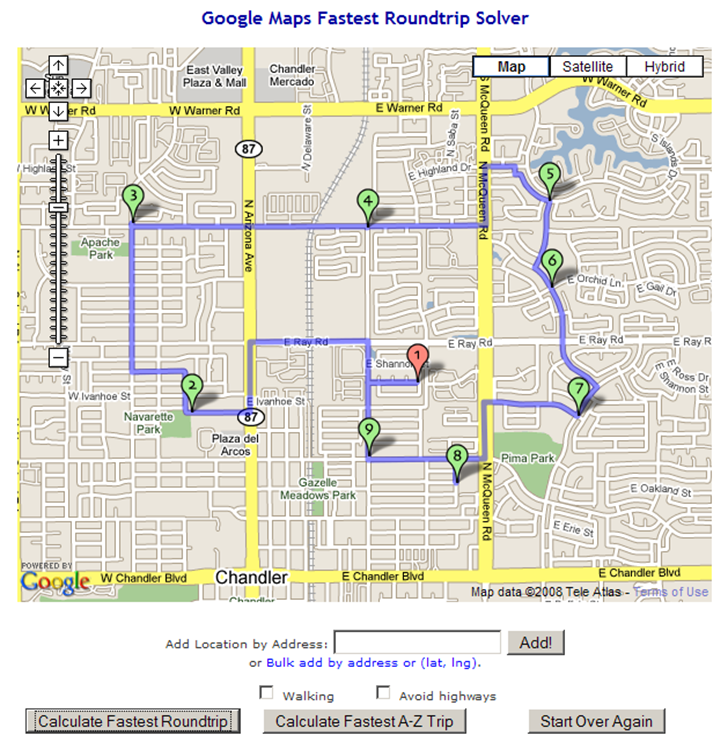
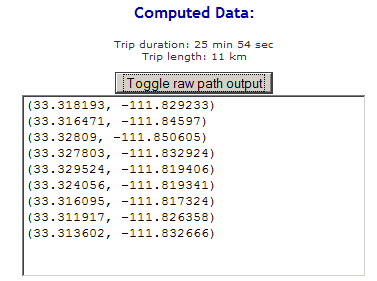
You’ll also get a set of Google Maps driving directions for the trip shown in the solution map. By clicking on the “Toggle raw path output” button, you’ll also get a text list of latitude/longitude coordinates in sequence for this route that you could convert into a GPS route:
The “Calculate Fastest A-Z Trip” works in a similar fashion, but for a one-way trip, where the first address/node you entered is taken as the start “A”, and the last address/node is the destination “Z”.
The technical background and source code are available on the OptiMap website, as are instructions on how to use this on your own website.
Other posts in the Google Maps Tools series
- Coordinate Data From Google Maps
- Reverse Address Geocoding With Google Maps
- Converting Google Maps Search Results To GPX
- Coordinate, Elevation, Distance And More In Google Maps
- Google Maps "My Maps" Features
- Measuring Elevation, Distance And Area In Google Maps
- Creating GPS Routes In Google Maps
- Thematic Polygon Shapefile Display In Google Maps
- Using The Google Maps Interface To Display General Maps And Images
- Heat Mapping In Google Maps
- Elevation Profile In Google Maps
- Embed Google Maps "My Maps" On Your Web Page
- Customizing Google Maps Markers
- Two Fun Cartographic Google Maps Tools
- Simple Guide To Embedding Google Maps "My Maps" On Your Own Webpage
- Another Google Maps Geocoder/Reverse Geocoder
- Drawing Lines Between Points In Google Maps, Straight And Great Circle
- Convert A Google Maps Point To Multiple Text Geographic Formats
- Meet Your Friends Halfway
- Plotting Swivel Data In Google Maps
- Meet Your Friends Halfway II
- Geographic Midpoint Calculator
- GIS-Like Functionality In Google Maps With ZeeMaps
- Creating GPS Waypoints Online From The USGS Geographic Names Information System (GNIS)
- MapMyRide.com
- Exporting KML Data From Google Maps MyMaps To A GPS
- Advanced Tool For Embedding Google Maps MyMaps On Your Website
- Draw/Label On Google Maps, And Generate GPX/KML/Embeddable Maps
- Another Way To Create Embeddable Google Maps With KML Data
- Documenting A Journey With Maptales
- Plot A Coordinate Position On Different Map Pages
- Worldwide Reverse Geocoding With Google Maps
- Google Maps Shaded Relief Site Updates
- Digipoint 2: Export Of Google Maps Points In Multiple Formats, And Elevation Data
- Google Maps Line Tool Now Supports Distance Measurement
- Geographically-Linked Video With VeoGeo
- Recent Google Maps Tools
- Google Maps Mapplets From Zonums Software
- Maximize Google Maps With Google Maps Max
- Mapping Zip And Area Code Boundaries, And More
- Altitudes And Terrain Profiles In Google Maps
- “Friendly” URLs To Address Maps
- Quick Zip Code Information
- Simple Online Form For Creating An Embeddable Google Map
- Embed Synchronized Google/Microsoft Virtual Earth Maps On Your Website/Blog
- Worldwide Contour Lines In Google Maps’ Terrain View
- Plot Gazetteer Features In A Google Maps Interface
- Antipodes Map


Hi – Here’s an entry with additional info on the traveling salesman: http://technology.slashgeo.org/article.pl?sid=08/01/17/2258255 Cheers and thanks for your useful blog! :-)