

“Waypoints”, geographic position markers created either in a GPS unit or using software, have been a function found on virtually every GPS unit ever made. More recently, “Points of Interest” or POIs have been implemented as an alternate way to store data for a point position, and many recent GPS units let you upload your own custom POI lists. POIs provide a handy way of organizing groups of points, and can also include more information on a point than a standard waypoint. I’ll be doing a short series of posts on creating and manipulating POIs. While the focus will be on Garmin GPS POI capabilities, other GPS manufacturers also support them as well, though usually in different formats. Note: As far as I know, only Garmin GPS units that use external data storage cards (like those listed in this post) can accept custom POI data.
Here’s a comparison table listing some of the characteristics of both waypoints and POIs:
Property |
Waypoints |
POI (Points Of Interest) |
| On the GPSr unit | ||
| Number of data points per unit | Typically 500 to 1000 | At least 3000 according to Garmin, but may only be limited by unit memory. Some have reported uploading in excess of 30,000 separate POIs to a single unit |
| User-definable (computer) | Yes | Yes |
| User-definable (in the field) | Yes | No, but POI can be saved as a user-modifiable waypoint while in the field |
| Modifiable visibility zoom level | Yes | Yes |
| Modifiable label size | Yes | Yes |
| Searchable on unit | Yes, by name | Yes, by name |
| Browsable on unit | Yes, by proximity and symbol | Yes, by proximity and datafile grouping |
| Custom Symbols | ||
| Available? | Yes on supported units | Yes on supported units |
| Number of custom symbols | Maximum of 24 | Essentially unlimited |
| Size/color of custom symbols | Must be 16 x 16 pixels, created in 8-bit format (254 colors); supports transparency | Any size between 1 x 1 and 24 x 24 pixels; can be created and uploaded in 24-bit color, but colors displayed depend on unit; transparency requires original to be in 8-bit color (254 colors) |
| Data Parameters | ||
| Acceptable data formats | Depends on program being used to upload waypoints, but can include many different formats, including GPX, GDB, KML, shapefile and more | Must be in either GPX or CSV format |
| Downloadable from unit | Yes | No |
| Name field | One line of up to 14 characters (40 characters in the new Colorado series) | Two lines of up to 48 characters each |
| Data fields | One: Description field up to 30 characters | Up to four lines of data, each with up to 48 characters of data |
| Additional data | Yes: Coordinates, elevation, depth | No, unless included in data fields |
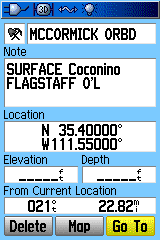
As an additional comparison, here is one data point on my Garmin, stored and displayed both as a POI, and as a waypoint saved and modified from the POI data. The data point is from a database of uranium mines in Arizona, generated from a point shapefile. First, the data screens:
 |
 |
| POI Data Screen | Waypoint Data Screen |
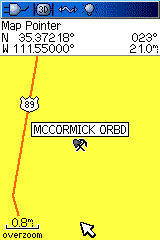
Even after stripping out the labels (“Status”, “County”, etc.), it’s impossible to fit all of the data on the POI screen into the waypoint screen. In fact, there’s unused data space on the POI screen above, since you can have two lines of “Name” data at the top, and can also fill out the four data lines all the way to the end; on the waypoint side, every bit of data space is taken up.On the map display:
 |
 |
| POI Map Display (with custom POI icon) | Waypoint Map Display (with standard icon) |
The POI map display shows the full first line of the POI name, which can be up to 48 characters long (although this will be more like 20-25 in practice); the waypoint shows the maximum name length of only 14 characters. The POI icon covers a size of 24 x 24 pixels in this case, and there’s no limit to the number of custom icons you can create for a POI database. For the waypoint, I used a mine symbol, supplied with the unit; you can create a custom waypoint icon as well, but its size is limited to 16 x 16 pixels.So, for importing and using some kinds of point datasets in Garmin GPS units, POIs offer some useful features above and beyond what waypoints can do. Next post in this series will talk about the Garmin POI data format, how to create a POI-compatible file, and how to convert between POI data formats and those for GPS waypoints.
3/6/2010: The newer Colorado/Oregon/Dakota GPS units can store and display more data; see this Oregon Wiki page for more information.
Great introduction to POI!