blankblank blank


A Simple DBF Editor


I’ve posted before about using OpenOffice’s Calc spreadsheet for use as a DBF editor (and why it doesn’t have the serious problem Excel 2003 has with editing DBF files). But Calc isn’t really designed to be a DBF file editor per se, which means that if, for example, you want to add new data columns to your shapefile’s DBF file, you’ll need to know a bit about column data formatting, and that’s kind of a pain. For basic DBF file editing, I find DBF Explorer easier to use, since it’s designed specifically and exclusively to work with DBF files. Adding and defining data column types is easy using the “Structure” button, as is modifying the values of individual data elements and searching for specific text elements (hint: use the Tab key to move to the data record you want to change). You can also delete full individual records, but that can easily screw up the relationship between the shape data and the associated DBF records, and should be done with care. Also be aware that the DBF file is updated continuously as you modify records, so if you want to keep the original unchanged, you should edit a copy of the original file.

Not a particularly fancy interface:
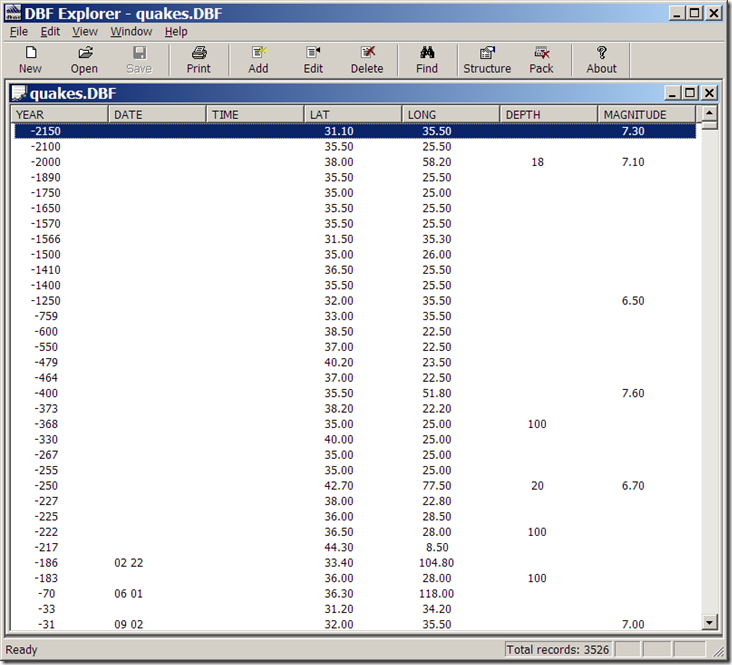
DBF Explorer

but it doesn’t need to be. And the help file tells you everything you need to know.

Addendum (1/29/08): Dave McGraw points out that if you use the “Structure” button to modify some of the parameters of an existing field, like the name, it will wipe out the data in that field, which is a bad thing; it will give you a warning first, though, that you may lose some data after such a modification. Other parameters, like field type and width, seem to be modifiable without nuking the original data; adding or deleting a field does not seem to cause any problems, either. Another argument in favor of editing a copy of the original, rather than the original itself.

The author also has some other free utilities on his site, including FTP/Web/Mail server software, and a simple install file builder.

Other posts in the GIS Tools series

  1. Converting E00 Vector Data To Shapefiles – A Free And Fairly Painless Approach
  2. Simplifying Line And Polygon Shapefiles
  3. Converting US Census TIGER Data Into Shapefiles For Free
  4. Converting Shapefiles and ArcINFO Coverages To AutoCAD DXF Format
  5. Converting Point Shapefiles To Text/Spreadsheet Format
  6. Converting Text/Spreadsheet Files To Point Shapefile Format
  7. An Easier Way To Convert Shapefiles to Text/Spreadsheet Format
  8. Converting Text/Spreadsheet Data To Line/Area Shapefiles
  9. Full Resolution Raster Map Combining, Subsetting And Export With The TatukGIS Viewer
  10. Viewing Vector Data In The TatukGIS Viewer
  11. The LizardTech Stand-Alone MRSID Viewer
  12. Converting Raster Area Images Into Polygon Shapefiles
  13. SAGA GIS 2.0 Released
  14. ILWIS GIS Is Now Open Source
  15. AVHRR Analysis Add-On For ILWIS
  16. Advanced Image Mosaicking With Regeemy
  17. A Free GIS Viewer (And Cheap GIS Editor) For Windows Mobile Systems
  18. Updates For MapWindow And Saga GIS Programs
  19. Updates For Two Open-Source GIS Programs
  20. Putting Together A Basic Linux GIS Workstation
  21. Free Online Courses For Open Source GIS
  22. GIS-Oriented Linux Distributions
  23. Tabular Terrain Elevation Data
  24. Quick Data Gridding With QuikGrid
  25. A Good Introduction To Geospatial Data Analysis
  26. Converting Digital Elevation Models To Shapefile/DXF Contours
  27. Fixing "Broken" Shapefiles
  28. A Simple DBF Editor
  29. Two Online Vector GIS/GPS/KML Conversion Utilities
  30. Another Shapefile Repair Tool
  31. Quantum GIS (qGIS) Version 0.10 Released
  32. Online Raster Map Georeferencing/Registration With Map Rectifier
  33. Using The Demo Version Of Global Mapper As A Raster/Vector Data Viewer
  34. New Stable Release Of MapWindow GIS
  35. The Big List Of Free Metadata Software I
  36. The Big List Of Free Metadata Software II
  37. GIS On A Stick

Looking for something else? Enter some keywords below, then click "Search".
"This site" searches Free Geography Tools; "Web" searches the Internet using Google.


5 Responses to “A Simple DBF Editor”


  1. 1 Ade

    Looks nice on first use :) Practical, too. Bugs me that you cannot open files with it, only within it. Other than that, it’s the best I’ve tried so far, and I have tried many, plus it’s free. Or so I hope, don’t wanna wake up in 30 days not being able to use it :)

  2. 2 toto

    thanks danke merci

  3. 3 toto

    merci pour les éfforts que vous faite

    thanks

  4. 4 toto

    merci bcp pour ce que vous faite

  1. 1 Tiny geocoder « LocalLab : Foire aux Infos

Leave a Reply


I welcome all legitimate comments. But spammers should know that my spam filters are currently blocking almost 100% of comment spam, and any that gets through the filters is immediately deleted. Don't believe me? Try posting a spam comment, and see what happens.

Powered by WP Hashcash