

Rich at GPS Tracklog cites OpenStreetMap’s recently-completed importation of the TIGER road data for the US, and challenges me to take a look at exporting it to a Garmin GPS (based on this post, I assume). OK, sure.
TIGER is a dataset produced by the US Census; from the website:
The TIGER/Line files are a digital database of geographic features, such as roads, railroads, rivers, lakes, legal boundaries, census statistical boundaries, etc. covering the entire United States. The data base contains information about these features such as their location in latitude and longitude, the name, the type of feature, address ranges for most streets, the geographic relationship to other features, and other related information. They are the public product created from the Census Bureau’s TIGER database.
TIGER data was originally intended to aid the official US Census, mandated every 10 years by the US Constitution. For those purposes, the data didn’t need to be created with an exceptionally high degree of accuracy, and it wasn’t. While the US Census is working on improving the spatial accuracy of the data, it isn’t complete or fully accurate yet, and you should keep that in mind if you plan to use the data for navigation.
The process for downloading OpenStreetMap (OSM) data and converting it to Garmin’s .img format is unchanged from this post, though you should make sure you have the latest versions of both the JOSM and mkgmap applications (as I discovered, older versions may not work). I downloaded data from my neighborhood, and overlaid it on top of an aerial photo:

Most of the streets that actually exist are mapped in TIGER, and the topology is accurate, but you can see that for a fair number of streets, the TIGER data doesn’t match exactly. In addition, there are some streets missing (see the upper-left hand corner), and also some roads plotted that don’t actually exist (mid to lower left-hand corner). But that’s not just a problem with TIGER; while Google Earth shows the roads in the upper-left-hand-corner correctly, it also plots those non-existent roads on the left as well. And using the JOSM application, you can correct a map, adding or deleting features, then upload those corrections to the OpenStreetMap project (though when I tried, the process hung on me).
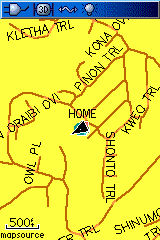
Here are screenshots of some of this TIGER road data loaded into my Garmin on the left, and the corresponding area in MetroGuide 4 loaded on the right:
 |
 |
| OSM TIGER Data | Garmin MetroGuide Data |

Works great, thanks.
I’ve used TIGER data over the years in GIS and found that in some rural areas, it can be spot on or egregiously wrong, but quite imaginative. So buyer beware, I guess. Not really different than the reguritated TIGER pay-to-map data in MapSource and MapSend for Magellan.