Many raster image formats commonly used in GIS applications have metadata embedded in them that georeferences the pixels (assigns them a coordinate location), and often includes other information like the coordinate system, origin, and datum. Some GIS programs will let you view some or all of this metadata, others won’t. I’ve written a simple GUI front-end program for the GDALInfo utility that will extract the metadata from a compatible image file, display it, and save it in a text file. Download the program folder here, and unzip it to your desired location; keep the executable and the GDAL subfolder in the same folder, otherwise the program won’t work. No installation required, just run the program. Choose the raster image file you want with the “Open File And Read MetaData” button:
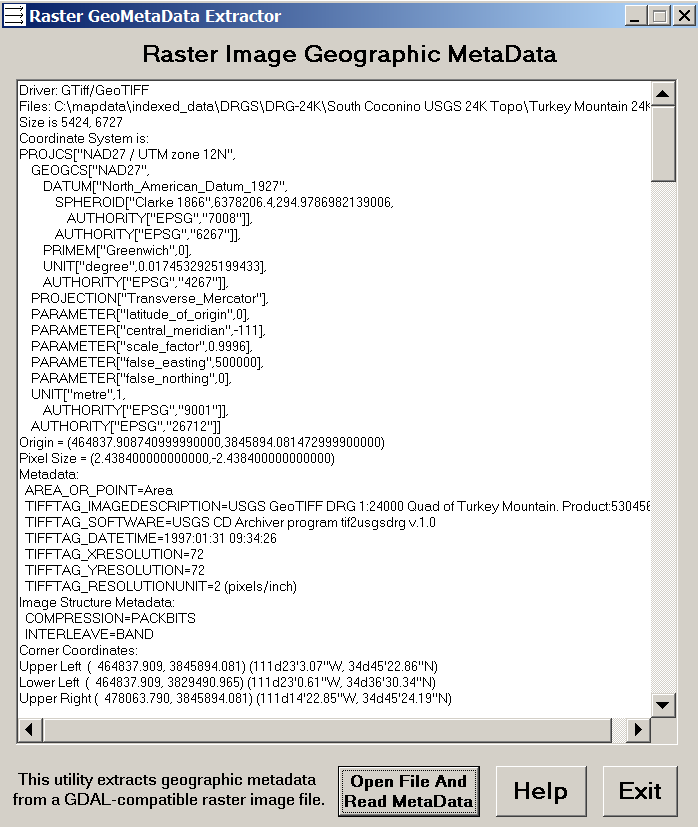
In this example, GDALInfo has extracted the metadata, and also basic image parameters, from a GeoTiff file called “Turkey Mountain 24k.tif”. You can copy the metadata from the text box for pasting elsewhere, but a text file containing all this information called “Turkey Mountain 24k.metadata.txt” has also been created. The “Help” button brings you to this page, while the “Exit” button ….
The program has been tested with GeoTiff (.tif, .tiff), MRSID (.sid), ECW (.ecw), JPEG2000 (.jp2,,j2k), and BSB (.kap) raster image file formats. However, it should run with any raster image format supported by the GDAL library, and I’ve included all the file extensions I could find for those supported formats. If you find a file format that GDAL supports, but which this utility doesn’t open, let me know what the file extension is and I’ll add it. If you find a GDAL-supported format that it doesn’t seem to work with, let me know that as well. The GDAL library is very reliable, but as usual, use it at your own risk.
Other posts in the GIS Tools series
- Converting E00 Vector Data To Shapefiles - A Free And Fairly Painless Approach
- Simplifying Line And Polygon Shapefiles
- Converting US Census TIGER Data Into Shapefiles For Free
- Converting Shapefiles and ArcINFO Coverages To AutoCAD DXF Format
- Converting Point Shapefiles To Text/Spreadsheet Format
- Converting Text/Spreadsheet Files To Point Shapefile Format
- An Easier Way To Convert Shapefiles to Text/Spreadsheet Format
- Converting Text/Spreadsheet Data To Line/Area Shapefiles
- Full Resolution Raster Map Combining, Subsetting And Export With The TatukGIS Viewer
- Viewing Vector Data In The TatukGIS Viewer
- The LizardTech Stand-Alone MRSID Viewer
- Converting Raster Area Images Into Polygon Shapefiles
- SAGA GIS 2.0 Released
- ILWIS GIS Is Now Open Source
- AVHRR Analysis Add-On For ILWIS
- Advanced Image Mosaicking With Regeemy
- A Free GIS Viewer (And Cheap GIS Editor) For Windows Mobile Systems
- Updates For MapWindow And Saga GIS Programs
- Updates For Two Open-Source GIS Programs
- Putting Together A Basic Linux GIS Workstation
- Free Online Courses For Open Source GIS
- GIS-Oriented Linux Distributions
- Tabular Terrain Elevation Data
- Quick Data Gridding With QuikGrid
- A Good Introduction To Geospatial Data Analysis
- Converting Digital Elevation Models To Shapefile/DXF Contours
- Fixing "Broken" Shapefiles
- A Simple DBF Editor
- Two Online Vector GIS/GPS/KML Conversion Utilities
- Another Shapefile Repair Tool
- Quantum GIS (qGIS) Version 0.10 Released
- Online Raster Map Georeferencing/Registration With Map Rectifier
- Using The Demo Version Of Global Mapper As A Raster/Vector Data Viewer
- New Stable Release Of MapWindow GIS
- The Big List Of Free Metadata Software I
- The Big List Of Free Metadata Software II
- GIS On A Stick
- ILWIS 3.5 Released
- European Open Street Map (OSM) Data In Shapefile Format
- GISVM - A Virtual Ubuntu Linux GIS Workstation
- A Basic Raster Image GeoMetaData Extractor/Viewer


1 Response to “A Basic Raster Image GeoMetaData Extractor/Viewer”