

Frank at Google Earth Blog links to a new Google article on the nuts-and-bolts of KML time coding, which goes into far greater detail than my own simple post. Not too long ago, I created a simple utility for embedding time data into a KML file after the first feature tag, and which doesn’t require you to fiddle with the KML code. It has the limitation that it only embeds basic time data after the first KML feature tag; if you have multiple feature tags in a KML file, and want to embed separate time data for each of them, my utility won’t help. And if you read the Google article and want to get more creative with time coding, you’ll have to manually write the KML time code yourself and put it into the KML file within the corresponding feature section.
I’ve created a stripped-down version of that KML time utility called “KML Time Code Creator” that lets you set the TimeSpan or TimeStamp with a GUI, and then creates the properly formatted KML time code to copy and paste into your own KML file. Download the executable file here; if you get error message about missing files, download and install the full version of the KML Time Embedder Utility, which installs the required files.
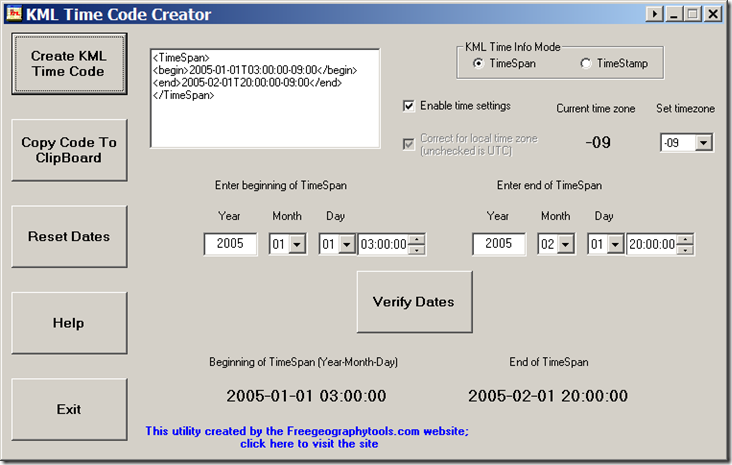
Setting time parameters is done the same as in my KML Time Embedder utility, so I’ll refer you to those posts for details. Once you’ve set and verified the time parameters, click on the “Create KML Time Code” button at upper left, and the KML time code will be generated and displayed in the white text box. You can copy the text in this box to the clipboard with the appropriate button at left, and then paste it into your own KML file. Nothing fancy, but it does the job.
Other free utilities can be found on the Utilities page. If you find this or any of my other utilities particularly useful and would like to show your appreciation, donations of any amount are gratefully accepted via PayPal.
I like it. Do you know a good M/D/Y to universal time converter?
No, I don’t know of a good local to UTC converter, but it shouldn’t be that hard to write; Googling “UTC time convert” got me this page with VB.Net code for the hardest part, the conversion:
http://www.vb-helper.com/howto_utc_to_local_time.html