blankblank blank


Grid Creation And Path/Polygon Measurements: Two New Online KML Tools


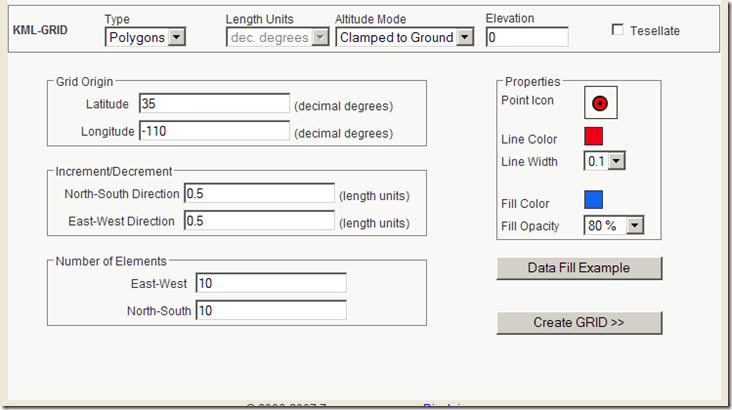
KML-GRID: Creates a point, line or filled polygon grid in KML. Set the desired parameters:
KMLGrid1

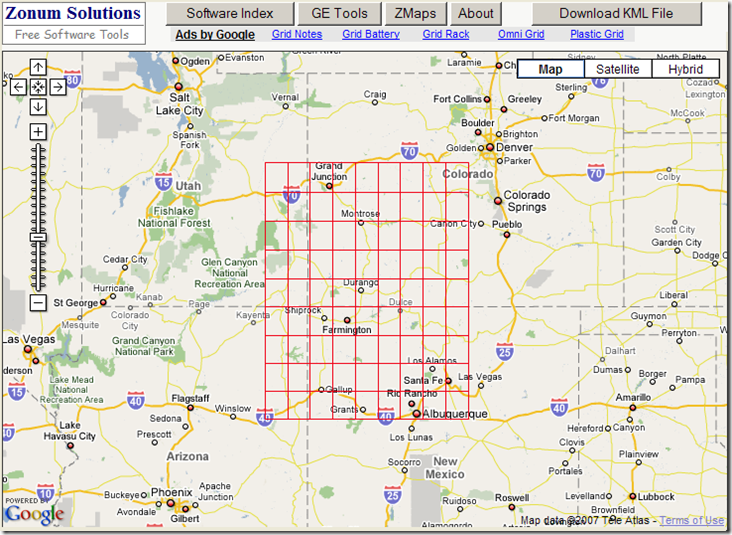
Clicking on “Data Fill Example” enters sample data into the boxes. For Grid Origin, it’s decimal latitude/longitude. For Increment/Decrement, it’s currently also decimal degrees, as the “Length Units” drop-down at top is currently limited to those units (wouldn’t surprise me if additional unit options were added soon). Click on “Create GRID”, and a view of the grid is shown in Google Maps (lines in this case):
10-24-2007-2.20.39 PM

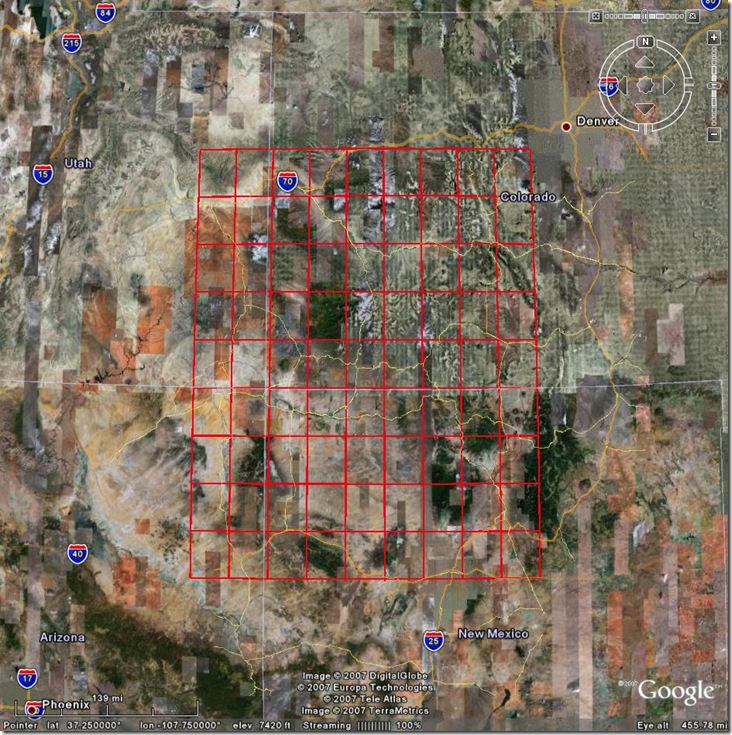
Click on the “Download KML File” button, and the KML code will appear in your browser; either choose “Save As” from the File menu, or copy and paste it into a text editor and save it as a KML file there. Open it in Google Earth, and there’s your grid:
kmlgrid

A useful complement to GE-Path for creating KML grids.
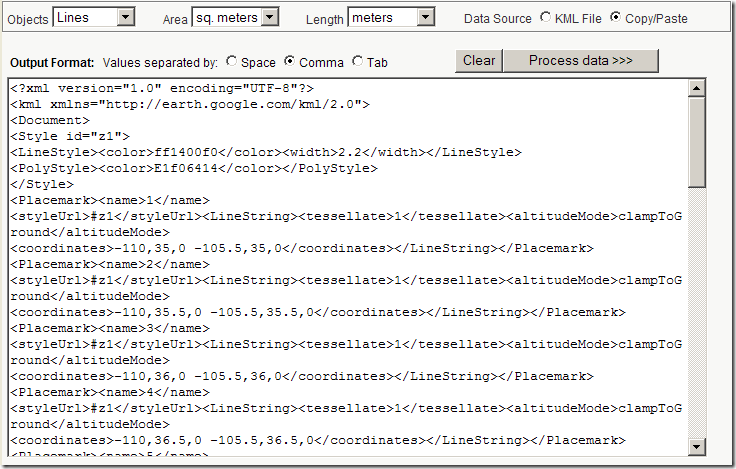
KML - Area & Length: I’ve covered some other utilities that will calculate path lengths from KML code, filling in a gap in Google Earth. This new utility calculates not just path lengths, but areas as well. Paste the KML code into the text box:
kmllengtharea

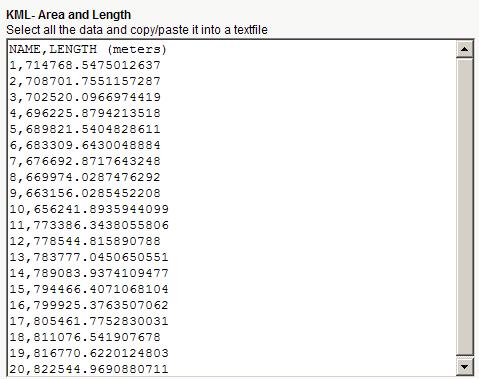
For KML files that have both paths and polygons, you can calculate just the path lengths, just the areas, or both; set the units and the delimiters at top. When you click on “Process data”, you’ll get back a text window with the IDs and lengths/areas of the features in the KML file, separated on each line by the chosen delimiter. e.g. for the grid file above:
kmllengthresults

Other posts in the Google Earth Data Tools series

  1. KML Editors
  2. Diagramming In Google Maps And Google Earth With Smoot
  3. Plotting Data In Google Earth Using GE-Graph
  4. Drawing Grids, Paths And Polygons In Google Earth Using GE-Path
  5. Online Google Earth Utilities For Buffering And Area Calculations
  6. Easy Display Of Thematic Data In Google Maps And Google Earth
  7. Using GIF/PNG Transparency In Displaying Raster Graphics In Google Earth
  8. Adding Vector Graphic Objects To Google Earth
  9. Animated GIFs In Google Earth
  10. Creating A Network KML Link To A Google Spreadsheet
  11. LIDAR Tools
  12. EarthPlot Software Tools For Google Earth
  13. Geographic Time Animations
  14. Convert TIGER Polygons To KML Files
  15. Putting Time Data Into A KML File
  16. Using The KML Time Embedder To Stamp Time Data Into A Google Earth File
  17. Using The KML Time Embedder, Concluded
  18. KML Time Embedder Improved With Hour-Minute-Second Ability
  19. Grid Creation And Path/Polygon Measurements: Two New Online KML Tools
  20. Google Earth PhotoOverlay Tool
  21. KML Random Placemark Generator
  22. Update For Online Google Earth Utilities
  23. KML Time Code Utility
  24. Screen Overlays In Google Earth
  25. The KML Screen Overlay Maker Utility
  26. KML Screen Overlay Maker Utility, Concluded
  27. KML Circle Generator
  28. Creating Google Earth Screen Overlays With EarthPaint
  29. Text Editor With KML Validation
  30. Online Spreadsheet To KML Converter
  31. Version 2.0 Of Google’s Online KML Spreadsheet Mapper Tool Released
  32. Creating Google Earth Ground Overlays From Georeferenced Images
  33. Google Earth Ground Overlays With GIF Transparency
  34. Creating "Transparent" Topo Map Overlays For Google Earth
  35. Using Google Earth Ground Overlays To Display Shapefile Data
  36. Converting 3D Objects Into Google Earth Format
  37. Thematic Mapping In Google Earth
  38. An Online KML Validator
  39. Modify A KML Polygon File With Excel Data
  40. US Nautical Chart Overlay For Google Earth
  41. Plot Google Analytics Geographic Data In Google Earth/Maps
  42. Placemark Creator For Google Earth


Subscribe to this blog's RSS feed

1 Response to “Grid Creation And Path/Polygon Measurements: Two New Online KML Tools”


  1. 1 Steve Lombardi

    on the subject of lengths and areas in KML - Live Search Maps will calculate and show this information when viewing a KML file. If your kml file is on the web you can view it like http://maps.live.com/?mapul=http://yourserver.com/yourgeodata.kml and if it is a local file you can import it by using the Collections -> Open my Collections menu. Hope that helps in some situations. we support a lot of KML in this manner - if you find a file we don’t handle, email me a link to it so we can investigate for a future release.

    regards,

    Steve lombadi
    Virtual Earth program manager
    stevelom a microsoft d com

Leave a Reply


Be sure to enter the "reCAPTCHA" below before submitting your comment.