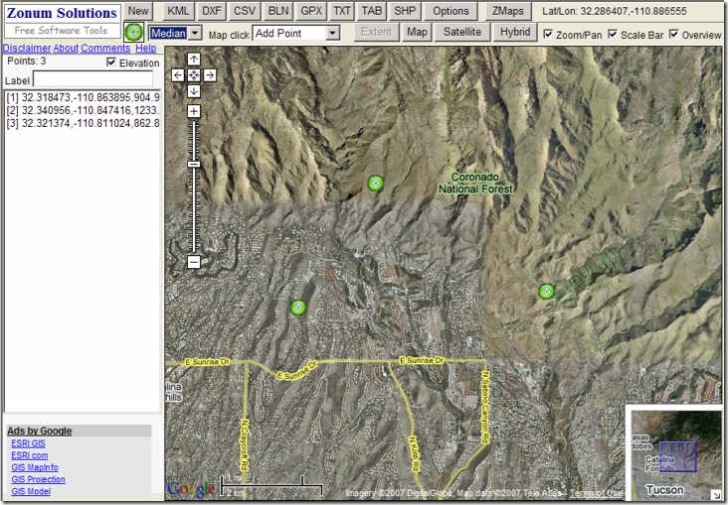
Quite a while ago, I posted about Digipoint, a website that let you plot points in Google Maps automatically get the coordinates of the points, and export the data in text (TXT), AutoCad (DXF), comma-separated values (CSV), BLN (Golden Software blanking format) and tab-delimited (TAB). The Digipoint website has been upgraded to version 2 since then, enhancing the old features and adding new ones:
- Export in KML, GPX, and shapefile formats has been added to the previous export options listed above
- Selectable icon shapes and sizes (Small, median, normal and big); click on the icon image to change the icon shape, choose the size from the drop-down next to it
- Four map-click options:
- Add point
- Delete point (new)
- Edit label (new)
- View elevation (new) – click on a point on the map and get the elevation
- Check the elevation box, and as you add points to your list, the elevation will be added as well
- An instantaneous readout of the cursor coordinates as you move it over the map display
- A separate “Options” button to set coordinate systems (lat/long. or UTM) and elevation units (meters/feet)
![]()
Other posts in the Google Maps Tools series
- Coordinate Data From Google Maps
- Reverse Address Geocoding With Google Maps
- Converting Google Maps Search Results To GPX
- Coordinate, Elevation, Distance And More In Google Maps
- Google Maps "My Maps" Features
- Measuring Elevation, Distance And Area In Google Maps
- Creating GPS Routes In Google Maps
- Thematic Polygon Shapefile Display In Google Maps
- Using The Google Maps Interface To Display General Maps And Images
- Heat Mapping In Google Maps
- Elevation Profile In Google Maps
- Embed Google Maps "My Maps" On Your Web Page
- Customizing Google Maps Markers
- Two Fun Cartographic Google Maps Tools
- Simple Guide To Embedding Google Maps "My Maps" On Your Own Webpage
- Another Google Maps Geocoder/Reverse Geocoder
- Drawing Lines Between Points In Google Maps, Straight And Great Circle
- Convert A Google Maps Point To Multiple Text Geographic Formats
- Meet Your Friends Halfway
- Plotting Swivel Data In Google Maps
- Meet Your Friends Halfway II
- Geographic Midpoint Calculator
- GIS-Like Functionality In Google Maps With ZeeMaps
- Creating GPS Waypoints Online From The USGS Geographic Names Information System (GNIS)
- MapMyRide.com
- Exporting KML Data From Google Maps MyMaps To A GPS
- Advanced Tool For Embedding Google Maps MyMaps On Your Website
- Draw/Label On Google Maps, And Generate GPX/KML/Embeddable Maps
- Another Way To Create Embeddable Google Maps With KML Data
- Documenting A Journey With Maptales
- Plot A Coordinate Position On Different Map Pages
- Worldwide Reverse Geocoding With Google Maps
- Google Maps Shaded Relief Site Updates
- Digipoint 2: Export Of Google Maps Points In Multiple Formats, And Elevation Data
- Google Maps Line Tool Now Supports Distance Measurement
- Geographically-Linked Video With VeoGeo
- Recent Google Maps Tools
- Google Maps Mapplets From Zonums Software
- Maximize Google Maps With Google Maps Max
- Mapping Zip And Area Code Boundaries, And More
- Altitudes And Terrain Profiles In Google Maps
- “Friendly” URLs To Address Maps
- Quick Zip Code Information
- Simple Online Form For Creating An Embeddable Google Map
- Embed Synchronized Google/Microsoft Virtual Earth Maps On Your Website/Blog
- Worldwide Contour Lines In Google Maps’ Terrain View
- Plot Gazetteer Features In A Google Maps Interface
- Antipodes Map


Hello,
I’ve been looking into google maps. I want to try and set up some code so that i can add points to my map automatically. i.e. if a user on my site registers a location, i want that to become a point on the map.
Does anyone know if this is possible?
I know how to embed maps and add points, etc, but to actually add points to MyMap automatically, not adding each point by hand. Tricky!
Any ideas?
I should add that I want to add points to a publicly visible map – points to be stored by google – not a temporary map on my server.