Cross-posted at the AndroGeoid site.
If anyone had told me three months ago that a company was going to propose a system that would fully disable GPS in areas that cover most of the population of the US, I would have ignored them. If someone told me two months ago that the FCC would give this proposal serious consideration, I would have laughed. If someone had told me a month ago that the US Federal Communications Commission would actually approve this scheme, I would have considered them crazy. And yet, that’s exactly what’s happened; the FCC has given conditional approval to LightSquared’s 4G LTE proposal (PDF link) . If implemented as planned, all current GPS receivers will no longer operate correctly in areas covered by their system, which include the overwhelming majority of the US population. I wish I were kidding, but I’m not. There’s a lot of technical jargon used in discussing this issue, so in this post I thought I’d try to explain the issues with a somewhat less technical, and hopefully more accessible approach. Technical nitpickers may see some oversimplification, for which I apologize … not at all.
At their most basic level, GPS receivers are pretty close to FM radios. So to explain some of these principal issues behind the GPS problem in understandable terms, I’ll use the basics of FM radio broadcasting. To tune in an FM radio station, you turn your radio’s dial or push the buttons until the receiving frequency of the radio is set to that of the station: 89.5, 101.7, 104.1, and so on. Those numbers refer to the number of cycles per second of the frequency in millions, so that 101.7 is a radio signal operating at 101.7 million cycles per second, abbreviated as 101.7 MegaHertz (MHz) for short. But that’s just the main frequency, sometimes referred to as the central “carrier wave”; receiving a signal at just at frequency wouldn’t give you any signal information, like music/talk/news. To encode that signal, the frequency of that carrier wave is varied, or “modulated”, by the signal; your radio then monitors those variations in frequency around the central carrier wave’s frequency, and then converts them back to the original signal, music/talk/news. Frequency being modulated = Frequency Modulation = FM.
If you had two stations broadcasting in the same area on the same frequency, they would interfere with each other, making both of them unlistenable. If the frequency is only slightly different, they will also interfere with each other. To prevent this, the FCC licenses broadcasters to transmit on a specific frequency, and also makes sure that the frequencies are far enough apart so that one station’s broadcasts won’t interfere with another station. In the original days of FM, the minimum spacing for FM frequencies was 800 thousand cycles per second (800 KiloHertz or KHz, 0.8 MHz); so if one station was at 90.1 MHz, the closest frequencies allowable to that station would be 89.3 MHz and 90.9 MHz, offset 0.8 MHz up and down from the center one.
With time, the FCC has loosened that frequency spacing requirement up a bit, taking into account factors like improved FM radio technology, the broadcast power of the station, and the distance from other stations assigned the same frequency. For the most part, the system works, but you’ve probably experienced occasions when you’ve been listening to one FM station, only to have a second signal cut in and interfere with the first station’s signal. This is especially noticeable if you drive right by an FM radio broadcast antenna; the signal from that station can be so strong, it wipes out reception from any stations that are even marginally close to it in frequency. Because a station requires about 150 KHz of frequency modulation bandwidth to carry its signal, the FCC has also mandated that all standard FM tuning signals need to be at least 200 KHz apart; that’s why your FM tuner jumps from 100.1 to 100.3 to 100.5, bypassing 100.2, 100.4; those frequencies need to be kept free to make sure stations don’t “step” on each other’s signals.
OK, so back to GPS. While GPS doesn’t technically use frequency modulation, it uses a closely-related system called “phase modulation“, which also relies on a carrier wave. The main signal broadcast by GPS satellites, and used by the overwhelming majority of GPS receivers for determing position, is the “L1” frequency, with the carrier wave 1.57542 billion cycles per second (aka a GigaHertz, or GHz); including the total frequency band required for phase modulation, the range is 1.559 GHz to 1.610 GHz. Phase modulation is used to transmit digital information with pulses 1-millionth of a second wide from the satellites to your GPS receiver; the receiver takes this data from multiple satellites, and uses it to calculate your position. This frequency was defined in the late 1970s, and has been used continuously for GPS operations since the system went operation early in the 1990s, twenty years now. This frequency band is also part of a larger range of frequencies designated for use in satellite broadcasting. As with FM radio, you need to separate the frequency bands far enough apart so that the signals don’t interfere with each other; you also need to make sure that a signal at one frequency isn’t broadcast at such a high power that it will interfere with signals broadcast at neighboring frequencies. The latter isn’t usually a problem – the signal strength from satellites 12,000 or 23,000 miles above the earth is usually so low that interference between adjacent frequency bands is infrequent.
So, enter LightSquared. LightSquared wants to build a high-speed wireless broadband network on the cheap. Problem is, the FCC holds regular auctions for frequency space, with all the big wireless players (Verizon, ATT, Cingular, Google) bidding billions of dollars for this frequency space to carry their traffic; a smaller company like LightSquared can’t compete financially. But LightSquared came up with several clever workarounds to get past this issue. Satellite frequencies are also regulated and auctioned by the FCC, but they usually go for prices far lower than terrestrial frequency space. LightSquared acquired a small satellite company called SkyTerra that already owned frequency rights for 1.525 GHz to 1.559 GHz, directly adjacent to the frequency band designated for GPS. They then announced plans to develop a satellite-based Internet access service using those frequencies. Satellite signals by themselves would be so weak, that Internet speeds would likely be limited to no more than a few megabits per second, comparable to current 3G wireless network speeds. But FCC regulations have a loophole that allows satellite services to broadcast stronger signals terrestrially to supplement satellite coverage in those areas where coverage might be weak. This terrestrial broadcast signal can be as strong as the FCC allows, and is covered by the satellite auction price paid by the licensee.
So LightSquared announces a “satellite Internet access” service, but one supplemented by free use of terrestrial transmitters. But these terrestrial transmitters aren’t intended merely to fill in gaps in satellite coverage; these are high-power transmitters that allow LightSquared to offer the equivalent of 4G wireless Internet speeds (up to 100 Mbps), without paying for terrestrial spectrum. So that’s how LightSquared plans to do high-speed wireless broadband on the cheap – they don’t have to pay for the frequency spectrum they’re using. It’s a clever use of loopholes, and one I wouldn’t have a problem with, except that they will be broadcasting at high-power at a frequency that will interfere with GPS signals to the point that GPS receivers will no longer operate correctly. And this isn’t just a few transmitters – LightSquared’s plans are to install 40,000 transmitters to cover areas that contain most of the US population.
This GPS interference isn’t just a hypothesis. Members of the US GPS Industry Council, Trimble and Garmin met with the FCC on January 19th to present and discuss Garmin’s tests of the LightSquared proposal (PDF link), and its potential for interference with GPS receivers. Garmin used LightSquared’s own proposed transmitter power levels to evaluate the effects of this transmitters on an automotive GPS (Garmin nuvi 265W) and an avionic GPS (GNS430W). Here are screen captures summarizing the effects of the LightSquared transmitters on GPS receiver performance at different distances:
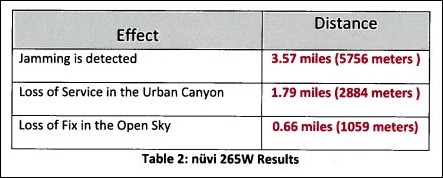
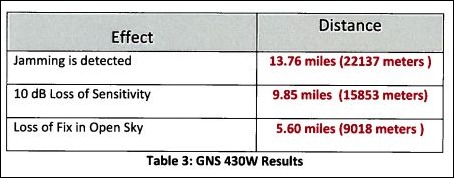
If you get within 0.66 miles of a LightSquared transmitter in open conditions, you’ll lose your position fix with the automotive nuvi 265W, further away in a city environment like New York or Chicago. The results are even worse for the aviation GPS. The FAA has essentially discontinued support for the old LORAN electronic navigation system in favor of GPS, and now LightSquared has proposed a system that essentially disables GPS in exactly the areas aviation needs it most. Garmin’s conclusion, shared by other industry proponents:
The operation of so many high powered transmitters so close in frequency to the GPS operating frequency (1575.42 MHz) will create a disastrous interference problem to GPS receivers to the point where GPS receivers will cease to operate (complete loss of fix) when in the vicinity of these transmitters.
Other government agencies are also concerned. In a January 12th letter to the FCC, Lawrence Strickland, the head of the National Telecommunications and Information Administration (a branch of the Department of Commerce) wrote:
Grant of the LightSquared waiver would create a new interference environment and it is incumbent on the FCC to deal with the resulting interference issues before any interference occurs. Several federal agencies with vital concerns about this spectrum band, including the Departments of Defense, Transportation and Homeland Security, have informed NTIA that they believe the FCC should defer action on the LightSquared waiver until these interference concerns are satisfactorily addressed.
And yet, on January 26th, waiving many of their standard procedures, the FCC gave conditional approval to LightSquared’s proposal (PDF link). The only bone thrown to the GPS community was the requirement that LightSquared work with the GPS community to resolve these interference issues. But since LightSquared is funding the study, there are concerns about how unbiased the results will be. Unless you can change the laws of physics, and principles of electrical engineering, you can’t resolve this problem directly with existing GPS equipment as-is. LightSpeed acknowledged as much when they stated that they saw the main purpose of this joint effort as seeing how to modify GPS equipment to implement “filtering so that they don’t look into our band”. There are only two ways to implement this:
- Retrofit current GPS equipment with improved electronics; possible but expensive for high-end equipment, impossible at a reasonable cost for consumer-grade equipment
- Replace all current incompatible GPS receivers with new ones that have improved filtering. While the marginal cost increase on a GPS receiver is likely to be low, the requirement that you have to replace the entire unit will make this staggeringly expensive. Every GPS receiver (automotive, aviation, handheld, mobile phone) would need to be replaced.
There’s additional fodder for conspiracy theorists as well. LightSquared filed its proposal on November 18, 2010, right before Thanksgiving. The FCC fast-tracked its proposal, and limited the comment period to December 2-9, 2010, over the objections of the GPS industry and other opponents. In approving LightSquared’s proposal, they acknowledge waiving some of their requirements (PDF link). And for the real conspiracy fans, the principals behind LightSquared may have political connections deep inside the current adminstration (PDF link). In normal circumstances, I would dismiss all this as nonsense, but the FCC’s decision is blatantly crazy, I have to wonder.
If it weren’t for its detrimental consequences on GPS, I’d think that LightSquared’s system would be a great idea – high-speed wireless Internet access in most populated places, and lower-speed access anywhere in the world by satellite. And if the FCC wants to propose regulations requiring better frequency band filtering in GPS receivers, and other types of satellite-band-based systems, to allow exactly these kind of systems to be developed in the future, I could get on board with that as well. But it should be up to LightSquared to prove that their system won’t interfere with GPS the way it is right now. GPS is the established system – twenty years of operation, hundreds of millions of receivers, uncountable numbers of applications. If LightSquared interferes with GPS, it should be required either to fix the problem itself, or be denied permission to function. That the FCC would even consider LightSquared’s proposal without modification, much less approve it, is astonishing.
If you’re interested in letting the government know how you feel, GPS World has a page on how to contact the relevant members of the House and Senate. GPS World is also the go-to source for coverage of this issue:
Addendum: A great article at InsideGNSS.
And a HT to GPS Tracklog Waypoints for the original link to GPS World.