

Claude Henri-Meledo writes to tell me about BeGraphic Lite, a free data visualization tool for Microsoft Excel. I don’t currently have easy access to Microsoft Excel (I’m working in OpenOffice exclusively), so I can’t try it out, but it looks interesting. It apparently does a wide variation of data graphics, not just maps; these include:
cascade chart / waterfall chart, marimekko / mekko chart, sankey diagram, dynamic diagram, pivot diagram, powerpivot charts, pivot chart, ishikawa cause-effect diagram, BCG matrix, ADL matrix, McKinsey 7S, RB profiler, DuPont chart, choropleth map, swot analysis model, vector glyph, business chart, business graph, business graphics, professional excel chart, mini-graphs, micro-charts, sparkline for excel, excel gauges, strategic maps, strategy map, dashboard software, moving bubble, motion chart, trend analyzer, scada system, control room, make a custom map in Excel, thematic map in PowerPoint, dynamic sales territories, mapping tool, geographical information system in excel2010, choropleth map, and any innovative charts…
A few sample map screenshots from the website:
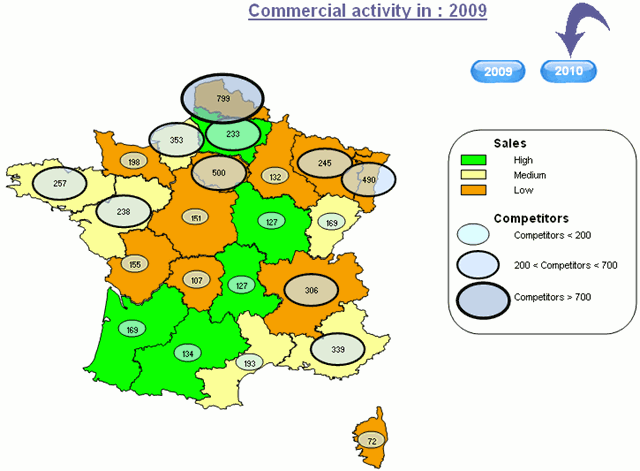
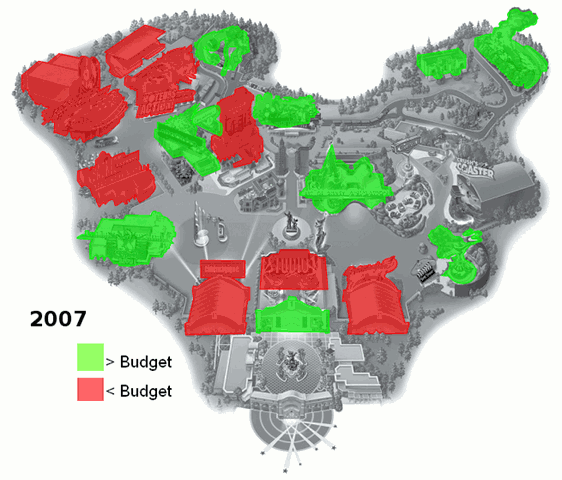
BeGraphic LIte works with the free vector graphic map data available at d-maps.com, which now has 7500 maps available (up from 4000 when I posted about the site in August 2009). Edit: You need to download the files in WMF format. There’s a Pro version of BeGraphic in the works for later this year, but the Lite version will still be free and available.
For those without Excel, it might be worth trying Go-oo, an OpenOffice variant similar to Novell’s version, that supports VBA. I am assuming that this has been used to get Excel to do the ‘magic’. The VBA in Go-oo may not be 100% complete though.
A new version of Go-oo was released on Feb 10th, version 3.2.10 for Windows users. If you use non-US languages, you might want to wait a week and get the patched 3.2.11 version.
If anyone tries this and is successful, post here to let us know. Thanks.
Dear Sir,
I have the pleasure to brief on our Data Visualization software
“Trend Compass”.
TC is a new concept in viewing statistics and trends in an animated
way by displaying 5 axis (X, Y, Time, Bubble size & Bubble color)
instead of just the traditional X and Y axis. It could be used in
analysis, research, presentation etc. In the banking sector, we have
Deutsche Bank New York as our client.
This a link on weather data :
http://www.epicsyst.com/test/v2/aims/
This is a bank link to compare Deposits, Withdrawals and numbers of
Customers for different branches over time ( all in 1 Chart) :
http://www.epicsyst.com/test/v2/bank-trx/
Misc Examples :
http://www.epicsyst.com/test/v2/airline/
http://www.epicsyst.com/test/v2/stockmarket1/
http://www.epicsyst.com/test/v2/tax/
http://www.epicsyst.com/test/v2/football/
http://www.epicsyst.com/test/v2/swinefludaily/
http://www.epicsyst.com/test/v2/flu/
http://www.epicsyst.com/test/v2/babyboomers/
http://www.epicsyst.com/test/v2/bank-trx/
http://www.epicsyst.com/test/v2/advertising/
This is a project we did with Princeton University on US unemployment :
http://www.epicsyst.com/main3.swf
A 3 minutes video presentation of above by Professor Alan Krueger
Bendheim Professor of Economics and Public Affairs at Princeton
University and currently Chief Economist at the US Treasury using
Trend Compass :
http://epicsyst.com/trendcompass/princeton.aspx?home=1
Latest financial links on the Central Bank of Egypt:
http://www.epicsyst.com/trendcompass/samples/Aggregate-balance-sheet/
http://www.epicsyst.com/trendcompass/samples/balance-sheet
http://www.epicsyst.com/trendcompass/samples/banks-deposits-by-maturity/
http://www.epicsyst.com/trendcompass/samples/egyptian-banks/
http://www.epicsyst.com/trendcompass/samples/currency-by-denomination/
I hope you could evaluate it and give me your comments. So many ideas
are there.
You can download a trial version. It has a feature to export
EXE,PPS,HTML and AVI files. The most impressive is the AVI since you
can record Audio/Video for the charts you create.
http://epicsyst.com/trendcompass/FreeVersion/TrendCompassv1.2_DotNet.zip
All the best.
Tarek Y Aziz
Marketing Manager
Epic Systems
http://www.epicsyst.com
For Excel Add-On For Map And Data Visualization, you should have a look to our website resources
http://www.deixsys.com