

When creating a thematic map where color represents different attribute values, there’s always the question of whether the color scheme you’ve selected will look good. and more importantly whether it will convey the information you’re trying to represent to its audience. Trial-and-error is one approach, but the ColorBrewer is a Flash web applet which lets you interactively experiment with different color schemes to see which ones work visually (and which ones don’t). It was created by Professor Cindy Brewer of Penn State University, author of Designing Better Maps: A Guide for GIS Users, and will run in any browser with Flash support.
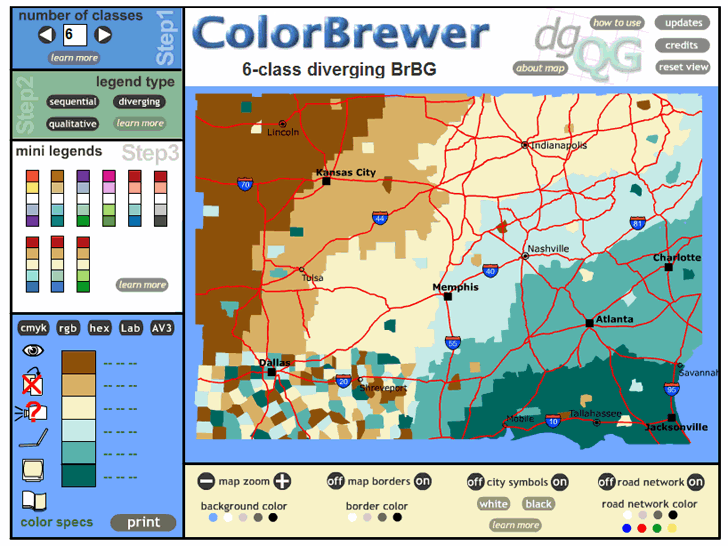
ColorBrewer doesn’t actually display any of your data – it uses a dummy map of what appears to be counties in the US Southeast to plot different color schemes in sequential, diverging or qualitative fashions. It’s not intended as a data plotter, just to evaluate the visual impact of different color schemes. Inputs include:
- Number of classes
- Sequential, diverging or qualitative schemes
- Mini-legends (pre-built color schemes)
- Turning map borders, city symbols, road networks on and off
- Selectable colors for map borders, city symbols, road networks, and the map’s background color.
Here’s a screenshot of the application in action (click on the image for a larger view):
Excellent tool, I’ve been using it for quite some time now. And by the way, congrats for the brand new hosting and name.
Comment by Ian Turton, brought over to the new blog:
People interested in presenting their data using these color schemes may like to know that the colorbrewer package is supported by GeoTools and UDig.
There’s a new version of ColorBrewer, http://colorbrewer2.org/
It’s possible to use it ofline.
http://colorbrewer2.org/ColorBrewer.swf
I started using the tool after reading your post, thanks.
Thanks for the comment. I have a post written already about the new version, but I didn’t know you could download it for offline use. I’ll add that to the post.